
bruceli2018 - Minecraft Skins & Skin History
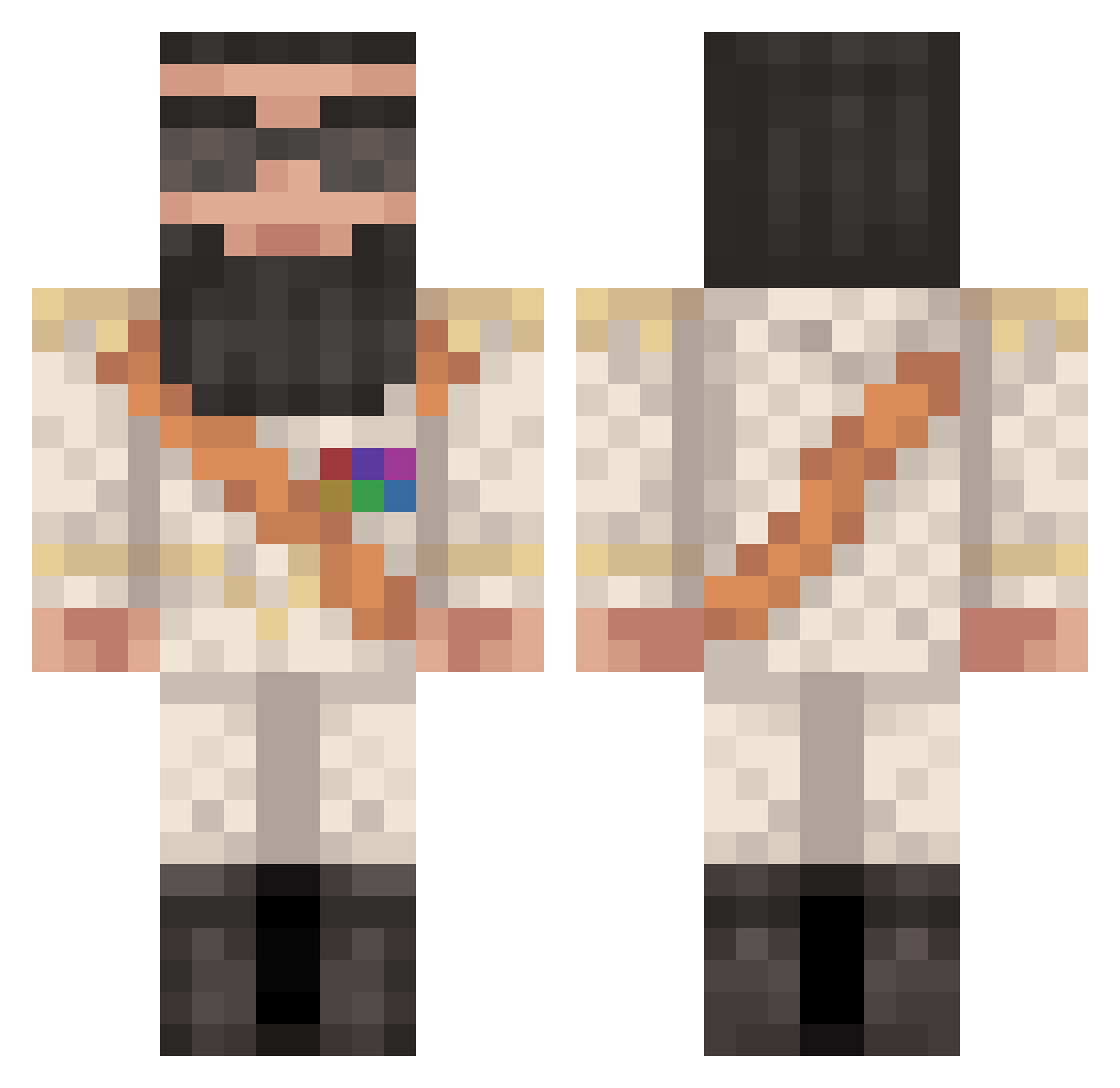
Current Minecraft skin of the player bruceli2018, loaded from the official Mojang API. Rotate the 3D model with your mouse or finger, then download the skin as a PNG file and use it in Minecraft: Bedrock Edition or Java Edition for free. When bruceli2018 changes their skin, this page updates automatically and the old skin stays in the history below.
Other players with this skin (427)
bruceli2018 was the 391st player we have seen with this skin, first spotted on 25.10.2026. The same skin was seen on these players. Open a nickname to see their current skin and skin history.
 zockerhirn hungerrrr Djenzen05 Thomasioo Googlelmages Fiskbilen Fidel___CashFlow bette1337 sneekyninja23 amit_geva RawrImlaser69 Zeda_B xymustafa Bubbinator101 Toekie Mikeyyd33 FrenchGamer21 rerolpxe11 themasterwp OTF456 nuke12354 pepsilow RichyRichHD thoro12 SmileyMc Zervino GeoCorner DrAladeen metafuse Joshuaiiick Nathan2200 omit_99 Amaligom78 DonovanDuck idenziick _SNO_ PowerPvP LonelRichie KaldMigL chops_97 hutikka69 TheAtomicWalnut coolstrul jamzyg _CheesyBurger_ Eleysian RazzW alex_fcz Schwitzeschwanz bean3520 HeraclesJones coolpben jonathan8059 UltraDanny123 nikl3233 diamondmaster001 NemesisLucius Skippermand2001 SonOfBaphomet wilhelmberg
More General Minecraft skins
How to install the bruceli2018 skin
- Press the Download button above to save the skin as a PNG file.
- Minecraft: Bedrock Edition (PE): open the Dressing Room from the main menu (or tap your character → Edit Character), go to Classic Skins → Owned, press the + (new skin) button, choose the downloaded PNG and pick the Classic (Steve) model. Works on PC and mobile; consoles cannot import custom skins.
- Minecraft: Java Edition: open the Minecraft Launcher, go to the Skins tab, click New Skin, load the PNG, pick the Classic (Steve) model and press Save & Use. You can also upload it at minecraft.net → Profile → Change Skin.
The skin does not show up after import - what should I do?
Restart Minecraft and open the Dressing Room again - imported skins sometimes appear only after a restart. Also make sure you selected the imported skin and picked the Classic (Steve) model.
Which model should I choose, Classic or Slim?
This skin is designed for the Classic (Steve) model. If you pick the wrong model, the arms of the skin will look stretched or squeezed.
Is the skin of bruceli2018 free to download?
Yes. Press Download, save the PNG file and use it in Minecraft: Bedrock Edition or Java Edition - no payment or registration needed. The skin also works on multiplayer servers and Realms.
More skins
Looking for more? Go back to all Minecraft skins and check the top skins of the week, month and all time, or find any player's skin by nickname.