
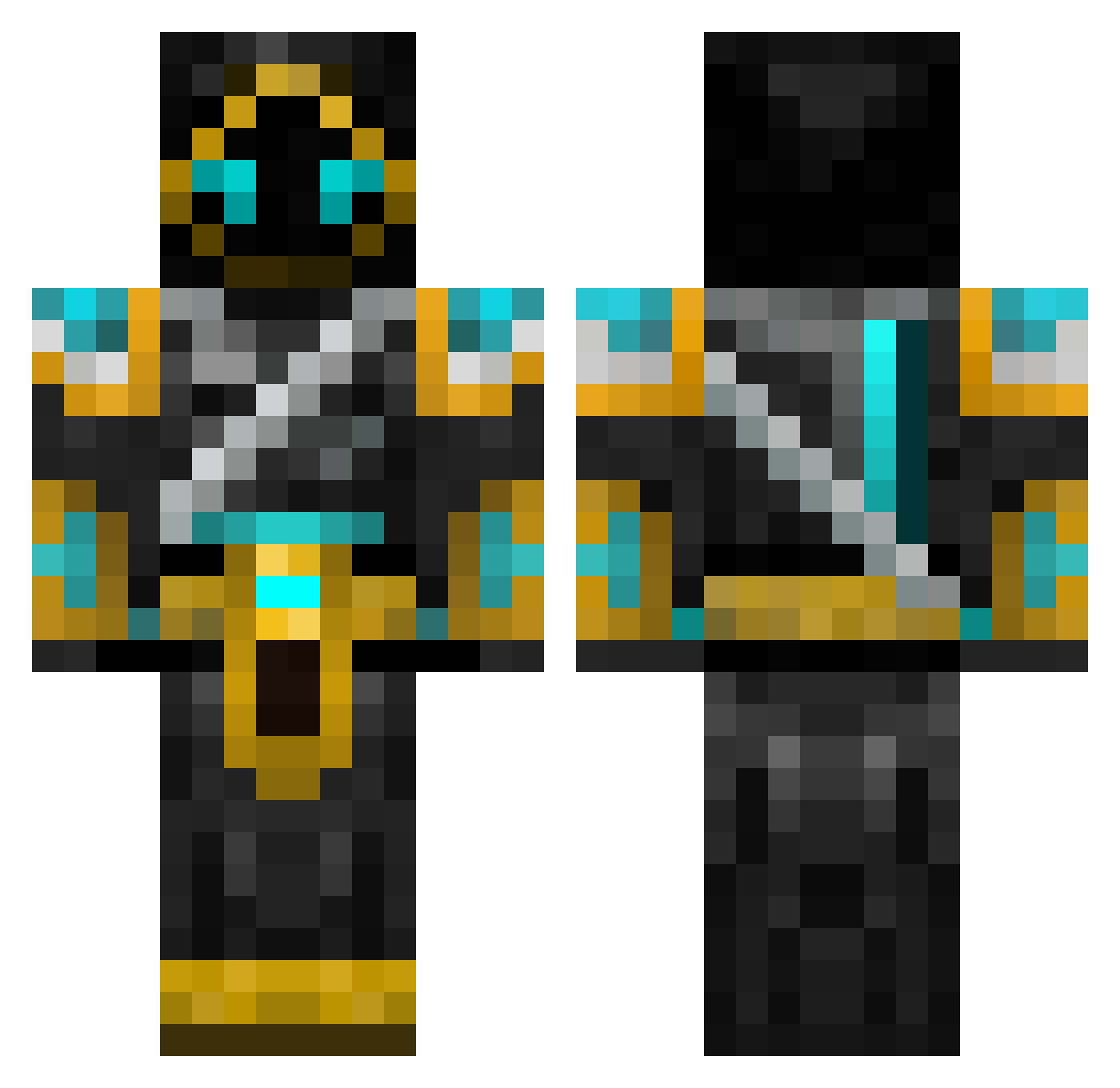
Current Minecraft skin of the player braddles31800, loaded from the official Mojang API. Rotate the 3D model with your mouse or finger, then download the skin as a PNG file and use it in Minecraft: Bedrock Edition or Java Edition for free. When braddles31800 changes their skin, this page updates automatically and the old skin stays in the history below.
Other players with this skin (547)
braddles31800 was the 509th player we have seen with this skin, first spotted on 11.10.2026. The same skin was seen on these players. Open a nickname to see their current skin and skin history.
 mw2codw nickninja 8he90 Merith2 maxmanbud Revatox 56_Henry Shukodye korreborre jellytug Rekilron Exterminatum Nassi1987 Virtus334 CuSammah RCyberW Urbienator crazypanda1278 Razzer716 Konsumboy7 ZDO7 koji356303 Etnethe PetGhost dclawsown Jewpecabra Zaryx12 Kage34 DC50 TASAiken Karateklant kwcubillos RunningFury ninjago68 XxDeath_v2xX Darkwizard193 JAC_N alteredexistence deadlox100 Endergod60 wasabilightening JoshNoyes ziPredz JJS725 Rapiermadman Kayjay6796 Rattler20 MaterBird zimbadyrkeladd MikeBunz Saabyzz JTiger57 maeyanli joenate Le_Chimp Spraggus Wuollo hugohall05 MassacreMC AquaManiacQ
More Hooded Warrior Minecraft skins
See all 40 Hooded Warrior skins
How to install the braddles31800 skin
- Press the Download button above to save the skin as a PNG file.
- Minecraft: Bedrock Edition (PE): open the Dressing Room from the main menu (or tap your character → Edit Character), go to Classic Skins → Owned, press the + (new skin) button, choose the downloaded PNG and pick the Classic (Steve) model. Works on PC and mobile; consoles cannot import custom skins.
- Minecraft: Java Edition: open the Minecraft Launcher, go to the Skins tab, click New Skin, load the PNG, pick the Classic (Steve) model and press Save & Use. You can also upload it at minecraft.net → Profile → Change Skin.
The skin does not show up after import - what should I do?
Restart Minecraft and open the Dressing Room again - imported skins sometimes appear only after a restart. Also make sure you selected the imported skin and picked the Classic (Steve) model.
Which model should I choose, Classic or Slim?
This skin is designed for the Classic (Steve) model. If you pick the wrong model, the arms of the skin will look stretched or squeezed.
Is the skin of braddles31800 free to download?
Yes. Press Download, save the PNG file and use it in Minecraft: Bedrock Edition or Java Edition - no payment or registration needed. The skin also works on multiplayer servers and Realms.
More skins
Looking for more? Go back to all Minecraft skins and check the top skins of the week, month and all time, or find any player's skin by nickname.