
beber19740 - Minecraft Skins & Skin History
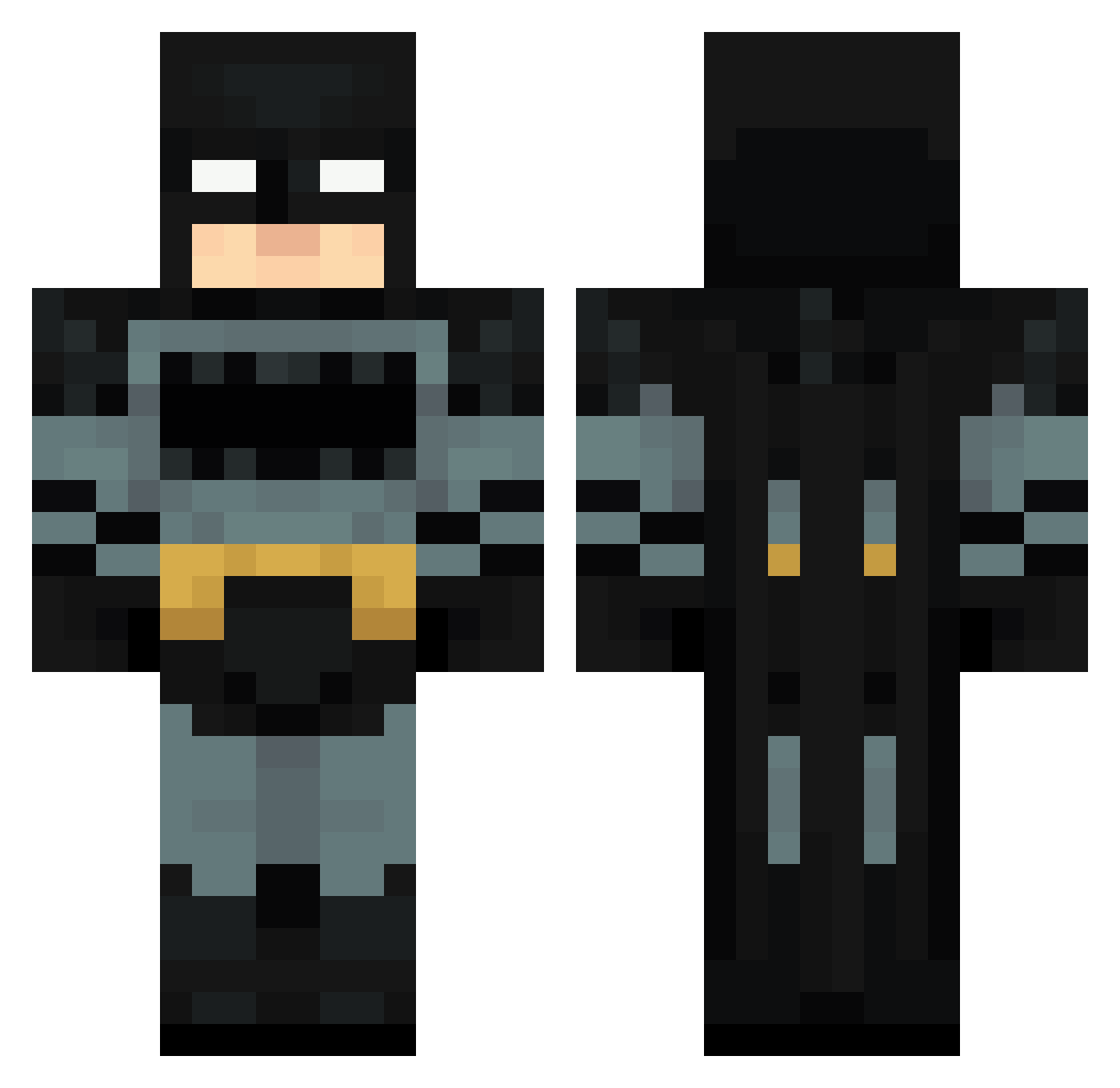
Current Minecraft skin of the player beber19740, loaded from the official Mojang API. Rotate the 3D model with your mouse or finger, then download the skin as a PNG file and use it in Minecraft: Bedrock Edition or Java Edition for free. When beber19740 changes their skin, this page updates automatically and the old skin stays in the history below.
Other players with this skin (71)
beber19740 was the 38th player we have seen with this skin, first spotted on 13.09.2026. The same skin was seen on these players. Open a nickname to see their current skin and skin history.
 BebetoBullicio TazoMTG q5or Hebiro Gary0623 itskiobrando NehanGamer Jeremikado Hydra6531 Avalon2791 5miq just_gregouin nxgm kbni vari3tyy ImpalaDean MrCupcake23 cotonete21 PYZYX MRpedrokapo auzbl artimks javovovu GiGiABC123 zeydox33 IIoPTixII Steez23 TheOneTrueJohnny Kawasaki0 Real_robit24 BloreQ musiala_777 Not_FBI_Agent Petizo JoJoHoh CRSBP erickarci calm2018 firefighter559 dark_x119 Zedfoxxx ShadowlX 3e11ita mathzdd Shoko_TV Dream_e6 Turcoow Ghost1214 yogpatel25 Flinnstones ayed0 Ricardinho1898 120bench Baymax10102011 AlexSpace10 Moe71313 _mhb6 saksoniaa
 dogthedestroyer Zer0Delay
More Batman Minecraft skins
How to install the beber19740 skin
- Press the Download button above to save the skin as a PNG file.
- Minecraft: Bedrock Edition (PE): open the Dressing Room from the main menu (or tap your character → Edit Character), go to Classic Skins → Owned, press the + (new skin) button, choose the downloaded PNG and pick the Classic (Steve) model. Works on PC and mobile; consoles cannot import custom skins.
- Minecraft: Java Edition: open the Minecraft Launcher, go to the Skins tab, click New Skin, load the PNG, pick the Classic (Steve) model and press Save & Use. You can also upload it at minecraft.net → Profile → Change Skin.
The skin does not show up after import - what should I do?
Restart Minecraft and open the Dressing Room again - imported skins sometimes appear only after a restart. Also make sure you selected the imported skin and picked the Classic (Steve) model.
Which model should I choose, Classic or Slim?
This skin is designed for the Classic (Steve) model. If you pick the wrong model, the arms of the skin will look stretched or squeezed.
Is the skin of beber19740 free to download?
Yes. Press Download, save the PNG file and use it in Minecraft: Bedrock Edition or Java Edition - no payment or registration needed. The skin also works on multiplayer servers and Realms.
More skins
Looking for more? Go back to all Minecraft skins and check the top skins of the week, month and all time, or find any player's skin by nickname.