
backland - Minecraft Skins & Skin History
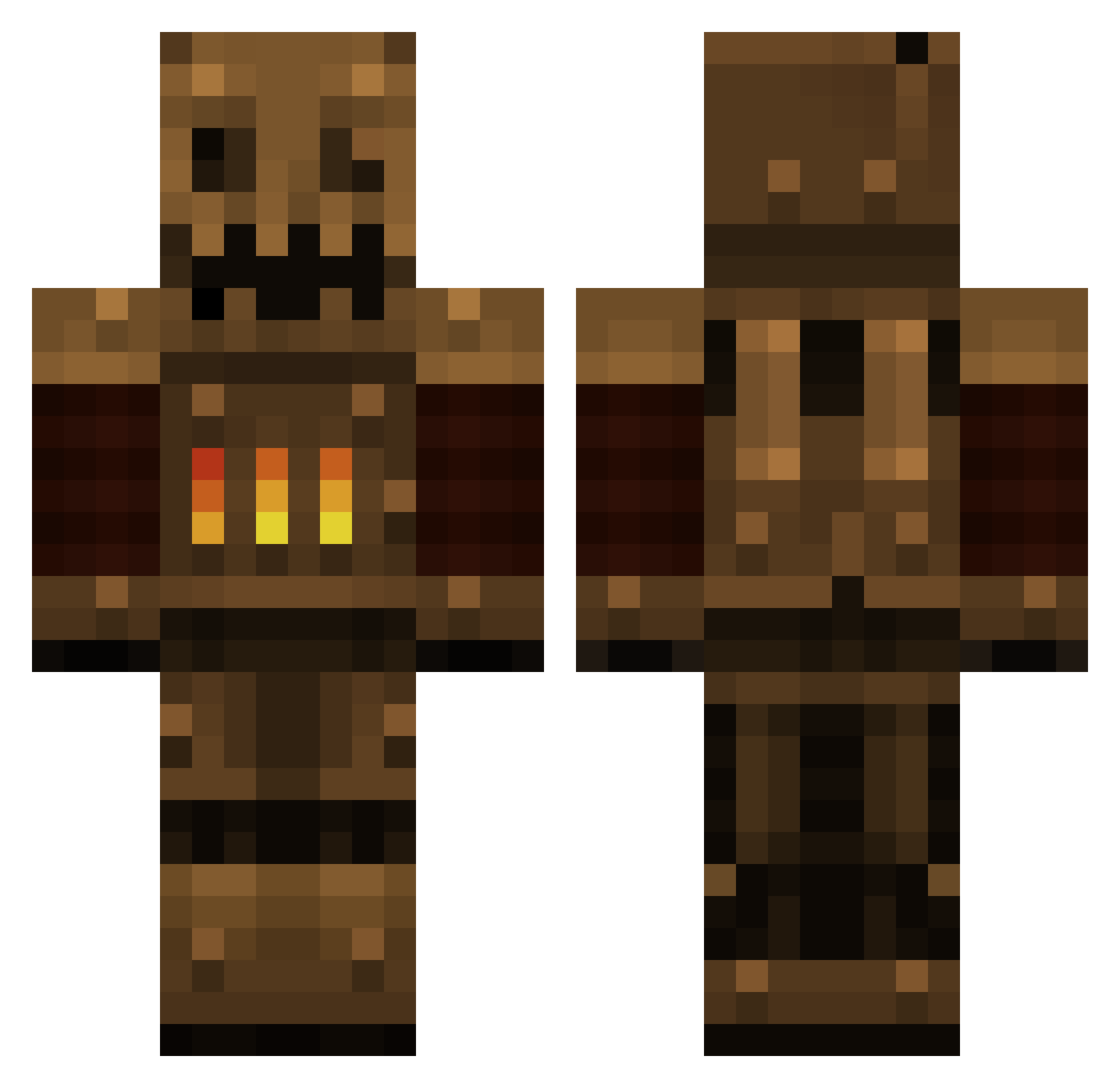
Current Minecraft skin of the player backland, loaded from the official Mojang API. Rotate the 3D model with your mouse or finger, then download the skin as a PNG file and use it in Minecraft: Bedrock Edition or Java Edition for free. When backland changes their skin, this page updates automatically and the old skin stays in the history below.
Other players with this skin (384)
backland was the 125th player we have seen with this skin, first spotted on 27.08.2026. The same skin was seen on these players. Open a nickname to see their current skin and skin history.
 davisabis MRBYRNES jhaas909 Icodtouch SPAAAAAAAAACE cranfifter Feromach spikedls briangold40 WiNzS_PvP matrin3456 Marshman envisionaut bussymerchant Shweatyballs nikody79 Likvidation fantastic_pony Scheurmuis Mr_Ree727 AwkwardLettuce ILLTakeTwo spitta3 Marvel_man99 Hibbleshibble Kazuyaaa C3H7COOH Alikolino Duister Evi1_LUka CiaoCiaoCiaoCiao Tim_Fitzwater Big_Jezza middymock Szarpiwor pluto40 metawewin mil005 beatsprominute AeroNight SgtBeano bdabeast456 A1Steaksauce BeignetPingouin XxSwainooo COLLlDE Eshemizu MadcapHog Oronous jackjo2000 HypixelBot lordmojang Alex__smithy1 Reptilicon Nina_Large MR_BomBom Mailman285 mooer gabosess Landscapecrafter
More Scarecrow Minecraft skins
How to install the backland skin
- Press the Download button above to save the skin as a PNG file.
- Minecraft: Bedrock Edition (PE): open the Dressing Room from the main menu (or tap your character → Edit Character), go to Classic Skins → Owned, press the + (new skin) button, choose the downloaded PNG and pick the Classic (Steve) model. Works on PC and mobile; consoles cannot import custom skins.
- Minecraft: Java Edition: open the Minecraft Launcher, go to the Skins tab, click New Skin, load the PNG, pick the Classic (Steve) model and press Save & Use. You can also upload it at minecraft.net → Profile → Change Skin.
The skin does not show up after import - what should I do?
Restart Minecraft and open the Dressing Room again - imported skins sometimes appear only after a restart. Also make sure you selected the imported skin and picked the Classic (Steve) model.
Which model should I choose, Classic or Slim?
This skin is designed for the Classic (Steve) model. If you pick the wrong model, the arms of the skin will look stretched or squeezed.
Is the skin of backland free to download?
Yes. Press Download, save the PNG file and use it in Minecraft: Bedrock Edition or Java Edition - no payment or registration needed. The skin also works on multiplayer servers and Realms.
More skins
Looking for more? Go back to all Minecraft skins and check the top skins of the week, month and all time, or find any player's skin by nickname.