
arigay5 - Minecraft Skins & Skin History
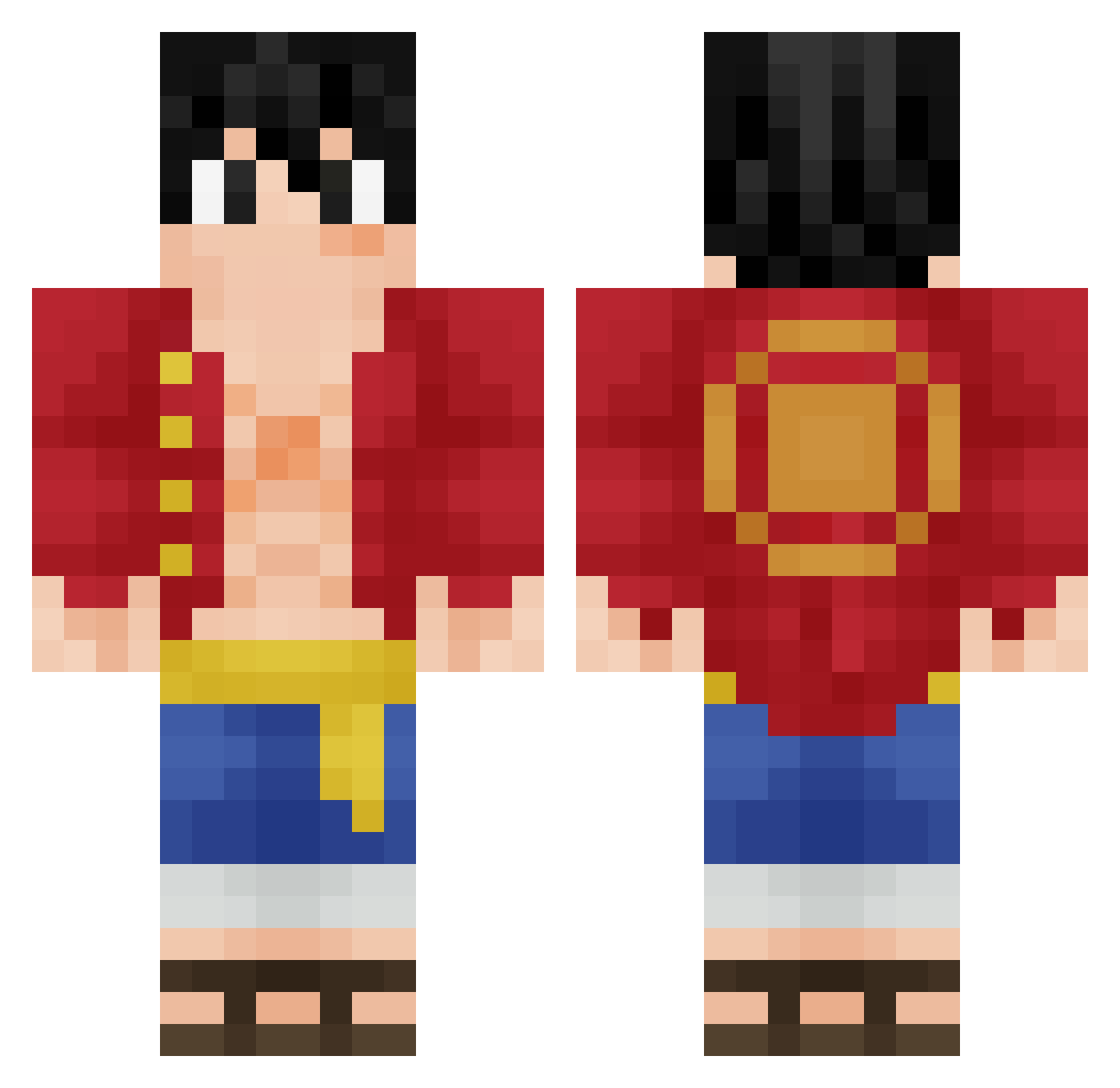
Current Minecraft skin of the player arigay5, loaded from the official Mojang API. Rotate the 3D model with your mouse or finger, then download the skin as a PNG file and use it in Minecraft: Bedrock Edition or Java Edition for free. When arigay5 changes their skin, this page updates automatically and the old skin stays in the history below.
Other players with this skin (350)
arigay5 was the 249th player we have seen with this skin, first spotted on 12.10.2026. The same skin was seen on these players. Open a nickname to see their current skin and skin history.
 AbsoluteAK Titancola IIPHANTOMII ILoveSandwich1 DamonD420 Metriczzz chrisfranzke Capybe SSENSEI17 KingRuffy12 Itz_Darshan BritLusk Xx_Akiller_xX Daemonin1 MCFCookie brunogolla HollowWizard Johakim3594 AnleLeon bendikvcss XectoUchiha agromight AceCIC SpicedMayonnaise Luffy_GG69 GearFour Feliipeos pt126 xKILUAxX ShadowFox231 Drinkoo ghostfreak2380 zXzXxZXZ KARATE_you Walkerboss Axry Eluney184 DavkoFR 1stmillion kazammi coldaaron IronmaNate PowerUpMV totoro129 imbigo10 So7ha Mortox66 Fire_spirit21 CrazyChaos1006 Cocopedo Ruviik3 Aaritus Sans_blo kbarcelo99 Faherian Gallem Fast_SEX Ro2H ExxSS No_Vaq
More Monkey D Luffy Minecraft skins
See all 924 Monkey D Luffy skins
How to install the arigay5 skin
- Press the Download button above to save the skin as a PNG file.
- Minecraft: Bedrock Edition (PE): open the Dressing Room from the main menu (or tap your character → Edit Character), go to Classic Skins → Owned, press the + (new skin) button, choose the downloaded PNG and pick the Classic (Steve) model. Works on PC and mobile; consoles cannot import custom skins.
- Minecraft: Java Edition: open the Minecraft Launcher, go to the Skins tab, click New Skin, load the PNG, pick the Classic (Steve) model and press Save & Use. You can also upload it at minecraft.net → Profile → Change Skin.
The skin does not show up after import - what should I do?
Restart Minecraft and open the Dressing Room again - imported skins sometimes appear only after a restart. Also make sure you selected the imported skin and picked the Classic (Steve) model.
Which model should I choose, Classic or Slim?
This skin is designed for the Classic (Steve) model. If you pick the wrong model, the arms of the skin will look stretched or squeezed.
Is the skin of arigay5 free to download?
Yes. Press Download, save the PNG file and use it in Minecraft: Bedrock Edition or Java Edition - no payment or registration needed. The skin also works on multiplayer servers and Realms.
More skins
Looking for more? Go back to all Minecraft skins and check the top skins of the week, month and all time, or find any player's skin by nickname.