
acer5200 - Minecraft Skins & Skin History
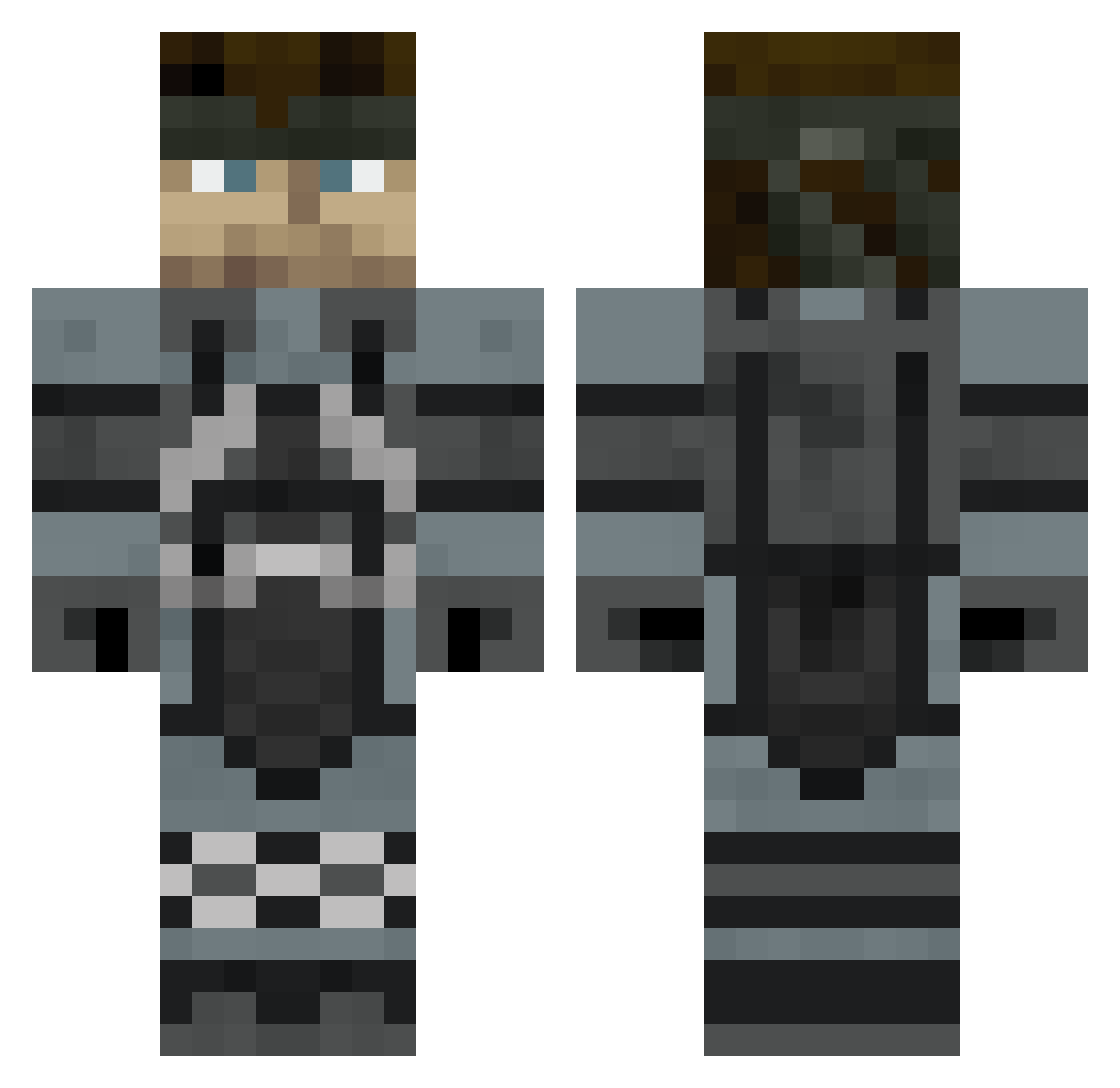
Current Minecraft skin of the player acer5200, loaded from the official Mojang API. Rotate the 3D model with your mouse or finger, then download the skin as a PNG file and use it in Minecraft: Bedrock Edition or Java Edition for free. When acer5200 changes their skin, this page updates automatically and the old skin stays in the history below.
Other players with this skin (422)
acer5200 was the 146th player we have seen with this skin, first spotted on 22.08.2026. The same skin was seen on these players. Open a nickname to see their current skin and skin history.
 froggeypen Victorceramica Zortea cahbx Haruda dragorrekiller xSFKDx Michanikos Flag2 Sesaaan chikinrox Sinterklaas69 apocalypsen12 Sugarfreehenno The_Driver devlav Darminuis then3rd001 DwayneW Sigosaurus nhvass fum252 Qwerty945 Ermac22 Master_Lynn SalmonSmoked emo_panda ZombieAmok MartinGutz DANOtheNAILER funkyflan CatapultMan joss87 Peloenpecho NintySoft77 Tanthor21 uhohZday v0ll3rt AluteTK Fruitcake4me hjy237 deepestsummer Trillickwars NKWB Ruyguy426 Yodahana Jooice KingStefano Choisai smiley_man101 kingkazma1214 bedguy009 LordRoxas jbattles07 Redkingxiix RealJason BaraVIP BonesGrinder Pummell d3ma1n
More Snake Minecraft skins
How to install the acer5200 skin
- Press the Download button above to save the skin as a PNG file.
- Minecraft: Bedrock Edition (PE): open the Dressing Room from the main menu (or tap your character → Edit Character), go to Classic Skins → Owned, press the + (new skin) button, choose the downloaded PNG and pick the Classic (Steve) model. Works on PC and mobile; consoles cannot import custom skins.
- Minecraft: Java Edition: open the Minecraft Launcher, go to the Skins tab, click New Skin, load the PNG, pick the Classic (Steve) model and press Save & Use. You can also upload it at minecraft.net → Profile → Change Skin.
The skin does not show up after import - what should I do?
Restart Minecraft and open the Dressing Room again - imported skins sometimes appear only after a restart. Also make sure you selected the imported skin and picked the Classic (Steve) model.
Which model should I choose, Classic or Slim?
This skin is designed for the Classic (Steve) model. If you pick the wrong model, the arms of the skin will look stretched or squeezed.
Is the skin of acer5200 free to download?
Yes. Press Download, save the PNG file and use it in Minecraft: Bedrock Edition or Java Edition - no payment or registration needed. The skin also works on multiplayer servers and Realms.
More skins
Looking for more? Go back to all Minecraft skins and check the top skins of the week, month and all time, or find any player's skin by nickname.