
_fsb_3 - Minecraft Skins & Skin History
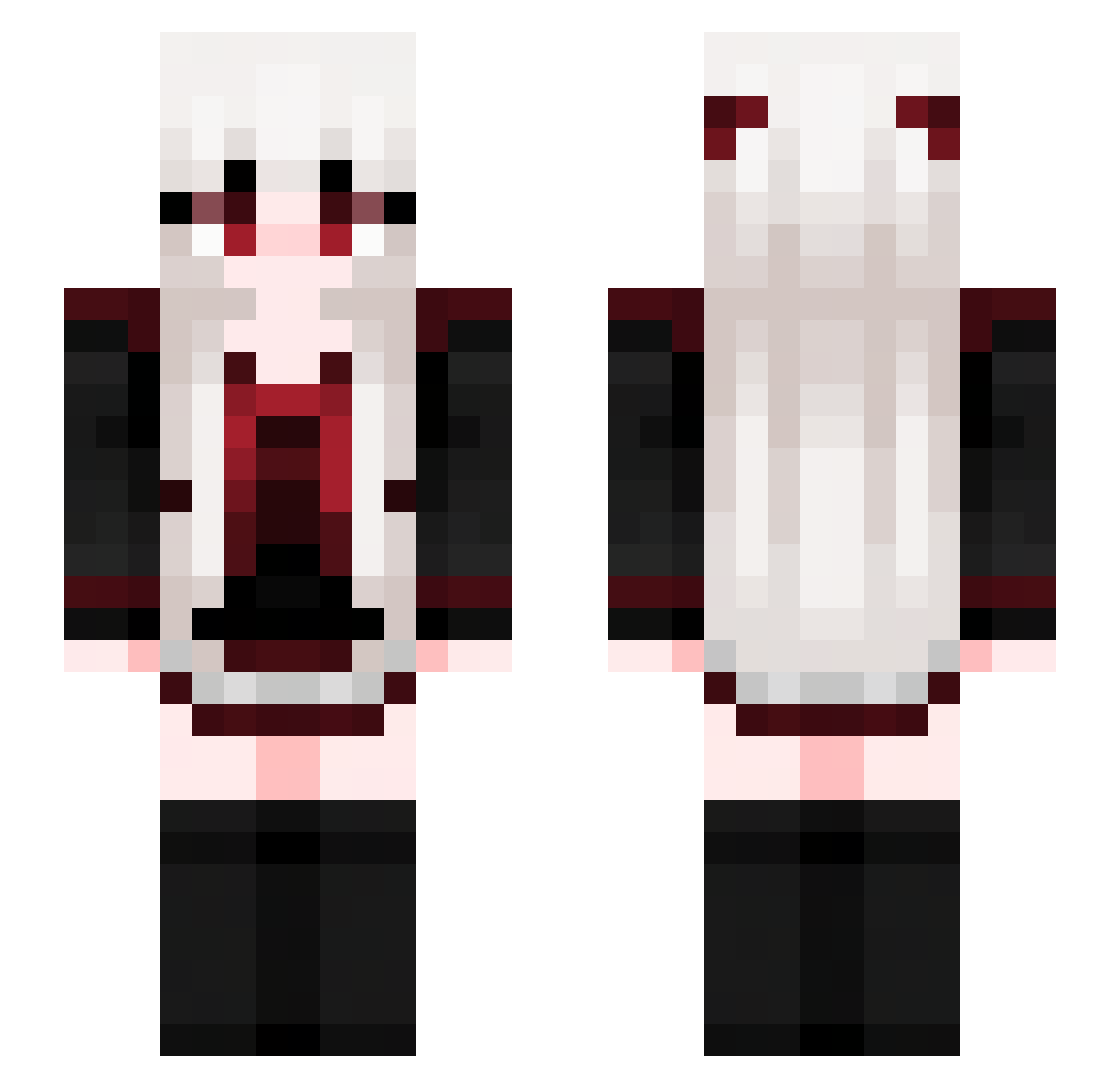
Current Minecraft skin of the player _fsb_3, loaded from the official Mojang API. Rotate the 3D model with your mouse or finger, then download the skin as a PNG file and use it in Minecraft: Bedrock Edition or Java Edition for free. When _fsb_3 changes their skin, this page updates automatically and the old skin stays in the history below.
Other players with this skin (676)
_fsb_3 was the 20th player we have seen with this skin, first spotted on 25.07.2026. The same skin was seen on these players. Open a nickname to see their current skin and skin history.
 Vincentseeyou Kopikat1337 N4G0K1 marcus_h04 jasonkb4 Alexouile YanChan9632 Violet687 Winterwolflove17 qwe65321 SPACExGHOST Drawdragon JSM0412 shadowstf taxiang Abendan viewangles HanaNiNatte Silent3291 JUSTPINE SUIXU ZDOIQA heartheart3 JessieeMC uzucubirisinsen freeKeds Flanoul Virtuosoooo W0o_ny _AAkame_ Dakke1
 GUGU956 ArtSide Pisces__ KIKI262801 EdisonDev airimania DuBaddie shuoli666 looktzj LadyDarkPheonix railrail22
 lexis16 VIZEEN HiddenPlayerxD 5Jz10 Tingrin1027 1_Annika_1 puiuoo xi_qiao JacX0116 larito002 SlodkaKotka6969 YANCHENG8189 illusorydream IronRode59 Future10086 Casually666 murakumo35 yulchiie
More Goth Minecraft skins
How to install the _fsb_3 skin
- Press the Download button above to save the skin as a PNG file.
- Minecraft: Bedrock Edition (PE): open the Dressing Room from the main menu (or tap your character → Edit Character), go to Classic Skins → Owned, press the + (new skin) button, choose the downloaded PNG and pick the Slim (Alex) model. Works on PC and mobile; consoles cannot import custom skins.
- Minecraft: Java Edition: open the Minecraft Launcher, go to the Skins tab, click New Skin, load the PNG, pick the Slim (Alex) model and press Save & Use. You can also upload it at minecraft.net → Profile → Change Skin.
The skin does not show up after import - what should I do?
Restart Minecraft and open the Dressing Room again - imported skins sometimes appear only after a restart. Also make sure you selected the imported skin and picked the Slim (Alex) model.
Which model should I choose, Classic or Slim?
This skin is designed for the Slim (Alex) model. If you pick the wrong model, the arms of the skin will look stretched or squeezed.
Is the skin of _fsb_3 free to download?
Yes. Press Download, save the PNG file and use it in Minecraft: Bedrock Edition or Java Edition - no payment or registration needed. The skin also works on multiplayer servers and Realms.
More skins
Looking for more? Go back to all Minecraft skins and check the top skins of the week, month and all time, or find any player's skin by nickname.