
Ziwie691 - Minecraft Skins & Skin History
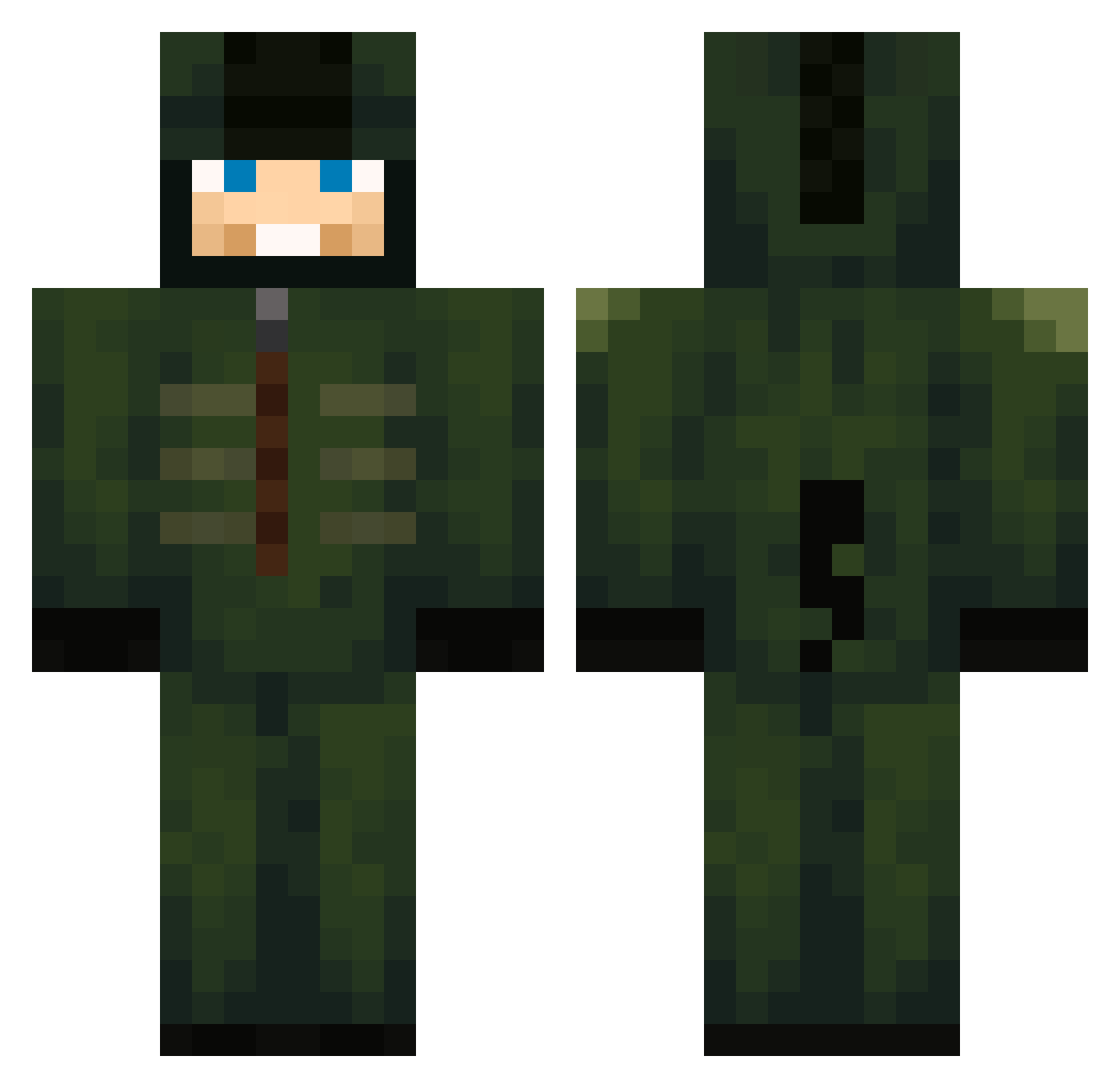
Current Minecraft skin of the player Ziwie691, loaded from the official Mojang API. Rotate the 3D model with your mouse or finger, then download the skin as a PNG file and use it in Minecraft: Bedrock Edition or Java Edition for free. When Ziwie691 changes their skin, this page updates automatically and the old skin stays in the history below.
Other players with this skin (712)
Ziwie691 was the 297th player we have seen with this skin, first spotted on 12.09.2026. The same skin was seen on these players. Open a nickname to see their current skin and skin history.
 TheGobGnibGnob MeltedChiz Jami98 Eg0mania23 JoaoBOrges6 PPringless19 Iam_awesomesauce YuriChuri sebagus1012 StayAutistic StoneWay wxllxce MiskoMasura Mqral Justinkoecky b66gy Jules_333 dfkazkz SH1NJO LeonardoMacOne ZEYIZYH Weezyolive toast267 SuperAngler Mete1919 kth6488_ pilmigim321 The_TankMaster Migueedp jaydanstochillie yatesboys Mmoen19 Geleia_88 EXP3CTS B00MB44 Godfather12222 somatostatin SkyplexALLTHEWAY itzrealqni Ke11og5 Vxlka Pajkous ix4_msmc_1vb William20242024 corrie99 Almogrote JbopGugs BertHuber JosePonfe10 Elptoamo17 outlauzjr jwx247 R3troFrost goymessironaldo Komniu Ghost_Hunter0073 mahoged hxrrybrowning MineroRandom Leon_197nr
More Kigurumi Minecraft skins
How to install the Ziwie691 skin
- Press the Download button above to save the skin as a PNG file.
- Minecraft: Bedrock Edition (PE): open the Dressing Room from the main menu (or tap your character → Edit Character), go to Classic Skins → Owned, press the + (new skin) button, choose the downloaded PNG and pick the Classic (Steve) model. Works on PC and mobile; consoles cannot import custom skins.
- Minecraft: Java Edition: open the Minecraft Launcher, go to the Skins tab, click New Skin, load the PNG, pick the Classic (Steve) model and press Save & Use. You can also upload it at minecraft.net → Profile → Change Skin.
The skin does not show up after import - what should I do?
Restart Minecraft and open the Dressing Room again - imported skins sometimes appear only after a restart. Also make sure you selected the imported skin and picked the Classic (Steve) model.
Which model should I choose, Classic or Slim?
This skin is designed for the Classic (Steve) model. If you pick the wrong model, the arms of the skin will look stretched or squeezed.
Is the skin of Ziwie691 free to download?
Yes. Press Download, save the PNG file and use it in Minecraft: Bedrock Edition or Java Edition - no payment or registration needed. The skin also works on multiplayer servers and Realms.
More skins
Looking for more? Go back to all Minecraft skins and check the top skins of the week, month and all time, or find any player's skin by nickname.