
Yukieraaa - Minecraft Skins & Skin History
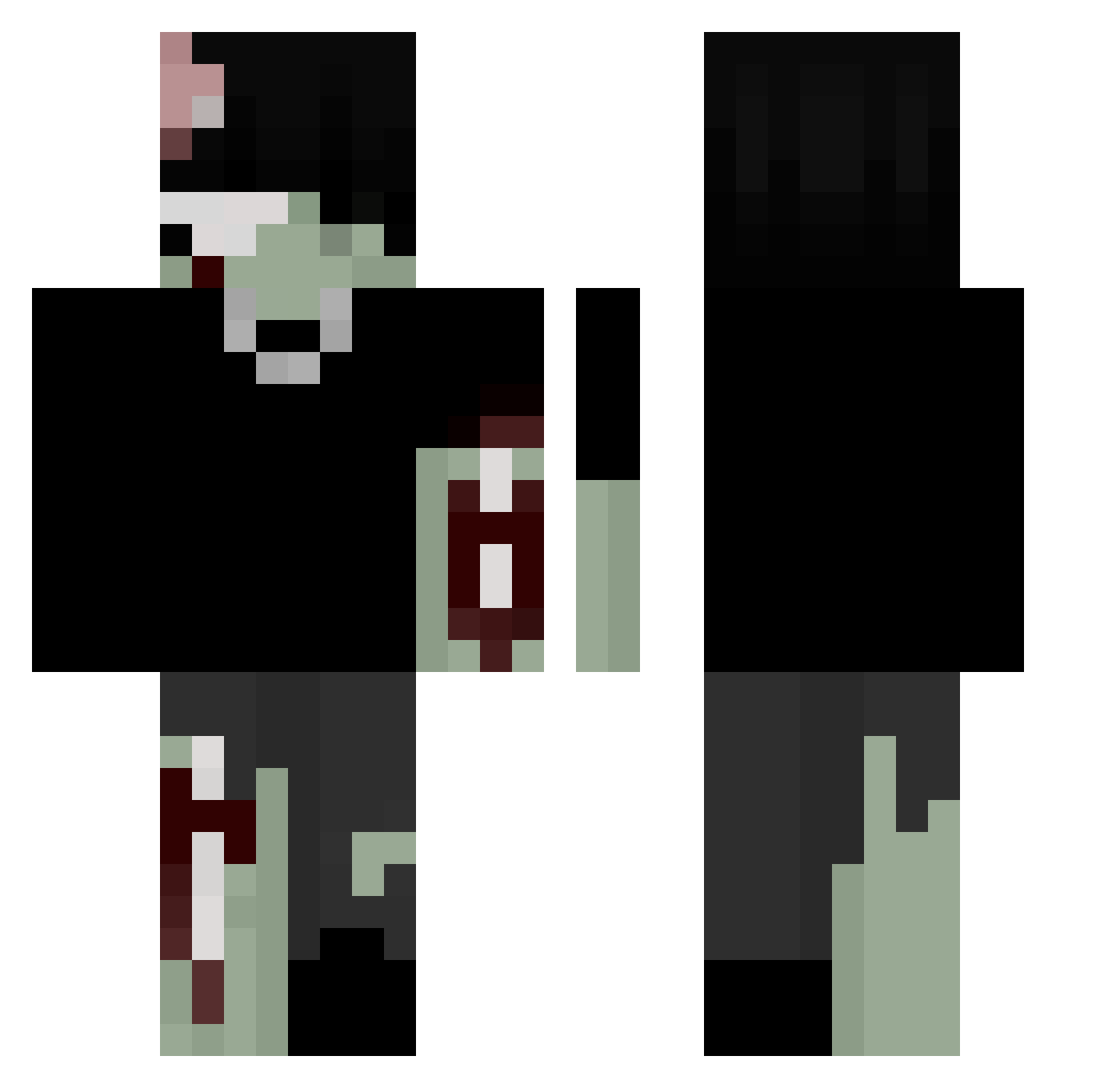
Current Minecraft skin of the player Yukieraaa, loaded from the official Mojang API. Rotate the 3D model with your mouse or finger, then download the skin as a PNG file and use it in Minecraft: Bedrock Edition or Java Edition for free. When Yukieraaa changes their skin, this page updates automatically and the old skin stays in the history below.
Other players with this skin (232)
Yukieraaa was the 48th player we have seen with this skin, first spotted on 19.08.2026. The same skin was seen on these players. Open a nickname to see their current skin and skin history.
 samukidd Luck332ITA Bedzik13
 drabolec Kyo_71 SHILLOwcs
 DGKBryaN Chillathekilla WELLZOZZ acoustic52 NeiroBoy Poisons Pirukaa7
 csubb ZyzzPower Gizzmio donivinxd
 metaniz FTNKED zinzen
 Kpicks Sav_Clap_KC cenzurat1 16mai Tank5k Dershing JusKrvy Hcei
 MaiKynhos BigHyuse Horeh Leather_Justice z_veks Angellii hoooonie 0seraph MrExoduz
 Zonnixon Mofility TTombed cyborgraupe No_VanityNV rawr987 0_Bartek0 MMmaksMM 21ReV TheBiggCon_ FearMyReflex 1oD4r bxxxred Artxsz marvinpop9boss Fedota2
 xqxpr_ ___kopi___ SzzYYmon _Quaks_ 1901F
 popu4 YLfishy_
More Undead Minecraft skins
How to install the Yukieraaa skin
- Press the Download button above to save the skin as a PNG file.
- Minecraft: Bedrock Edition (PE): open the Dressing Room from the main menu (or tap your character → Edit Character), go to Classic Skins → Owned, press the + (new skin) button, choose the downloaded PNG and pick the Classic (Steve) model. Works on PC and mobile; consoles cannot import custom skins.
- Minecraft: Java Edition: open the Minecraft Launcher, go to the Skins tab, click New Skin, load the PNG, pick the Classic (Steve) model and press Save & Use. You can also upload it at minecraft.net → Profile → Change Skin.
The skin does not show up after import - what should I do?
Restart Minecraft and open the Dressing Room again - imported skins sometimes appear only after a restart. Also make sure you selected the imported skin and picked the Classic (Steve) model.
Which model should I choose, Classic or Slim?
This skin is designed for the Classic (Steve) model. If you pick the wrong model, the arms of the skin will look stretched or squeezed.
Is the skin of Yukieraaa free to download?
Yes. Press Download, save the PNG file and use it in Minecraft: Bedrock Edition or Java Edition - no payment or registration needed. The skin also works on multiplayer servers and Realms.
More skins
Looking for more? Go back to all Minecraft skins and check the top skins of the week, month and all time, or find any player's skin by nickname.