
YuTong1420 - Minecraft Skins & Skin History
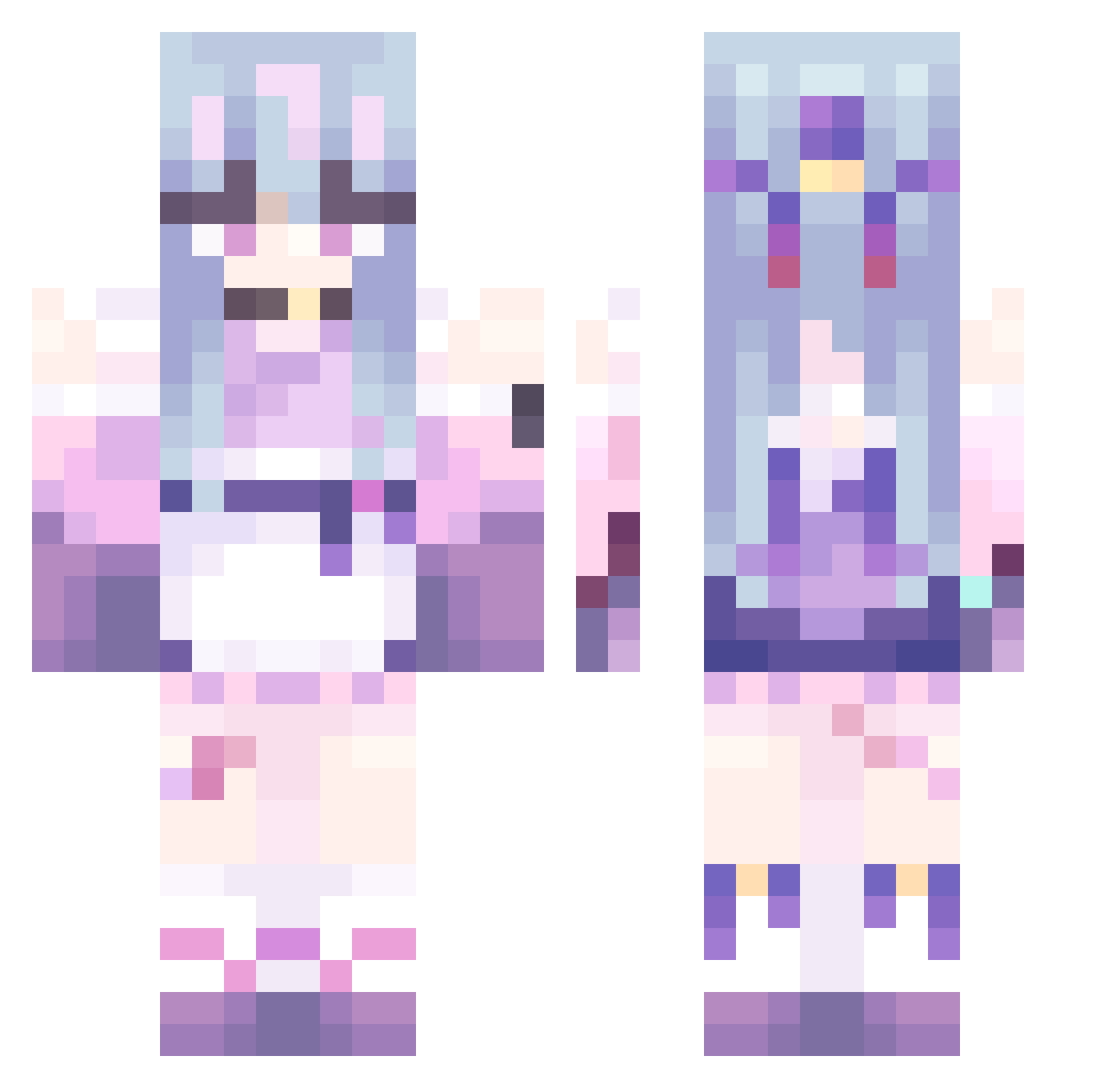
Current Minecraft skin of the player YuTong1420, loaded from the official Mojang API. Rotate the 3D model with your mouse or finger, then download the skin as a PNG file and use it in Minecraft: Bedrock Edition or Java Edition for free. When YuTong1420 changes their skin, this page updates automatically and the old skin stays in the history below.
Other players with this skin (479)
YuTong1420 was the 158th player we have seen with this skin, first spotted on 03.09.2026. The same skin was seen on these players. Open a nickname to see their current skin and skin history.
 1207ovo Maxino2306 kim5318 ckk_my232 JuAn_94 tarotaro7 Nightmarishx01 Aphora Mayunaiise_a ZEYUN_ YuKino1239 yuanmengyan ffzww Regnator1145 Kleriva LXSYX ClownInACircus jozenj1 Oleg_ch asuka2448 K0huke siyi123 Shato79 CRxiongmao Jiangmoli sensaki zhilulu Luu_JH Lesiaua shiguangw NannyKemper SoyMonitaChina marygraywhite BlueTvT dlwlsgudf92 ElBaarcia QSzsl ab80ab XRZ1228 Ema612 zmqy05 owo_32 Alubina mianyangbuchicao TinALTF4 Robing9986 wentu6 TDXDXS LingYu_BH longwo siro223 violetwoah NytricFox liu202410 kakashka04 Trickcal_Posher asiuze Trayvon_ vetovas__ ghostlydragon666
More Anime Girl Minecraft skins
See all 13509 Anime Girl skins
How to install the YuTong1420 skin
- Press the Download button above to save the skin as a PNG file.
- Minecraft: Bedrock Edition (PE): open the Dressing Room from the main menu (or tap your character → Edit Character), go to Classic Skins → Owned, press the + (new skin) button, choose the downloaded PNG and pick the Classic (Steve) model. Works on PC and mobile; consoles cannot import custom skins.
- Minecraft: Java Edition: open the Minecraft Launcher, go to the Skins tab, click New Skin, load the PNG, pick the Classic (Steve) model and press Save & Use. You can also upload it at minecraft.net → Profile → Change Skin.
The skin does not show up after import - what should I do?
Restart Minecraft and open the Dressing Room again - imported skins sometimes appear only after a restart. Also make sure you selected the imported skin and picked the Classic (Steve) model.
Which model should I choose, Classic or Slim?
This skin is designed for the Classic (Steve) model. If you pick the wrong model, the arms of the skin will look stretched or squeezed.
Is the skin of YuTong1420 free to download?
Yes. Press Download, save the PNG file and use it in Minecraft: Bedrock Edition or Java Edition - no payment or registration needed. The skin also works on multiplayer servers and Realms.
More skins
Looking for more? Go back to all Minecraft skins and check the top skins of the week, month and all time, or find any player's skin by nickname.