
Yeyo_Corleone - Minecraft Skins & Skin History
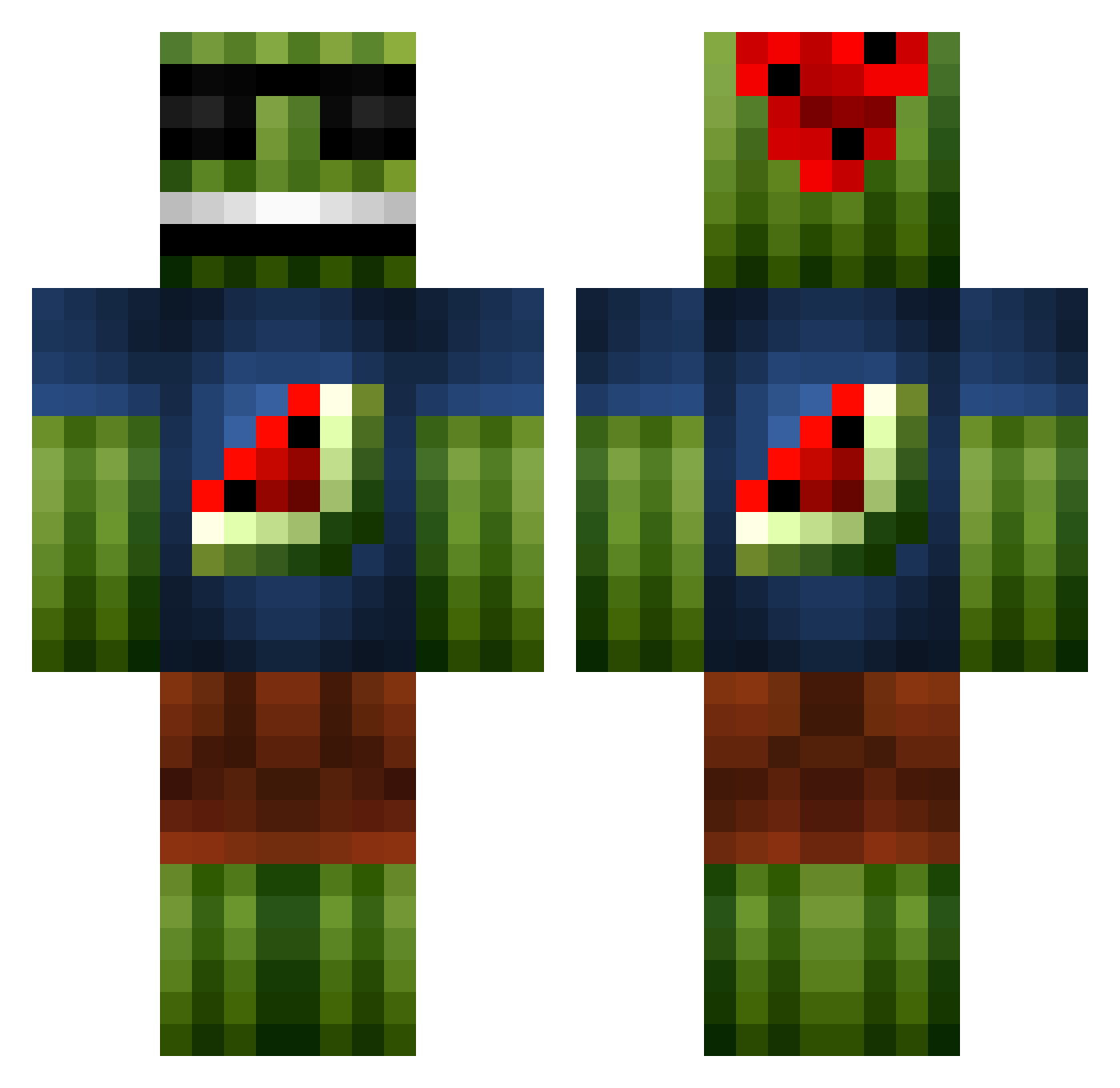
Current Minecraft skin of the player Yeyo_Corleone, loaded from the official Mojang API. Rotate the 3D model with your mouse or finger, then download the skin as a PNG file and use it in Minecraft: Bedrock Edition or Java Edition for free. When Yeyo_Corleone changes their skin, this page updates automatically and the old skin stays in the history below.
Other players with this skin (1095)
Yeyo_Corleone was the 690th player we have seen with this skin, first spotted on 05.10.2026. The same skin was seen on these players. Open a nickname to see their current skin and skin history.
 recey1215 MelonFireworks I_R3GI_I DamDam88 Thiago3015 Frozen505050 TigerChow878 tibster001 bippo2005 purepixel Senor_MeGusta LionBro24 joerivz Gurra26 MrTimoKoko xXlorziXx the_funny_man206 jw9t2 derda313 soccerboss11 Araulen oreobrows Lerfy Tebbii Lew15 firehawk199 hatmat765 mjorker Kizane_ deathburners willi1273827 JoeDeevey Melon007 WwillieE Gmania23 Lindskoog ethoman2 santa22501 TawaT Grubbie_monkey Jacob_slot Haussner lolzerpro just26in TheScrolls Nooes R0ssc0Peek0 abalone1209 awe_some_guy murillocanudas10 matt97912 scooter300 TommyLane Miguelosus OoseriousoO Naino99 TayTay96 Sawdawwg maxmit27 longline4
More Watermelon Minecraft skins
How to install the Yeyo_Corleone skin
- Press the Download button above to save the skin as a PNG file.
- Minecraft: Bedrock Edition (PE): open the Dressing Room from the main menu (or tap your character → Edit Character), go to Classic Skins → Owned, press the + (new skin) button, choose the downloaded PNG and pick the Classic (Steve) model. Works on PC and mobile; consoles cannot import custom skins.
- Minecraft: Java Edition: open the Minecraft Launcher, go to the Skins tab, click New Skin, load the PNG, pick the Classic (Steve) model and press Save & Use. You can also upload it at minecraft.net → Profile → Change Skin.
The skin does not show up after import - what should I do?
Restart Minecraft and open the Dressing Room again - imported skins sometimes appear only after a restart. Also make sure you selected the imported skin and picked the Classic (Steve) model.
Which model should I choose, Classic or Slim?
This skin is designed for the Classic (Steve) model. If you pick the wrong model, the arms of the skin will look stretched or squeezed.
Is the skin of Yeyo_Corleone free to download?
Yes. Press Download, save the PNG file and use it in Minecraft: Bedrock Edition or Java Edition - no payment or registration needed. The skin also works on multiplayer servers and Realms.
More skins
Looking for more? Go back to all Minecraft skins and check the top skins of the week, month and all time, or find any player's skin by nickname.