
Yalebulldogs22 - Minecraft Skins & Skin History
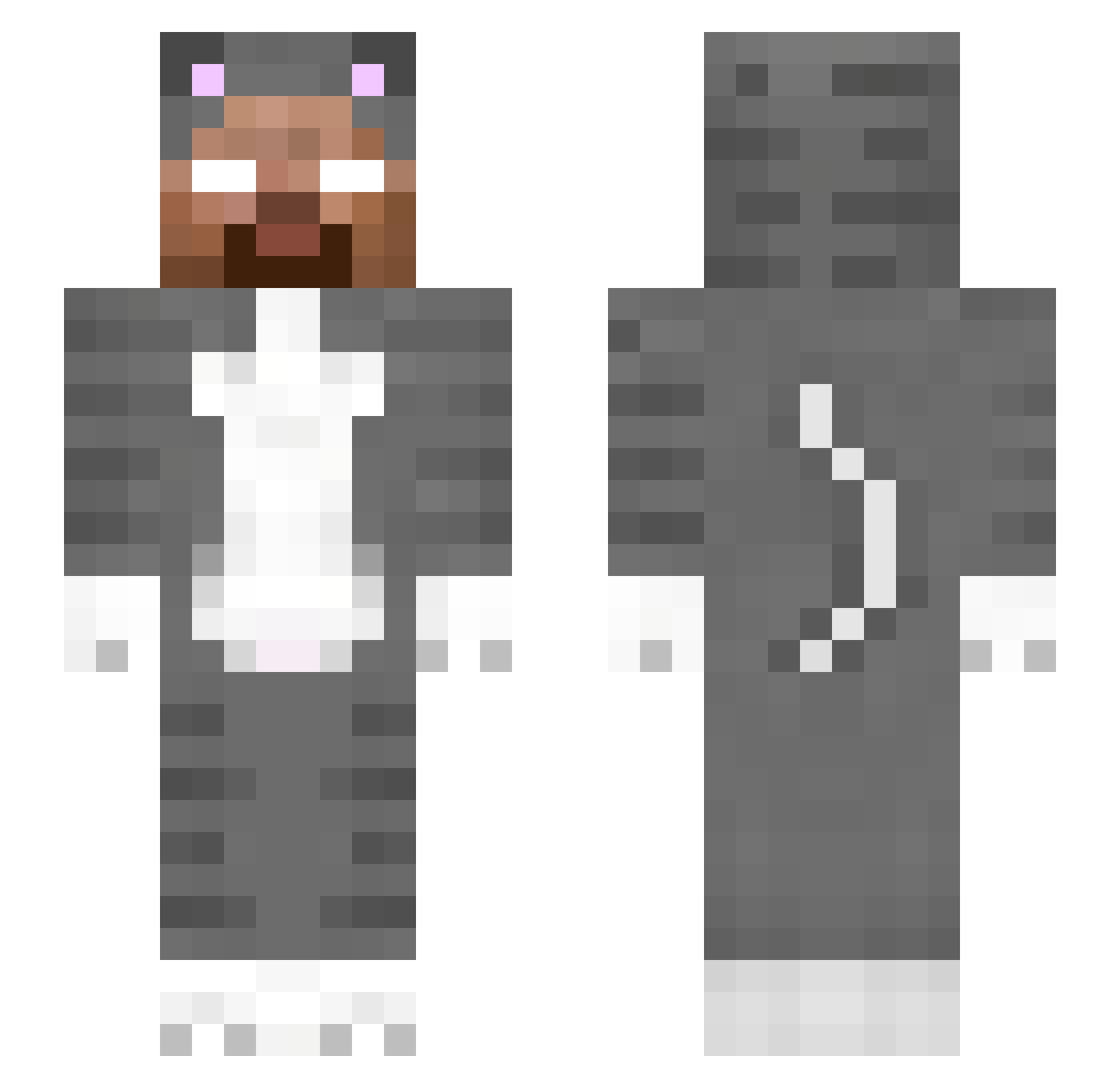
Current Minecraft skin of the player Yalebulldogs22, loaded from the official Mojang API. Rotate the 3D model with your mouse or finger, then download the skin as a PNG file and use it in Minecraft: Bedrock Edition or Java Edition for free. When Yalebulldogs22 changes their skin, this page updates automatically and the old skin stays in the history below.
Other players with this skin (250)
Yalebulldogs22 was the 159th player we have seen with this skin, first spotted on 02.10.2026. The same skin was seen on these players. Open a nickname to see their current skin and skin history.
 HERMANITOYT SoulkYT iq_uen104 cc721222 LandonCheese soede_thomas Bluecreeper1006 penniparker Jakobk2700 Negan3154 Jothph KFPDragnwarrior JohntFOOT Asharm123 plasmaa_ Brli CreepyTech P_layer_11 arichvePedro detoxfr Vilppa1234 Grass69z toitai therealneong ToonsPlayGames SSAVlTAR Szabbiii TimeTheBoss Drqf Nydelash laparte fafafaf23 AlBeRtO9012 NecrosnoT Yabibidibi spacedementia cydao S3GA AwashNewt513286 enos23 survivalboy Perk30Bandit qtoid loloreith creamybull21 FunMEMZ TrusTa girl4trd WindElevate Helliosq _bigooos_ blqwu crossy7585 cinava Technicbutton66 CovenantGrunts EbonyLavender Fischface2016 ToshaOne Emprazzs_
More Herobrine Minecraft skins
How to install the Yalebulldogs22 skin
- Press the Download button above to save the skin as a PNG file.
- Minecraft: Bedrock Edition (PE): open the Dressing Room from the main menu (or tap your character → Edit Character), go to Classic Skins → Owned, press the + (new skin) button, choose the downloaded PNG and pick the Slim (Alex) model. Works on PC and mobile; consoles cannot import custom skins.
- Minecraft: Java Edition: open the Minecraft Launcher, go to the Skins tab, click New Skin, load the PNG, pick the Slim (Alex) model and press Save & Use. You can also upload it at minecraft.net → Profile → Change Skin.
The skin does not show up after import - what should I do?
Restart Minecraft and open the Dressing Room again - imported skins sometimes appear only after a restart. Also make sure you selected the imported skin and picked the Slim (Alex) model.
Which model should I choose, Classic or Slim?
This skin is designed for the Slim (Alex) model. If you pick the wrong model, the arms of the skin will look stretched or squeezed.
Is the skin of Yalebulldogs22 free to download?
Yes. Press Download, save the PNG file and use it in Minecraft: Bedrock Edition or Java Edition - no payment or registration needed. The skin also works on multiplayer servers and Realms.
More skins
Looking for more? Go back to all Minecraft skins and check the top skins of the week, month and all time, or find any player's skin by nickname.