
XEINBR0T - Minecraft Skins & Skin History
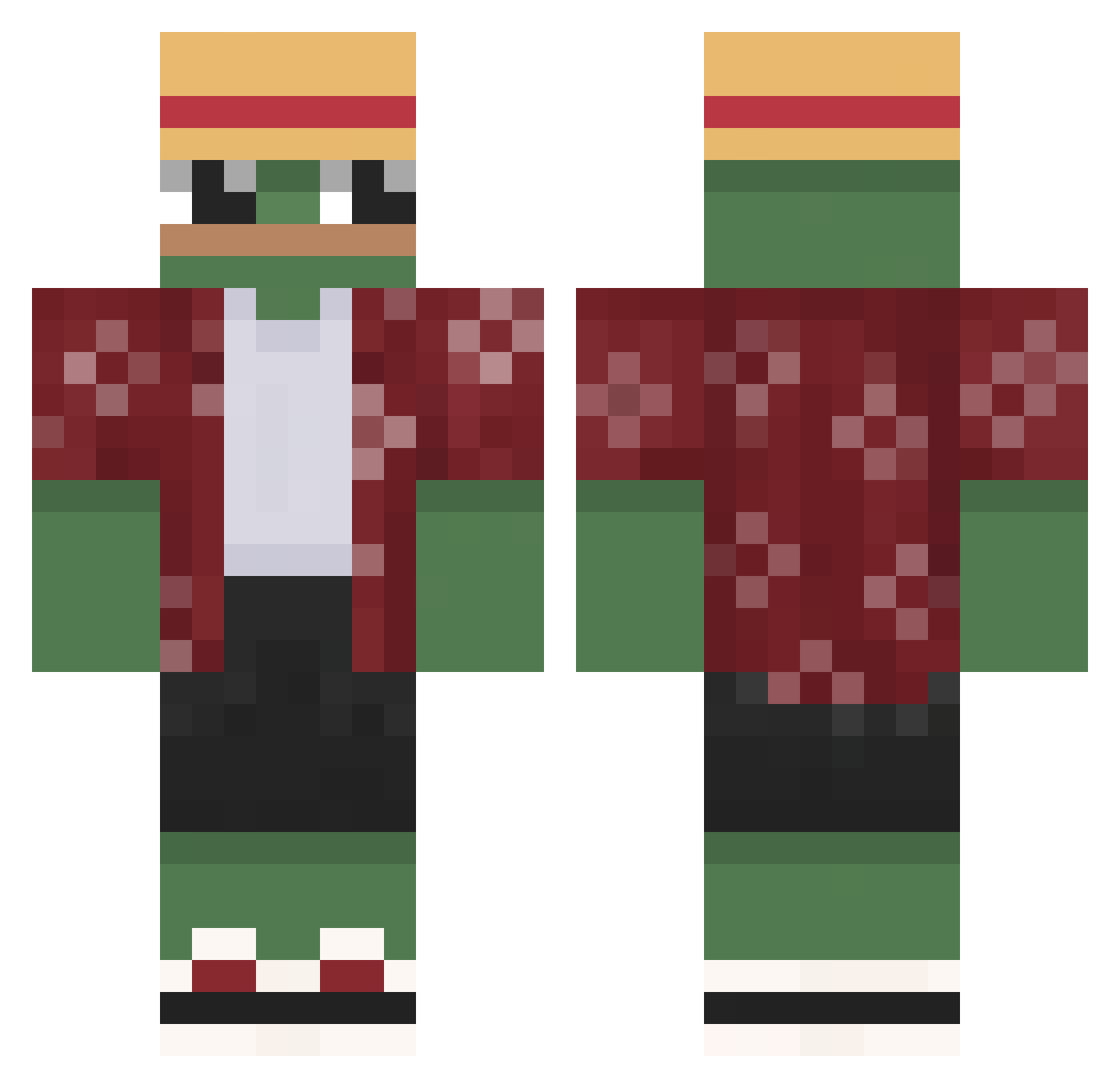
Current Minecraft skin of the player XEINBR0T, loaded from the official Mojang API. Rotate the 3D model with your mouse or finger, then download the skin as a PNG file and use it in Minecraft: Bedrock Edition or Java Edition for free. When XEINBR0T changes their skin, this page updates automatically and the old skin stays in the history below.
Other players with this skin (556)
XEINBR0T was the 406th player we have seen with this skin, first spotted on 29.09.2026. The same skin was seen on these players. Open a nickname to see their current skin and skin history.
 m7md38 JackBaiano kochampiwo666 Pekioo UHKBU3UTOPCKUY Dom167 ZzAlex03Zz Danieldarg Vojtazmesta44 davidabo2013 NoIAmTom zPepeJamZ ka6a4ok Harry1022847 RealTwobeers Osvaysss StooD8 IantacularsI einfachsinan Jtobler SAXEL34 SawkoJP BigNig420 Sa88y Happy_Frog22 bocharnickita lumpymeow TODOROKI1805 KalusCz alpsait madless_official Rec0p hifrog_1 BigBlackMan6147 Goldiwarvergeben ladergal04 NeverEcoo SourLemonite FalconHP8 Beleberdaa GATOPUNK _JustPommes_ Incriper556703 KDD_HUN Haise_420 SuperPigeons Palav_ PhasmaQc Landrodon TaGaC Thom_22 Lkl93600 KickTacho ElbaLita Lagon09 CarryPotterKppa sergi1201 earthfish Richard_Bomber Sadiq_
More Monkey D Luffy Minecraft skins
See all 856 Monkey D Luffy skins
How to install the XEINBR0T skin
- Press the Download button above to save the skin as a PNG file.
- Minecraft: Bedrock Edition (PE): open the Dressing Room from the main menu (or tap your character → Edit Character), go to Classic Skins → Owned, press the + (new skin) button, choose the downloaded PNG and pick the Classic (Steve) model. Works on PC and mobile; consoles cannot import custom skins.
- Minecraft: Java Edition: open the Minecraft Launcher, go to the Skins tab, click New Skin, load the PNG, pick the Classic (Steve) model and press Save & Use. You can also upload it at minecraft.net → Profile → Change Skin.
The skin does not show up after import - what should I do?
Restart Minecraft and open the Dressing Room again - imported skins sometimes appear only after a restart. Also make sure you selected the imported skin and picked the Classic (Steve) model.
Which model should I choose, Classic or Slim?
This skin is designed for the Classic (Steve) model. If you pick the wrong model, the arms of the skin will look stretched or squeezed.
Is the skin of XEINBR0T free to download?
Yes. Press Download, save the PNG file and use it in Minecraft: Bedrock Edition or Java Edition - no payment or registration needed. The skin also works on multiplayer servers and Realms.
More skins
Looking for more? Go back to all Minecraft skins and check the top skins of the week, month and all time, or find any player's skin by nickname.