
TommolTrommel - Minecraft Skins & Skin History
Current Minecraft skin of the player TommolTrommel, loaded from the official Mojang API. Rotate the 3D model with your mouse or finger, then download the skin as a PNG file and use it in Minecraft: Bedrock Edition or Java Edition for free. When TommolTrommel changes their skin, this page updates automatically and the old skin stays in the history below.
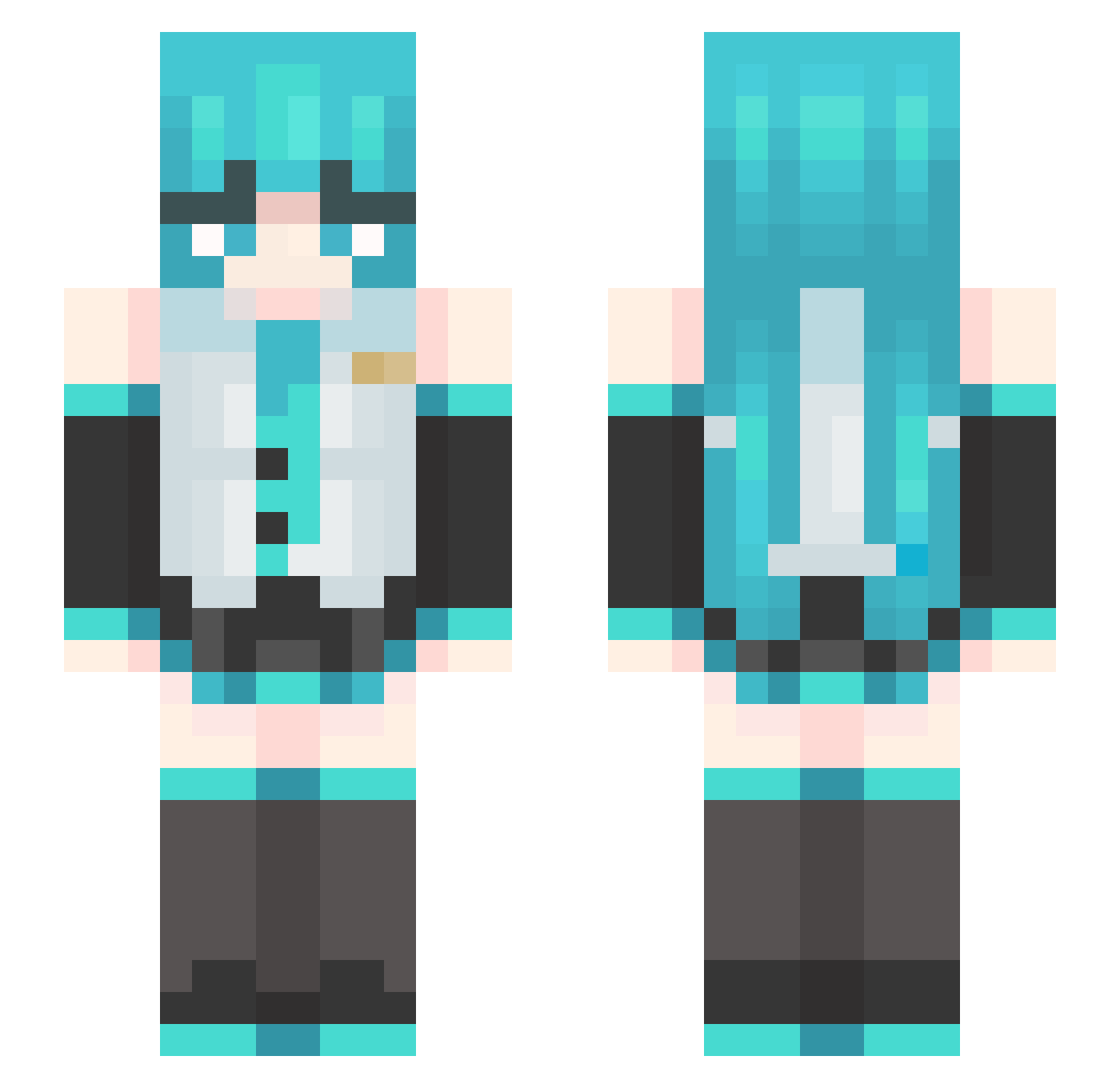
Other players with this skin (484)
TommolTrommel was the 124th player we have seen with this skin, first spotted on 23.08.2026. The same skin was seen on these players. Open a nickname to see their current skin and skin history.
 Quark97
 VanitasCss not_dordib MigYan04 ChoiMidam
 Zynkque harver60 Li_He DinglSmash pepepojavzx01 Fabinator6999 NFbot
 CARDBOARD17 prodbyd1sc YumiYumiYumiYumi ALPAC198 Joementum SJ0403
 Emanuelzinhoh Travelingsheep MC_Andromeda Richardlez CfxChester WittyOverLord_ Davi_uzzo Kartoffel_Tomate
 Thing526 justina01 PanirMoghol potateeeeeee slowcar
 Acecooljet7 FloffyWeeb only_robin Azuak211 DNSlayer2 Tai_Sui mBBEm 1HaTsuneMKu SwYosef R3D_T1G3R XeEternity Verliona leen3312 illegal_kevin sebek2010 KonnorVerse funung
 V1Real sst233 ElWeyDeCoppel _DUSTCUTTER Gigantin Azin_217 Shiroi_Yurei
 Vuucas KNzin_ SIDEOLIVEIsSoAss mikukim MilkBagInMilk
More Hatsune Miku Minecraft skins
See all 900 Hatsune Miku skins
How to install the TommolTrommel skin
- Press the Download button above to save the skin as a PNG file.
- Minecraft: Bedrock Edition (PE): open the Dressing Room from the main menu (or tap your character → Edit Character), go to Classic Skins → Owned, press the + (new skin) button, choose the downloaded PNG and pick the Slim (Alex) model. Works on PC and mobile; consoles cannot import custom skins.
- Minecraft: Java Edition: open the Minecraft Launcher, go to the Skins tab, click New Skin, load the PNG, pick the Slim (Alex) model and press Save & Use. You can also upload it at minecraft.net → Profile → Change Skin.
The skin does not show up after import - what should I do?
Restart Minecraft and open the Dressing Room again - imported skins sometimes appear only after a restart. Also make sure you selected the imported skin and picked the Slim (Alex) model.
Which model should I choose, Classic or Slim?
This skin is designed for the Slim (Alex) model. If you pick the wrong model, the arms of the skin will look stretched or squeezed.
Is the skin of TommolTrommel free to download?
Yes. Press Download, save the PNG file and use it in Minecraft: Bedrock Edition or Java Edition - no payment or registration needed. The skin also works on multiplayer servers and Realms.
More skins
Looking for more? Go back to all Minecraft skins and check the top skins of the week, month and all time, or find any player's skin by nickname.