
TimoHoltkamp - Minecraft Skins & Skin History
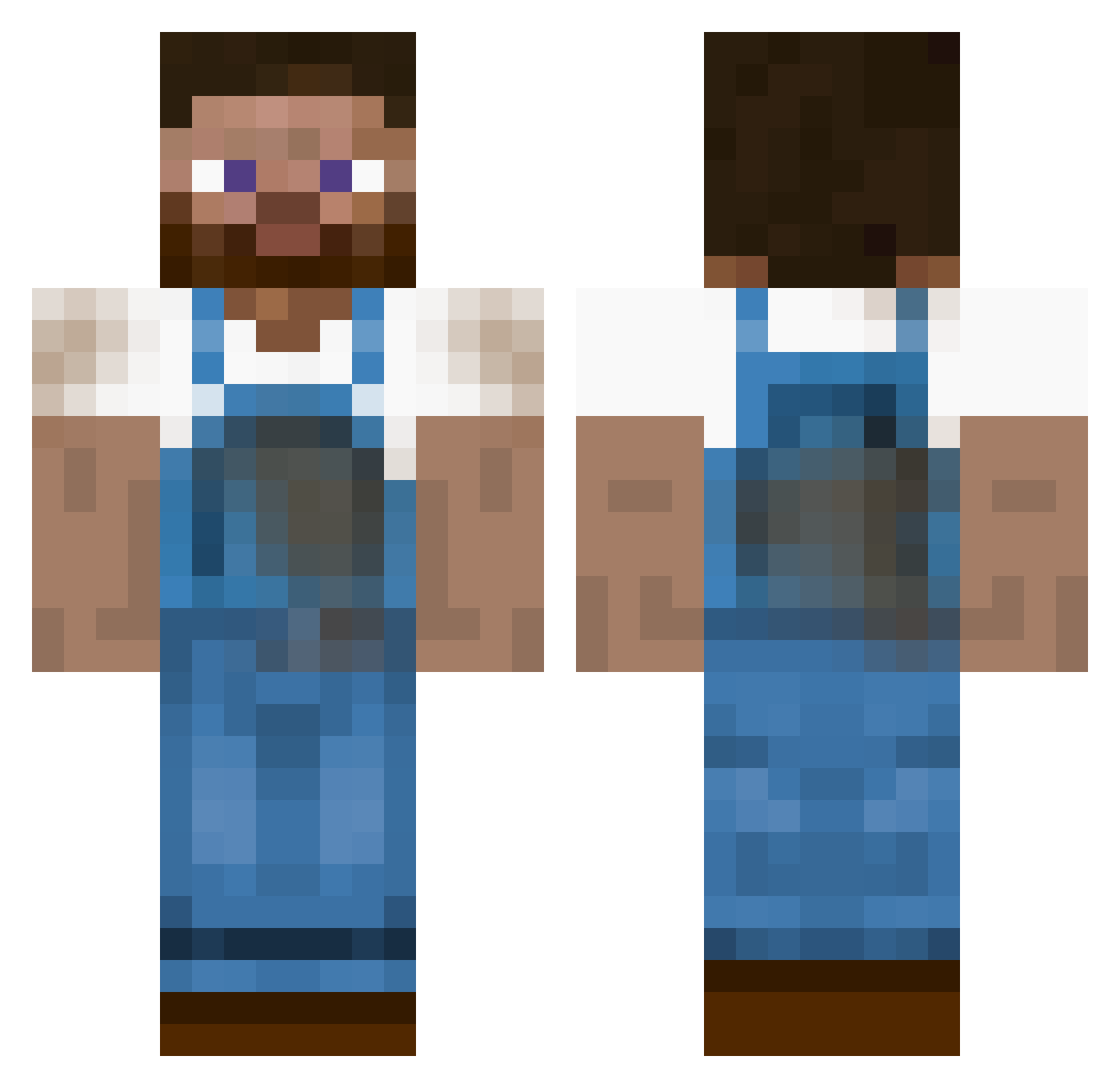
Current Minecraft skin of the player TimoHoltkamp, loaded from the official Mojang API. Rotate the 3D model with your mouse or finger, then download the skin as a PNG file and use it in Minecraft: Bedrock Edition or Java Edition for free. When TimoHoltkamp changes their skin, this page updates automatically and the old skin stays in the history below.
Other players with this skin (181)
TimoHoltkamp was the 82nd player we have seen with this skin, first spotted on 05.09.2026. The same skin was seen on these players. Open a nickname to see their current skin and skin history.
 iJusp_ Dahroosh unkyle Nick_Sekac_Magor dafib SzmoRo PozLuke BigggestBird Zhaix3 kortspelaren Benji1333 bsinkk MepsiPax08 Poutchu Willard__ James_Bo Chabram_Schnitte CHEESE_IS_GOOD Swaannyy Rolfero XYZK1LLER ZooOfHumans jiejiesha Fayki PCID ButtUglyJeff IvarBamos potatoiscuty Madeleine_Bread proatwork Norkels ktr_DET IkeaMascot SamGV Vit_B2 luismi56 eppej FarmerBen25 Knautschkopf Hjallehp System054 kome1985 UnboxyG spennser_ FatKidInGoonies icozha boermaarten LORDPTA Nuux__ Big_J03 Pablowe AniMolsX Tombeart ramair37 DroneEagle trolwane drdaramg ChunBae5186 AVG1710 BLOODYHELL
More Farmer Minecraft skins
How to install the TimoHoltkamp skin
- Press the Download button above to save the skin as a PNG file.
- Minecraft: Bedrock Edition (PE): open the Dressing Room from the main menu (or tap your character → Edit Character), go to Classic Skins → Owned, press the + (new skin) button, choose the downloaded PNG and pick the Classic (Steve) model. Works on PC and mobile; consoles cannot import custom skins.
- Minecraft: Java Edition: open the Minecraft Launcher, go to the Skins tab, click New Skin, load the PNG, pick the Classic (Steve) model and press Save & Use. You can also upload it at minecraft.net → Profile → Change Skin.
The skin does not show up after import - what should I do?
Restart Minecraft and open the Dressing Room again - imported skins sometimes appear only after a restart. Also make sure you selected the imported skin and picked the Classic (Steve) model.
Which model should I choose, Classic or Slim?
This skin is designed for the Classic (Steve) model. If you pick the wrong model, the arms of the skin will look stretched or squeezed.
Is the skin of TimoHoltkamp free to download?
Yes. Press Download, save the PNG file and use it in Minecraft: Bedrock Edition or Java Edition - no payment or registration needed. The skin also works on multiplayer servers and Realms.
More skins
Looking for more? Go back to all Minecraft skins and check the top skins of the week, month and all time, or find any player's skin by nickname.