
Tijl_Escobar - Minecraft Skins & Skin History
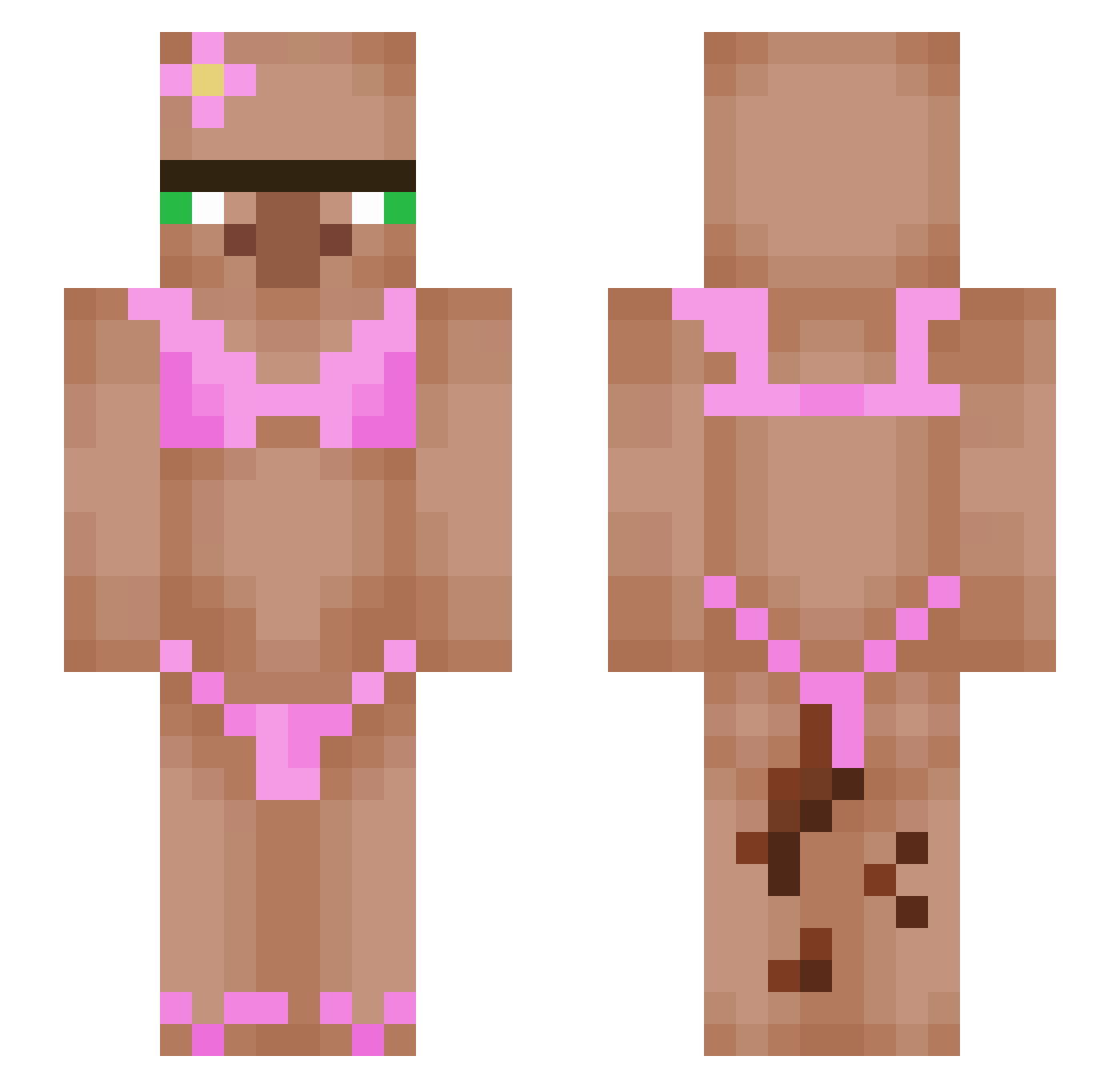
Current Minecraft skin of the player Tijl_Escobar, loaded from the official Mojang API. Rotate the 3D model with your mouse or finger, then download the skin as a PNG file and use it in Minecraft: Bedrock Edition or Java Edition for free. When Tijl_Escobar changes their skin, this page updates automatically and the old skin stays in the history below.
Other players with this skin (467)
Tijl_Escobar was the 30th player we have seen with this skin, first spotted on 29.07.2026. The same skin was seen on these players. Open a nickname to see their current skin and skin history.
 TheMikels
 diaboniks Ahmet_0911 Spixxel lauryndg
 JackHass34 Naraic69 moppyloppy TetroMC GubbyAngel Juanpi22 swagpapa69
 Bucosul ForceYee debroser R3DxTH0RNS Cryptic263 Robemaster27 Lillypie12 haileysniffing 7Daniiii julesmang Erman07823 cristenthebud HugePootato nossekvaerneren Localdumptruck DerPorofessor bbom5 Gi3da D4blueAmoon MasterChud67 AgentNemesis KnockToxicS
 SexyGayPerson freakyfiona ontheoc1 SuryaProMild Anweki Casman7244 ItzxXsmokey08 Sweeeet81 Pirolita33
 gabby11289 Astronoboy Dokeboy imills13 Epecik sackofnuts123 hotczarny romachka123 Zaravar RubixCubed3 FaZenoob1 Stullilein KarmicLuna Joaquincito777 Dofi35 BigGodFatherz Spxzionyt
More Bikini Minecraft skins
How to install the Tijl_Escobar skin
- Press the Download button above to save the skin as a PNG file.
- Minecraft: Bedrock Edition (PE): open the Dressing Room from the main menu (or tap your character → Edit Character), go to Classic Skins → Owned, press the + (new skin) button, choose the downloaded PNG and pick the Slim (Alex) model. Works on PC and mobile; consoles cannot import custom skins.
- Minecraft: Java Edition: open the Minecraft Launcher, go to the Skins tab, click New Skin, load the PNG, pick the Slim (Alex) model and press Save & Use. You can also upload it at minecraft.net → Profile → Change Skin.
The skin does not show up after import - what should I do?
Restart Minecraft and open the Dressing Room again - imported skins sometimes appear only after a restart. Also make sure you selected the imported skin and picked the Slim (Alex) model.
Which model should I choose, Classic or Slim?
This skin is designed for the Slim (Alex) model. If you pick the wrong model, the arms of the skin will look stretched or squeezed.
Is the skin of Tijl_Escobar free to download?
Yes. Press Download, save the PNG file and use it in Minecraft: Bedrock Edition or Java Edition - no payment or registration needed. The skin also works on multiplayer servers and Realms.
More skins
Looking for more? Go back to all Minecraft skins and check the top skins of the week, month and all time, or find any player's skin by nickname.