
SuperMarioNB - Minecraft Skins & Skin History
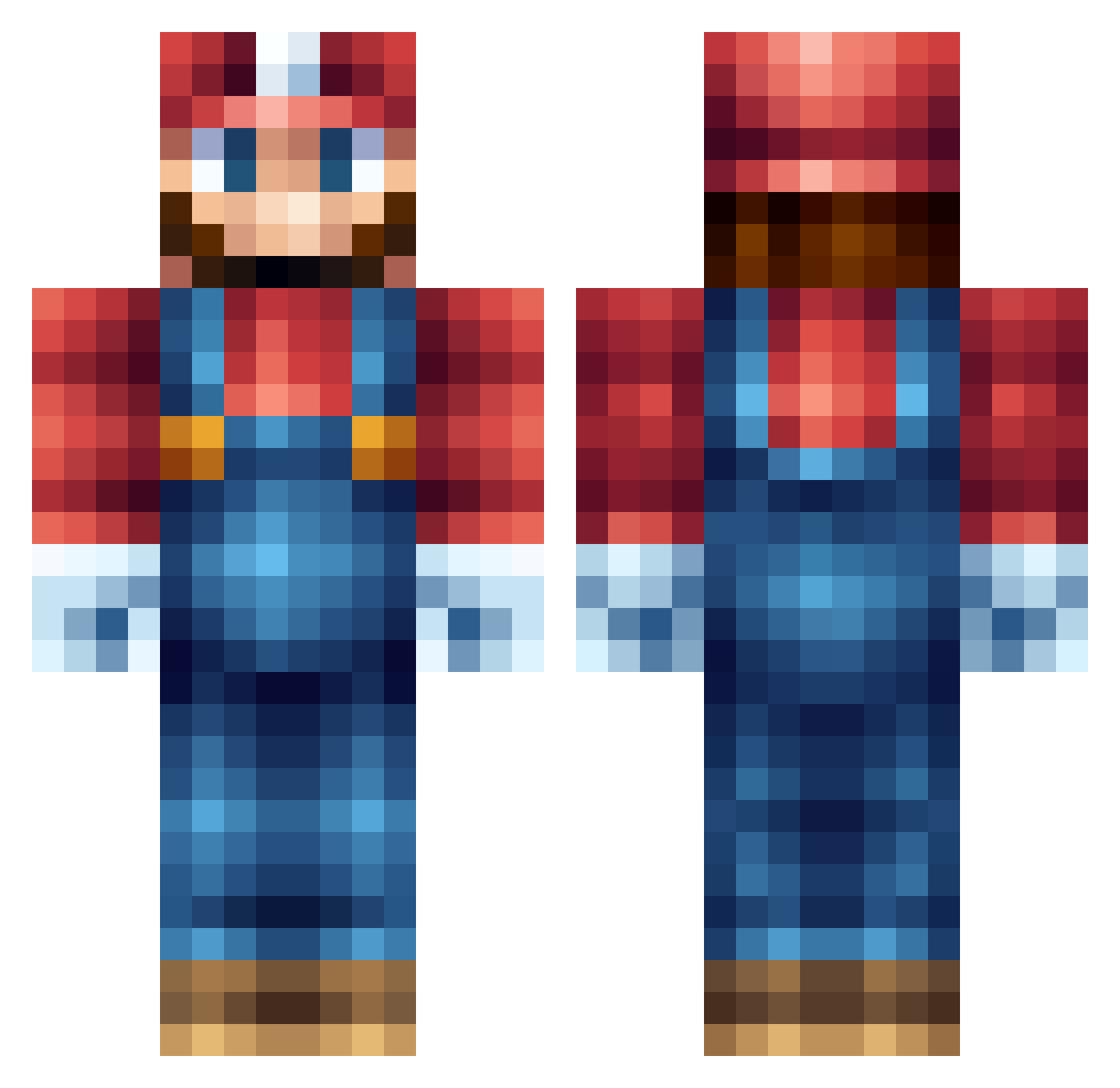
Current Minecraft skin of the player SuperMarioNB, loaded from the official Mojang API. Rotate the 3D model with your mouse or finger, then download the skin as a PNG file and use it in Minecraft: Bedrock Edition or Java Edition for free. When SuperMarioNB changes their skin, this page updates automatically and the old skin stays in the history below.
Other players with this skin (555)
SuperMarioNB was the 202nd player we have seen with this skin, first spotted on 04.09.2026. The same skin was seen on these players. Open a nickname to see their current skin and skin history.
 xNorthKingx ChengKaiWen Seanray03 MuUnP DanWhitfield roel1903 ianramsey yousyu Elchwurst Its_Mario_Time a_pizza_man DreamSky42 tbong dylandown famoustbag Mario_512 hirokei MCTheBalls crosbys23 takita 0mathias KalleEve GARBADSQ K4mpers bgrich jomar0304 Kappie_ HaberX z0kkeh Pauster l2aZel2 thaduchie chino250 GameBooij matte9_swe hayato1 IIIIIIIlIIlIIl Lochyboy iQuality CapnJack007 bouboutheo aznbeast78 killerdeetje Ciao65Boy KryptoChris kuroir CamYang mattborr WeapDog tmdgus Forever_Time_ Olesinski488 bubbahlooh Arne36 Dimbodoo stankinlankin EltonJohn231 penxiko 420Reido minecartDANI
More Nintendo Minecraft skins
How to install the SuperMarioNB skin
- Press the Download button above to save the skin as a PNG file.
- Minecraft: Bedrock Edition (PE): open the Dressing Room from the main menu (or tap your character → Edit Character), go to Classic Skins → Owned, press the + (new skin) button, choose the downloaded PNG and pick the Classic (Steve) model. Works on PC and mobile; consoles cannot import custom skins.
- Minecraft: Java Edition: open the Minecraft Launcher, go to the Skins tab, click New Skin, load the PNG, pick the Classic (Steve) model and press Save & Use. You can also upload it at minecraft.net → Profile → Change Skin.
The skin does not show up after import - what should I do?
Restart Minecraft and open the Dressing Room again - imported skins sometimes appear only after a restart. Also make sure you selected the imported skin and picked the Classic (Steve) model.
Which model should I choose, Classic or Slim?
This skin is designed for the Classic (Steve) model. If you pick the wrong model, the arms of the skin will look stretched or squeezed.
Is the skin of SuperMarioNB free to download?
Yes. Press Download, save the PNG file and use it in Minecraft: Bedrock Edition or Java Edition - no payment or registration needed. The skin also works on multiplayer servers and Realms.
More skins
Looking for more? Go back to all Minecraft skins and check the top skins of the week, month and all time, or find any player's skin by nickname.