
SoulSeeker36 - Minecraft Skins & Skin History
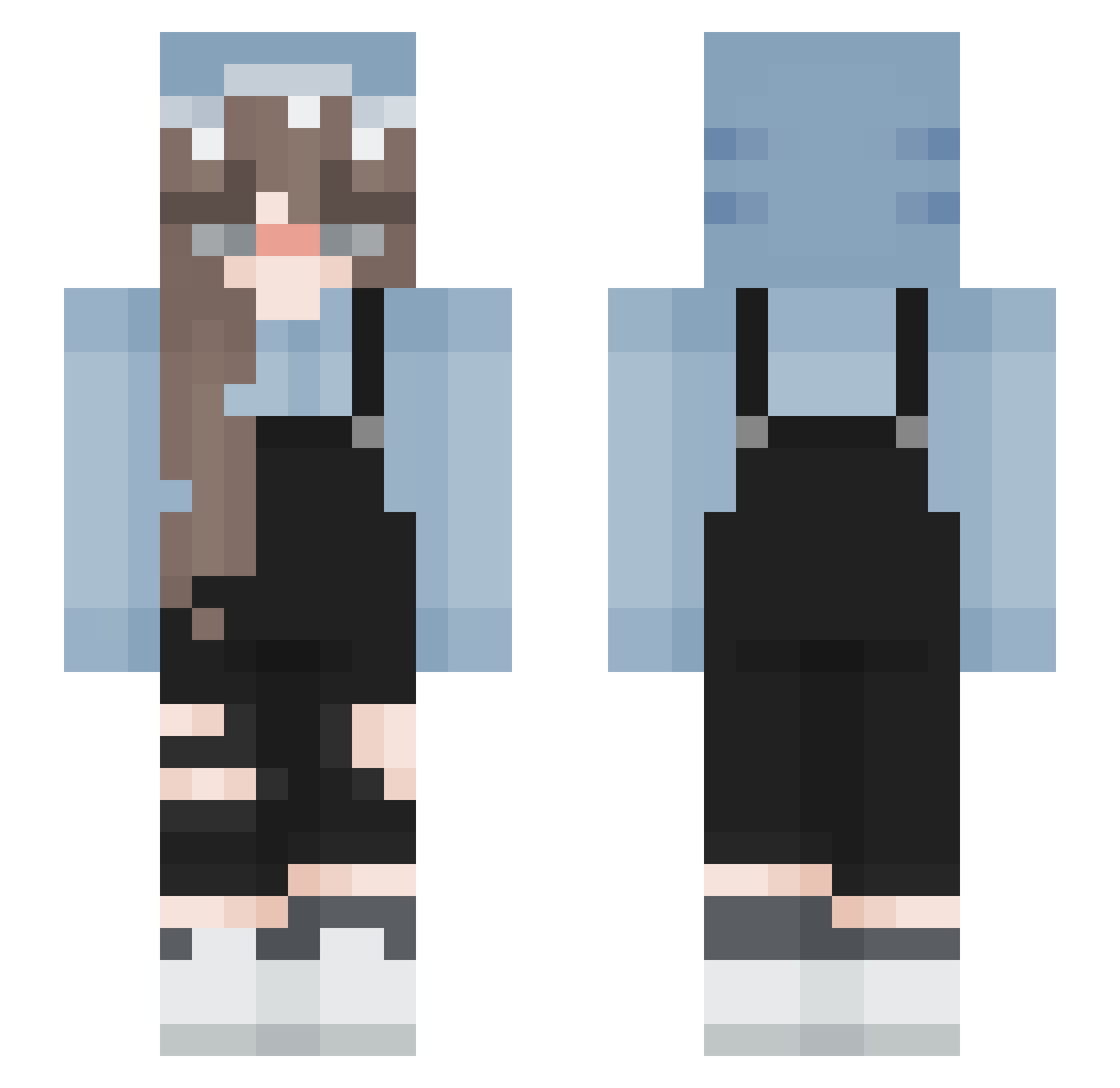
Current Minecraft skin of the player SoulSeeker36, loaded from the official Mojang API. Rotate the 3D model with your mouse or finger, then download the skin as a PNG file and use it in Minecraft: Bedrock Edition or Java Edition for free. When SoulSeeker36 changes their skin, this page updates automatically and the old skin stays in the history below.
Other players with this skin (193)
SoulSeeker36 was the 52nd player we have seen with this skin, first spotted on 24.08.2026. The same skin was seen on these players. Open a nickname to see their current skin and skin history.
 Julia02062009 rxlnp ikatacosy Memaud _EmiSia_ Mustangowaa Varvara363 ploefie jongeare blu_goose NeunTW xsleepycakes SunnyDreams_ Cafett heejin0407
 Abfallentsorgung bokchoye rachel1127 GabVx keirr1583 wei0v0 Bumble_Bee55 Ajaxon1717 TriggerControl6 RICA20120 kiss_t ZYZIA11 Greed_Dragon BeccaBean1015 LINCHEN0215 Faiola xMaud_08 louisa03_ bly90xclara MariPalari seungyeon3057 FloppyBot yanago1337 LilUziZez lazeryia DJ_RedWolf _Jugoslav_ VorticalBongo84 Stefano_sans111 blueberryyshark sophliz_ chenchen0813 Papie29 IStarlightI tomatokiller02 SKYLUNA aaaaayue _Matrixi_ oOhaniOo GojisBuster MsRubberDucky _cqmoe bloodymango smol_nabi AwwBae
More Girl Minecraft skins
How to install the SoulSeeker36 skin
- Press the Download button above to save the skin as a PNG file.
- Minecraft: Bedrock Edition (PE): open the Dressing Room from the main menu (or tap your character → Edit Character), go to Classic Skins → Owned, press the + (new skin) button, choose the downloaded PNG and pick the Slim (Alex) model. Works on PC and mobile; consoles cannot import custom skins.
- Minecraft: Java Edition: open the Minecraft Launcher, go to the Skins tab, click New Skin, load the PNG, pick the Slim (Alex) model and press Save & Use. You can also upload it at minecraft.net → Profile → Change Skin.
The skin does not show up after import - what should I do?
Restart Minecraft and open the Dressing Room again - imported skins sometimes appear only after a restart. Also make sure you selected the imported skin and picked the Slim (Alex) model.
Which model should I choose, Classic or Slim?
This skin is designed for the Slim (Alex) model. If you pick the wrong model, the arms of the skin will look stretched or squeezed.
Is the skin of SoulSeeker36 free to download?
Yes. Press Download, save the PNG file and use it in Minecraft: Bedrock Edition or Java Edition - no payment or registration needed. The skin also works on multiplayer servers and Realms.
More skins
Looking for more? Go back to all Minecraft skins and check the top skins of the week, month and all time, or find any player's skin by nickname.