
Snuzz135 - Minecraft Skins & Skin History
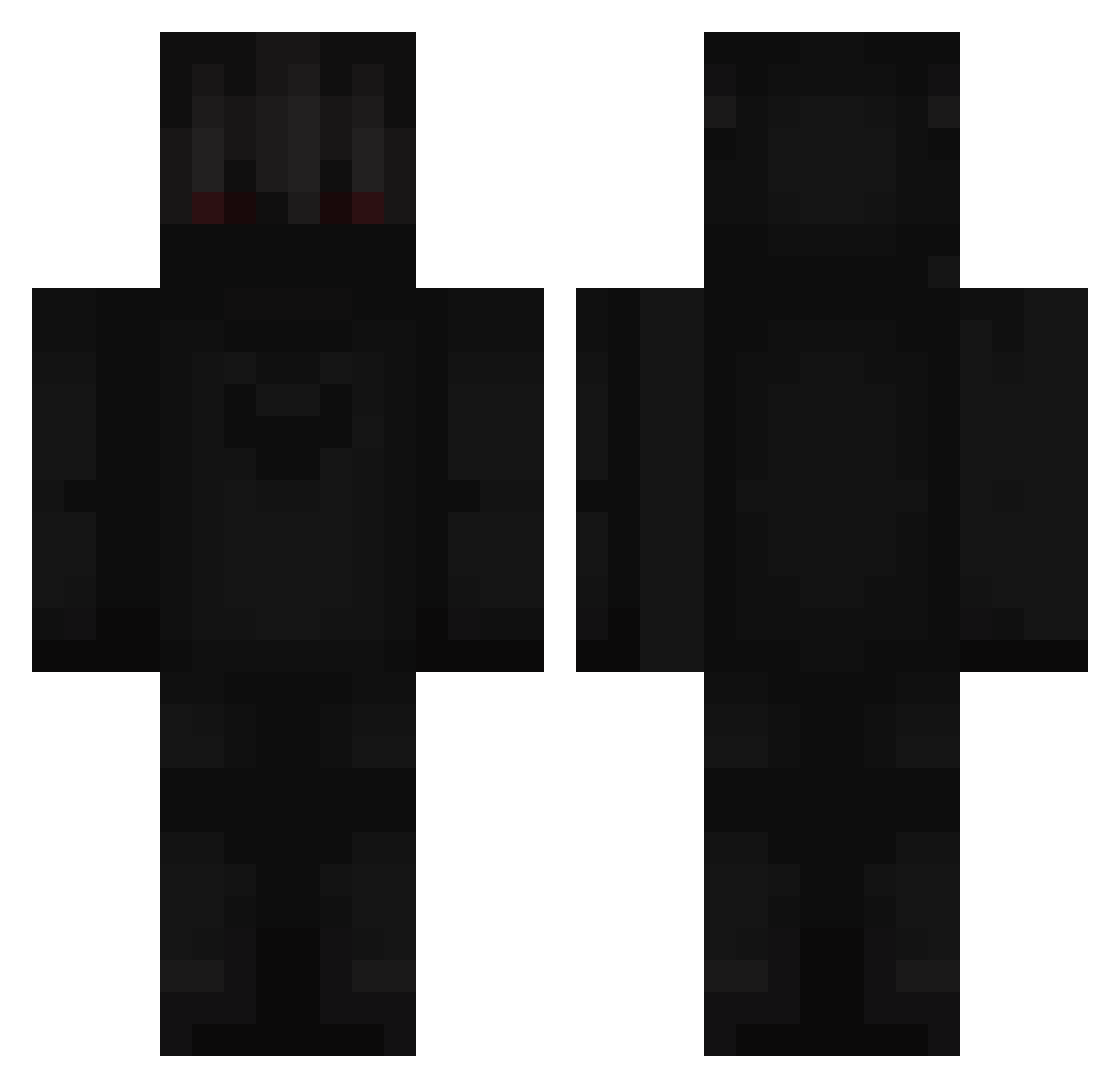
Current Minecraft skin of the player Snuzz135, loaded from the official Mojang API. Rotate the 3D model with your mouse or finger, then download the skin as a PNG file and use it in Minecraft: Bedrock Edition or Java Edition for free. When Snuzz135 changes their skin, this page updates automatically and the old skin stays in the history below.
Other players with this skin (366)
Snuzz135 was the 284th player we have seen with this skin, first spotted on 19.10.2026. The same skin was seen on these players. Open a nickname to see their current skin and skin history.
 tweci la_tomate_bleu Avange_ DevilPro Slidix Szymek9109 JuicyJules4453 Sonicexodia hitominero ImTheRealB2 kapusta4608 Jegi70 gold_23 Pekk444 Knowledge98 Shokero1337 FrenziesHyper agentsocrbtm DUOSHEEP woopwo2006 jojo_404_ Banan1413 8Bu Xurec Plutanic pjboy862 ttvVoidStalker MiniSkala Drippier yung_alphabet ikoli2 TacoGrande7 Blockskip Levi_Kratos Risaulait CODE_Zigi Curykid ILoveKlds detinuited Wyborowy Farisalshammary ExcaliaButForbi Johann20014 vladnn DrakeSavedMyLife Random_Glitch _HUB3RT miischase1 jsty4948 Urajoke_ JorMatC gt_0310 Dadagamer11 IamAyberk monsterman654 SethTheBum Red_Hen Shadowismo VzeeT Hazby
More Shadow Minecraft skins
How to install the Snuzz135 skin
- Press the Download button above to save the skin as a PNG file.
- Minecraft: Bedrock Edition (PE): open the Dressing Room from the main menu (or tap your character → Edit Character), go to Classic Skins → Owned, press the + (new skin) button, choose the downloaded PNG and pick the Classic (Steve) model. Works on PC and mobile; consoles cannot import custom skins.
- Minecraft: Java Edition: open the Minecraft Launcher, go to the Skins tab, click New Skin, load the PNG, pick the Classic (Steve) model and press Save & Use. You can also upload it at minecraft.net → Profile → Change Skin.
The skin does not show up after import - what should I do?
Restart Minecraft and open the Dressing Room again - imported skins sometimes appear only after a restart. Also make sure you selected the imported skin and picked the Classic (Steve) model.
Which model should I choose, Classic or Slim?
This skin is designed for the Classic (Steve) model. If you pick the wrong model, the arms of the skin will look stretched or squeezed.
Is the skin of Snuzz135 free to download?
Yes. Press Download, save the PNG file and use it in Minecraft: Bedrock Edition or Java Edition - no payment or registration needed. The skin also works on multiplayer servers and Realms.
More skins
Looking for more? Go back to all Minecraft skins and check the top skins of the week, month and all time, or find any player's skin by nickname.