
Shrub_pop - Minecraft Skins & Skin History
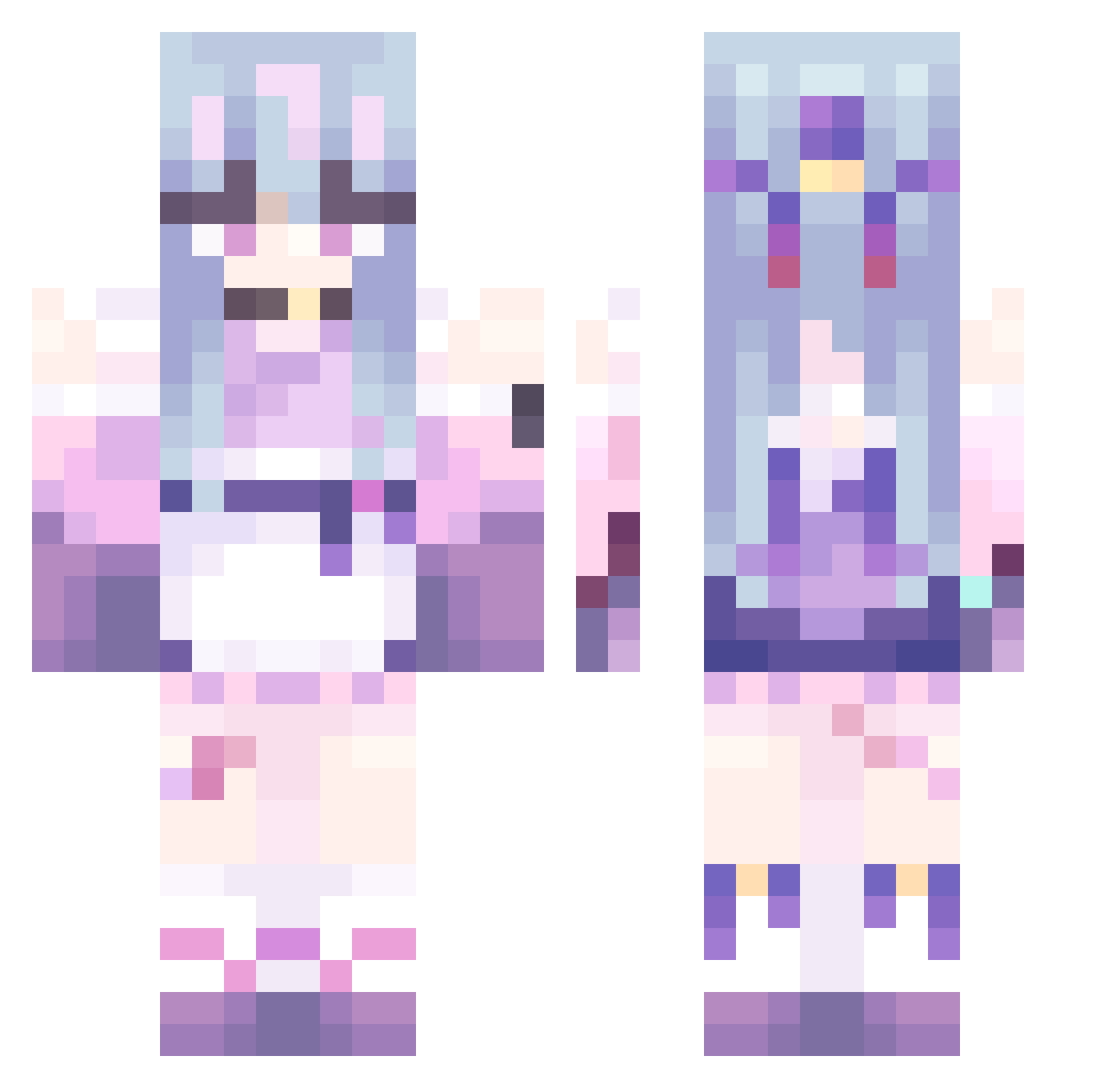
Current Minecraft skin of the player Shrub_pop, loaded from the official Mojang API. Rotate the 3D model with your mouse or finger, then download the skin as a PNG file and use it in Minecraft: Bedrock Edition or Java Edition for free. When Shrub_pop changes their skin, this page updates automatically and the old skin stays in the history below.
Other players with this skin (479)
Shrub_pop was the 319th player we have seen with this skin, first spotted on 08.10.2026. The same skin was seen on these players. Open a nickname to see their current skin and skin history.
 Ravager3 BellaTheBaboon dkandmlaldjqtdma Makaela24 Drizzy880 hehehehehe111 bolotop oyun_kardesler error2333 WinteryFern3477 Eunice_1337 wudibinbin123123 51c41 Chenfeiyan yildiizzz Hao712 im_so_cute926 MikaSwag 69Blaze_Boi69 ikun665 lovesense voidpatri KillianCape RoseRayde Edoviii TTsyx misosoopo EvieIsAlive FAssla tierracat AkaneSaiko fafa555 PIInac Nafyra hiki316 BaoLong00 HEI_GE arie9989 Loveshy303 kongguijiang Callay02 HeartReaper20 _ToruKuro_ wuxi114 xieguihua T0xicTokyo siromachi yutongwu corbqn GabaGoo19 IxmGoat TWWWWWW SKY0713 te_114514 BEAMZAMAN WuMingZhiZ joe00007 gmgrc _0000_0000_ Mosik_
More Anime Girl Minecraft skins
See all 13505 Anime Girl skins
How to install the Shrub_pop skin
- Press the Download button above to save the skin as a PNG file.
- Minecraft: Bedrock Edition (PE): open the Dressing Room from the main menu (or tap your character → Edit Character), go to Classic Skins → Owned, press the + (new skin) button, choose the downloaded PNG and pick the Classic (Steve) model. Works on PC and mobile; consoles cannot import custom skins.
- Minecraft: Java Edition: open the Minecraft Launcher, go to the Skins tab, click New Skin, load the PNG, pick the Classic (Steve) model and press Save & Use. You can also upload it at minecraft.net → Profile → Change Skin.
The skin does not show up after import - what should I do?
Restart Minecraft and open the Dressing Room again - imported skins sometimes appear only after a restart. Also make sure you selected the imported skin and picked the Classic (Steve) model.
Which model should I choose, Classic or Slim?
This skin is designed for the Classic (Steve) model. If you pick the wrong model, the arms of the skin will look stretched or squeezed.
Is the skin of Shrub_pop free to download?
Yes. Press Download, save the PNG file and use it in Minecraft: Bedrock Edition or Java Edition - no payment or registration needed. The skin also works on multiplayer servers and Realms.
More skins
Looking for more? Go back to all Minecraft skins and check the top skins of the week, month and all time, or find any player's skin by nickname.