
Shiro01__ - Minecraft Skins & Skin History
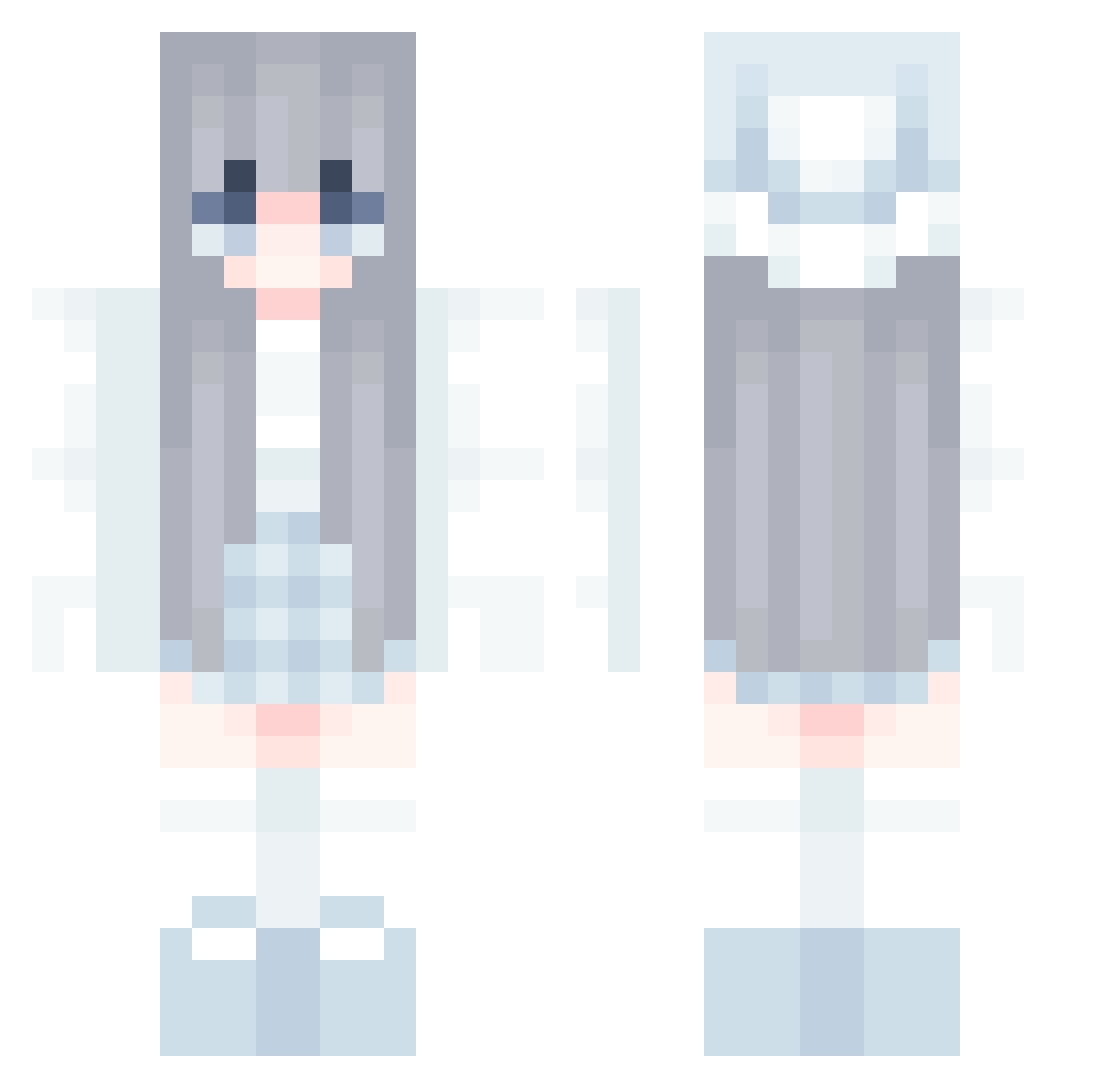
Current Minecraft skin of the player Shiro01__, loaded from the official Mojang API. Rotate the 3D model with your mouse or finger, then download the skin as a PNG file and use it in Minecraft: Bedrock Edition or Java Edition for free. When Shiro01__ changes their skin, this page updates automatically and the old skin stays in the history below.
Other players with this skin (858)
Shiro01__ was the 267th player we have seen with this skin, first spotted on 28.08.2026. The same skin was seen on these players. Open a nickname to see their current skin and skin history.
 cyglh Chapp1204 lisui1223 yuyuch SlolButBetter Bellula Lystn sien2541 _HinaJang_ LfTankDebuff yumaoy0805 sau_baka _Aliza BelaBell NafilaZasyfa P3rlit4 xjpNice Patrias snowie8888 haaapic kimyelin jh0928 LucidIz Mumimix AsyaPlay Luxava moesy55 chantolan bolishuang xin12336 Sona1000 MilkInCan qeiww33 raunruanjiang Folwod iamqiqia kina0423 _Ailza DUDUDUDUSaMa kotonoria nemuino0 z9s4c7 skiterbot Evegela blackcoso EmoTheBuilder MC_YuanChu squid_man53 B0MBIESFAN
 Bluefoo123 SaltyJuhlin SKY_1230 Candy2007 JinganYang kong_2 DarkestGreenPTNL esther130701 Ivennee Jeongseon27 Flanm_
More Aesthetic Minecraft skins
How to install the Shiro01__ skin
- Press the Download button above to save the skin as a PNG file.
- Minecraft: Bedrock Edition (PE): open the Dressing Room from the main menu (or tap your character → Edit Character), go to Classic Skins → Owned, press the + (new skin) button, choose the downloaded PNG and pick the Classic (Steve) model. Works on PC and mobile; consoles cannot import custom skins.
- Minecraft: Java Edition: open the Minecraft Launcher, go to the Skins tab, click New Skin, load the PNG, pick the Classic (Steve) model and press Save & Use. You can also upload it at minecraft.net → Profile → Change Skin.
The skin does not show up after import - what should I do?
Restart Minecraft and open the Dressing Room again - imported skins sometimes appear only after a restart. Also make sure you selected the imported skin and picked the Classic (Steve) model.
Which model should I choose, Classic or Slim?
This skin is designed for the Classic (Steve) model. If you pick the wrong model, the arms of the skin will look stretched or squeezed.
Is the skin of Shiro01__ free to download?
Yes. Press Download, save the PNG file and use it in Minecraft: Bedrock Edition or Java Edition - no payment or registration needed. The skin also works on multiplayer servers and Realms.
More skins
Looking for more? Go back to all Minecraft skins and check the top skins of the week, month and all time, or find any player's skin by nickname.