
Sh4dowWolf1994 - Minecraft Skins & Skin History
Current Minecraft skin of the player Sh4dowWolf1994, loaded from the official Mojang API. Rotate the 3D model with your mouse or finger, then download the skin as a PNG file and use it in Minecraft: Bedrock Edition or Java Edition for free. When Sh4dowWolf1994 changes their skin, this page updates automatically and the old skin stays in the history below.
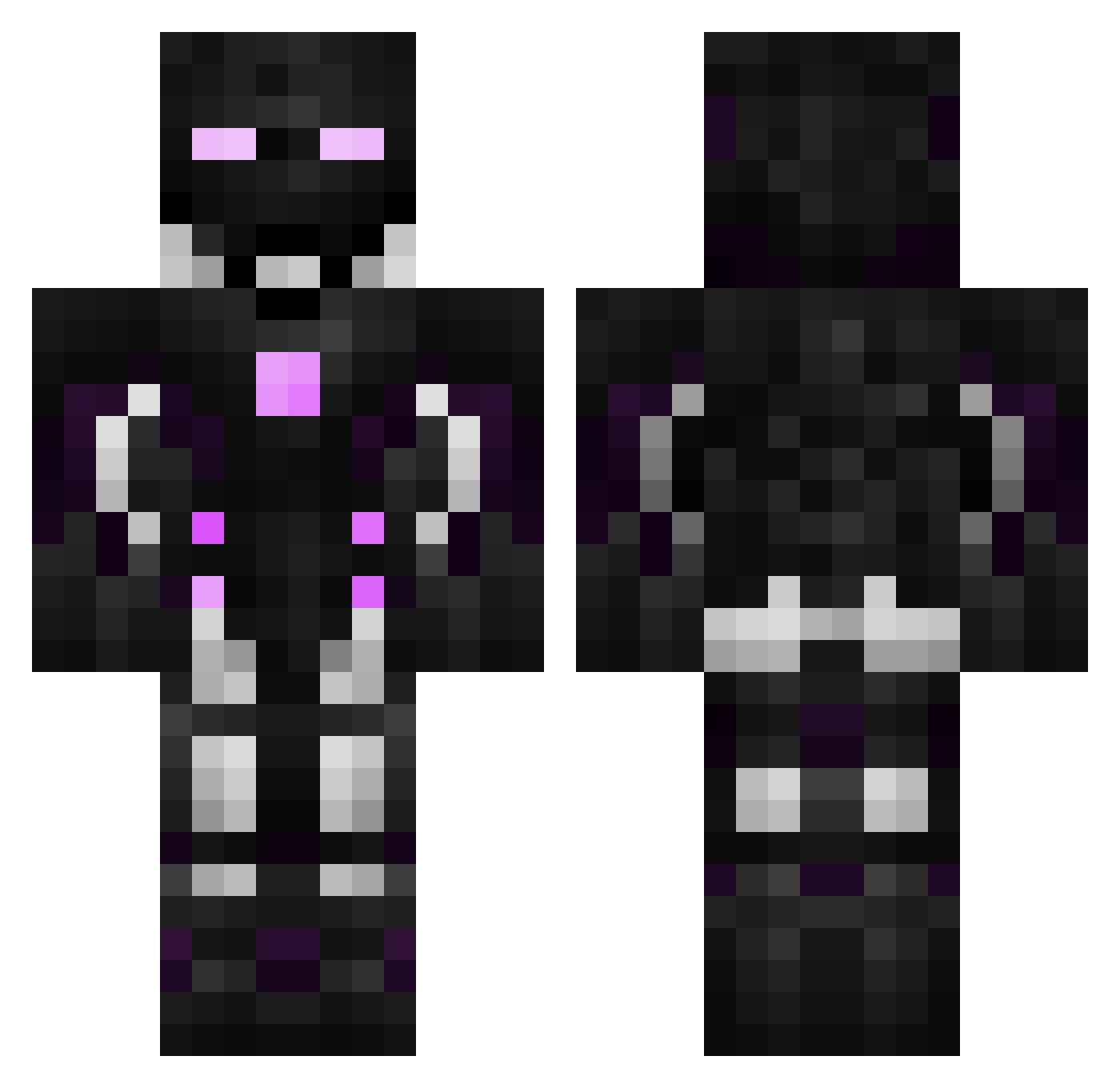
Other players with this skin (596)
Sh4dowWolf1994 was the 37th player we have seen with this skin, first spotted on 02.08.2026. The same skin was seen on these players. Open a nickname to see their current skin and skin history.
 _DiRF452 CreeperCool64 Dr_Epsilon GlitchedAura Oscar44_ MichelinPeruano PotoGamer_ Macaco30 onebeats Mircuri RedstoneKiller69 Eintol hasteharvester Kill_Tech_Pro MechanixZero xXStorminatorXx doaster Table94 JC_Elite lucaslm222 BlackBloodLust DylanHM DownTainted Menkoyyy Jp_lock Cza_rny csavory23 Tiago_007 XhyperYT wuwu1417 ivancito3008 mal_aux_dents ShadowHammer321 TheTomEleven Karim951 Maxmixxo CaesarXIV NathanaelGT mc_steve_ns
 Picoche Peregarik TonyCooks Jamo87 FireDragon12 Demauri Syzegy NFDagostino JulianSG97
 Jnn1s_06 Panky BMBL_FAKEZ Apurd21 Sucuk_Abi Alkyonius Jutran Calamitas233 kouX20A TheMobKing2008 KORI0608 Joseee117
More Cyborg Minecraft skins
How to install the Sh4dowWolf1994 skin
- Press the Download button above to save the skin as a PNG file.
- Minecraft: Bedrock Edition (PE): open the Dressing Room from the main menu (or tap your character → Edit Character), go to Classic Skins → Owned, press the + (new skin) button, choose the downloaded PNG and pick the Classic (Steve) model. Works on PC and mobile; consoles cannot import custom skins.
- Minecraft: Java Edition: open the Minecraft Launcher, go to the Skins tab, click New Skin, load the PNG, pick the Classic (Steve) model and press Save & Use. You can also upload it at minecraft.net → Profile → Change Skin.
The skin does not show up after import - what should I do?
Restart Minecraft and open the Dressing Room again - imported skins sometimes appear only after a restart. Also make sure you selected the imported skin and picked the Classic (Steve) model.
Which model should I choose, Classic or Slim?
This skin is designed for the Classic (Steve) model. If you pick the wrong model, the arms of the skin will look stretched or squeezed.
Is the skin of Sh4dowWolf1994 free to download?
Yes. Press Download, save the PNG file and use it in Minecraft: Bedrock Edition or Java Edition - no payment or registration needed. The skin also works on multiplayer servers and Realms.
More skins
Looking for more? Go back to all Minecraft skins and check the top skins of the week, month and all time, or find any player's skin by nickname.