
RoronoZoro_ - Minecraft Skins & Skin History
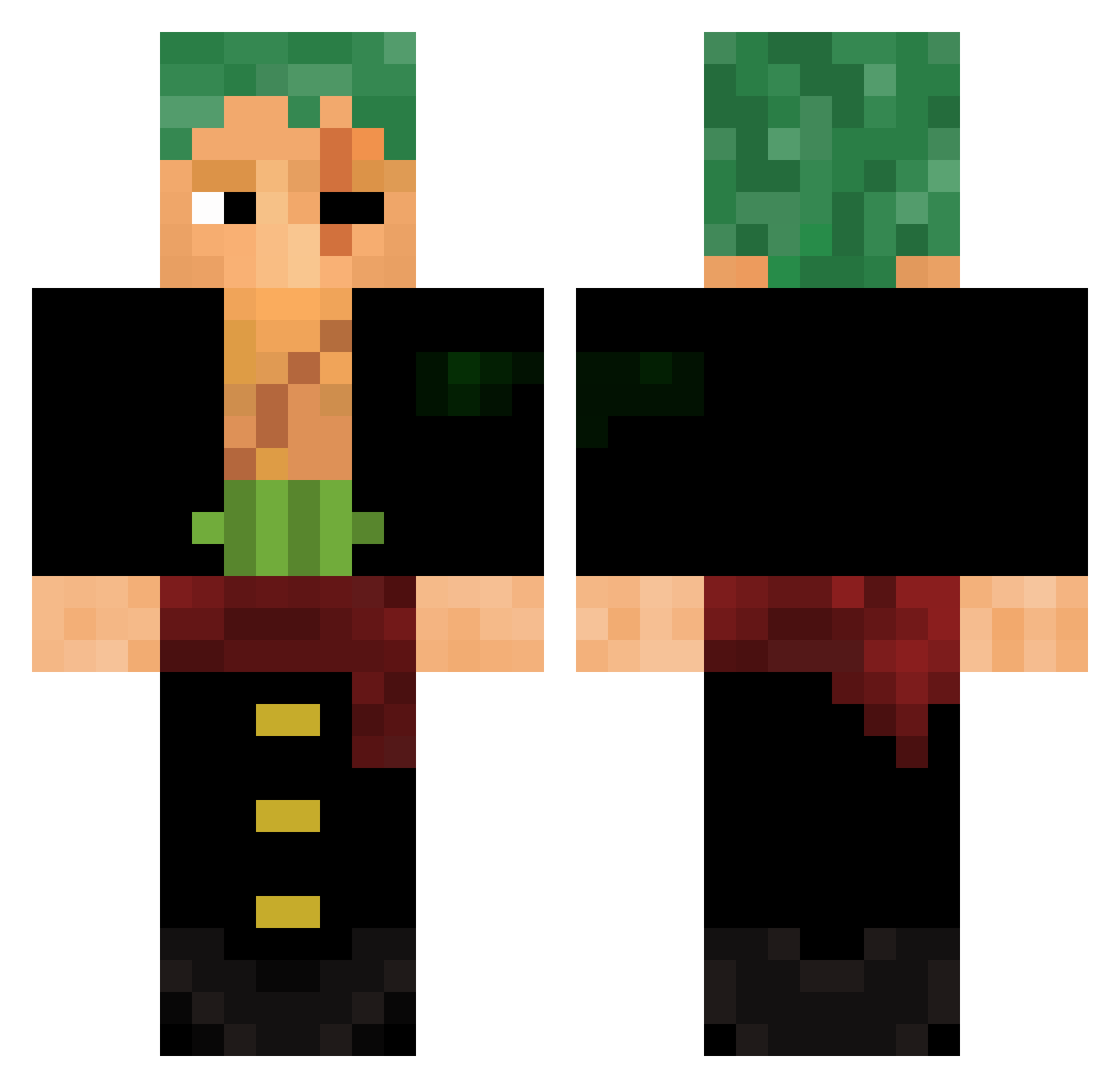
Current Minecraft skin of the player RoronoZoro_, loaded from the official Mojang API. Rotate the 3D model with your mouse or finger, then download the skin as a PNG file and use it in Minecraft: Bedrock Edition or Java Edition for free. When RoronoZoro_ changes their skin, this page updates automatically and the old skin stays in the history below.
Other players with this skin (588)
RoronoZoro_ was the 268th player we have seen with this skin, first spotted on 13.09.2026. The same skin was seen on these players. Open a nickname to see their current skin and skin history.
 Nobita001
 TechnicShark944 7j4o sinjaran Neutron2400 wjdgusdn0602 Coolguy0_o 7nsh1 QFOX_KSA Kratos420 Yaseenko shusei21 Smash58447 Gandaritaaa BL4NK17 llWisell Ippo4453 xIKaYn PANDA055 bokchoyyyy Otasia 17caarde Alpa420 OmegaG213 Paxeco dfm1893500 Djewez Os66 Rotimin Bin_Deutsch Llotus5 Winchester8671 nugget0101 KeroAbi24 xLightshot davlzin Hagen2170 1Plu2 Tr1xyTrippin AlanGaymers12 Sebero AvionRaspy Pachek420 Hk47_ LeviIndiana Shreyash00007 LaysChips69 Leon328 DRKZx Atherident Zarkdex DarKappa Adamibou Ponzera vr1xx hanyuu1 Visterbe Kotigor KANAMELTDOWN Old_Zoro
More Roronoa Zoro Minecraft skins
See all 335 Roronoa Zoro skins
How to install the RoronoZoro_ skin
- Press the Download button above to save the skin as a PNG file.
- Minecraft: Bedrock Edition (PE): open the Dressing Room from the main menu (or tap your character → Edit Character), go to Classic Skins → Owned, press the + (new skin) button, choose the downloaded PNG and pick the Classic (Steve) model. Works on PC and mobile; consoles cannot import custom skins.
- Minecraft: Java Edition: open the Minecraft Launcher, go to the Skins tab, click New Skin, load the PNG, pick the Classic (Steve) model and press Save & Use. You can also upload it at minecraft.net → Profile → Change Skin.
The skin does not show up after import - what should I do?
Restart Minecraft and open the Dressing Room again - imported skins sometimes appear only after a restart. Also make sure you selected the imported skin and picked the Classic (Steve) model.
Which model should I choose, Classic or Slim?
This skin is designed for the Classic (Steve) model. If you pick the wrong model, the arms of the skin will look stretched or squeezed.
Is the skin of RoronoZoro_ free to download?
Yes. Press Download, save the PNG file and use it in Minecraft: Bedrock Edition or Java Edition - no payment or registration needed. The skin also works on multiplayer servers and Realms.
More skins
Looking for more? Go back to all Minecraft skins and check the top skins of the week, month and all time, or find any player's skin by nickname.