
Riburje_ - Minecraft Skins & Skin History
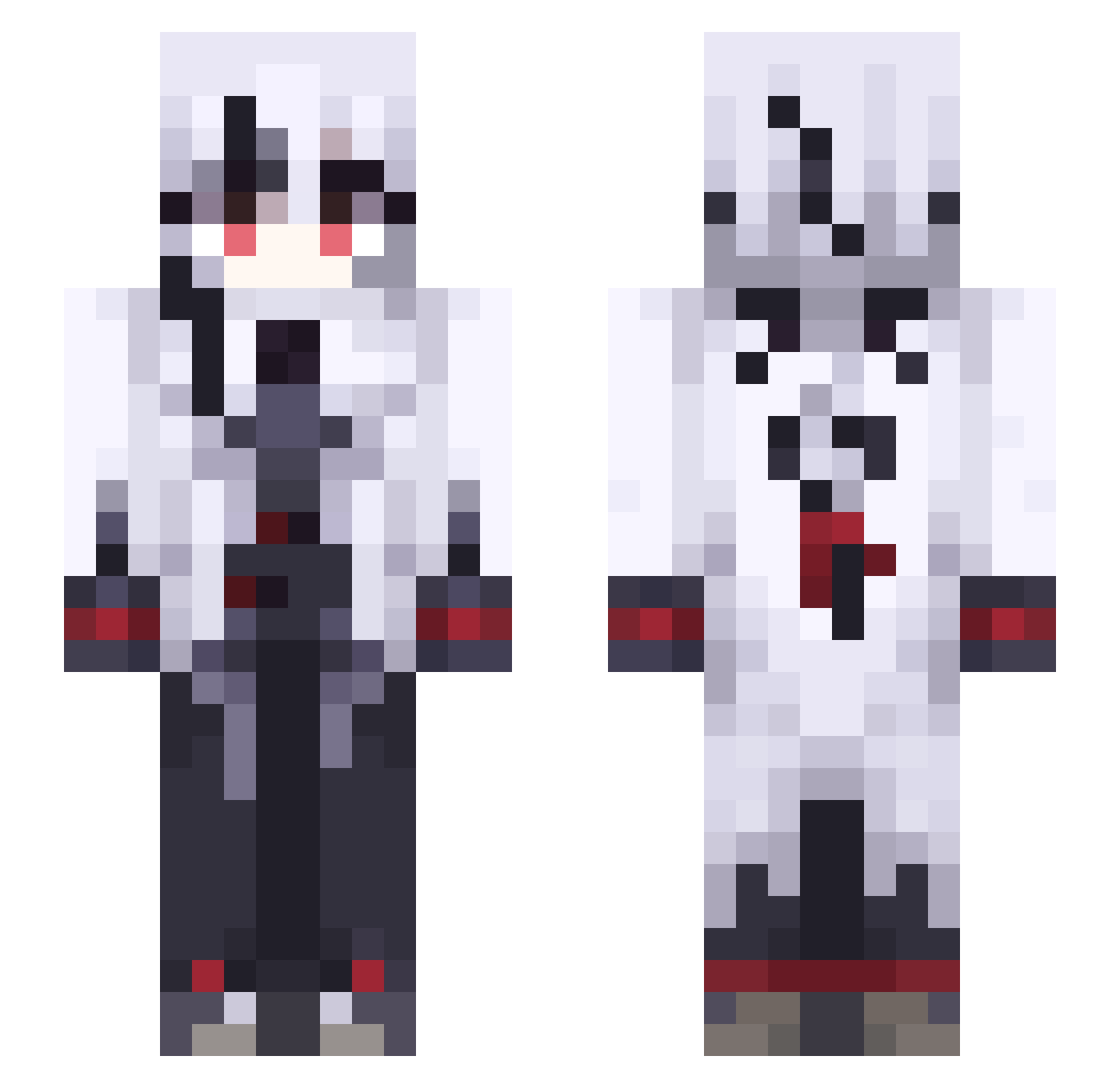
Current Minecraft skin of the player Riburje_, loaded from the official Mojang API. Rotate the 3D model with your mouse or finger, then download the skin as a PNG file and use it in Minecraft: Bedrock Edition or Java Edition for free. When Riburje_ changes their skin, this page updates automatically and the old skin stays in the history below.
Other players with this skin (491)
Riburje_ was the 190th player we have seen with this skin, first spotted on 02.09.2026. The same skin was seen on these players. Open a nickname to see their current skin and skin history.
 Grace7452 Shen__yin sirasu0 SzgI54 ravencrow001 syanousa KxYq123 eVf767 _WraithID KbSz895 Krysik2510 Lilo2305 LoK_228 mm3gamer33 KmJm774 foxy18379 Prunder hakkiyilmaz Medriarc hisaima KeqingMainer RimuruTempest_TH XEB334 arlecchiao Zyber44 Brisa_Ortiz mateooos Rory1056 AtPJ142 Justinminers infxnite cPp375 nightrider32 R4ydragon Artolina doig_gaming fvn452 Bluenys kofukuuu Elielzebeth catchakill KLd863 MCmeng5 OfY310 dream4688 SVHD832 Nakrotth_
 euridium rzhdsb Dayzon69 Kanreika HopelessHost lilsprout1732 Dinner13 jubileu007 saki1142 Scythes1921 Nebulyst Noire_s lucii2145
More Goth Minecraft skins
How to install the Riburje_ skin
- Press the Download button above to save the skin as a PNG file.
- Minecraft: Bedrock Edition (PE): open the Dressing Room from the main menu (or tap your character → Edit Character), go to Classic Skins → Owned, press the + (new skin) button, choose the downloaded PNG and pick the Slim (Alex) model. Works on PC and mobile; consoles cannot import custom skins.
- Minecraft: Java Edition: open the Minecraft Launcher, go to the Skins tab, click New Skin, load the PNG, pick the Slim (Alex) model and press Save & Use. You can also upload it at minecraft.net → Profile → Change Skin.
The skin does not show up after import - what should I do?
Restart Minecraft and open the Dressing Room again - imported skins sometimes appear only after a restart. Also make sure you selected the imported skin and picked the Slim (Alex) model.
Which model should I choose, Classic or Slim?
This skin is designed for the Slim (Alex) model. If you pick the wrong model, the arms of the skin will look stretched or squeezed.
Is the skin of Riburje_ free to download?
Yes. Press Download, save the PNG file and use it in Minecraft: Bedrock Edition or Java Edition - no payment or registration needed. The skin also works on multiplayer servers and Realms.
More skins
Looking for more? Go back to all Minecraft skins and check the top skins of the week, month and all time, or find any player's skin by nickname.