
Rfstaf - Minecraft Skins & Skin History
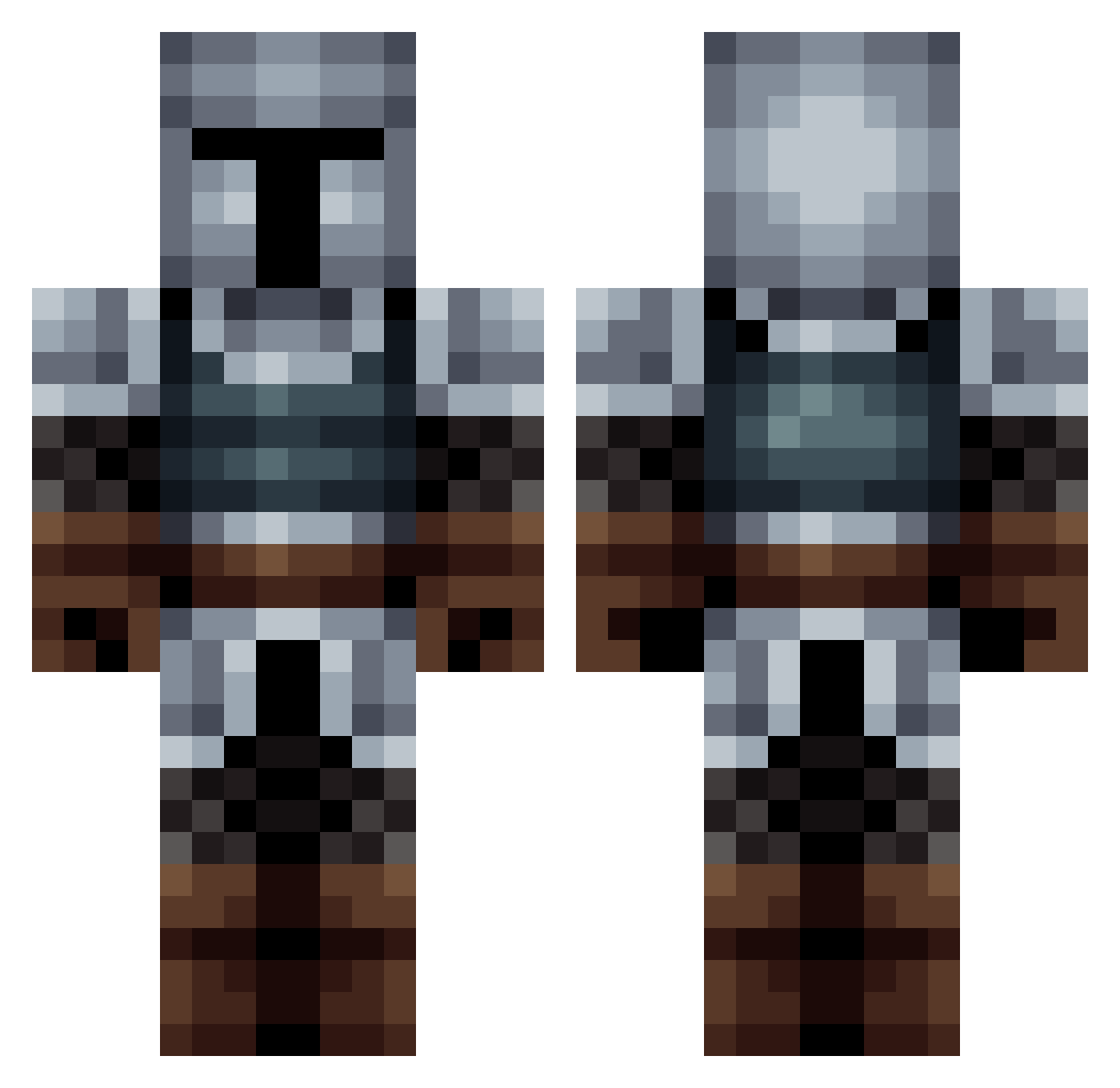
Current Minecraft skin of the player Rfstaf, loaded from the official Mojang API. Rotate the 3D model with your mouse or finger, then download the skin as a PNG file and use it in Minecraft: Bedrock Edition or Java Edition for free. When Rfstaf changes their skin, this page updates automatically and the old skin stays in the history below.
Other players with this skin (563)
Rfstaf was the 168th player we have seen with this skin, first spotted on 27.08.2026. The same skin was seen on these players. Open a nickname to see their current skin and skin history.
 AtIlA80 Schimmel_Brot 287hun Vielder xela_drane donedus Newo00 eyadx92 Lizu29 Sully_Su ranxeroc QueijosHP Emperor_Snow Akumoto12 Koichi Zsomb2012 Livi_2112 abfarris TOJNER BruhM0mentlol Deep_Walker NotTekis Cogurt swth_ Pixel_Soda_ wontong010 Baetrox THEcuguli Crizo03 Nyuza insaneminiman DiscoFam PANELEIRAO helyaas LodinDA
 CitadelGames FlamesOfPhoenix7 aromaticsugar Namotor
 chiplas AwtysmVroom VixeeR AverTheBeast elarroz10 Joepadgamer Dromokah REIXABLAU Kryner78 Okenaga skcodnRVR faithlessdread NyanLaser PetitChevalier SniZziii __Lucid Nickolas99 Pulse840 Rowan_watt laivane Cephisto
More Medieval Minecraft skins
How to install the Rfstaf skin
- Press the Download button above to save the skin as a PNG file.
- Minecraft: Bedrock Edition (PE): open the Dressing Room from the main menu (or tap your character → Edit Character), go to Classic Skins → Owned, press the + (new skin) button, choose the downloaded PNG and pick the Classic (Steve) model. Works on PC and mobile; consoles cannot import custom skins.
- Minecraft: Java Edition: open the Minecraft Launcher, go to the Skins tab, click New Skin, load the PNG, pick the Classic (Steve) model and press Save & Use. You can also upload it at minecraft.net → Profile → Change Skin.
The skin does not show up after import - what should I do?
Restart Minecraft and open the Dressing Room again - imported skins sometimes appear only after a restart. Also make sure you selected the imported skin and picked the Classic (Steve) model.
Which model should I choose, Classic or Slim?
This skin is designed for the Classic (Steve) model. If you pick the wrong model, the arms of the skin will look stretched or squeezed.
Is the skin of Rfstaf free to download?
Yes. Press Download, save the PNG file and use it in Minecraft: Bedrock Edition or Java Edition - no payment or registration needed. The skin also works on multiplayer servers and Realms.
More skins
Looking for more? Go back to all Minecraft skins and check the top skins of the week, month and all time, or find any player's skin by nickname.