
Pogsss - Minecraft Skins & Skin History
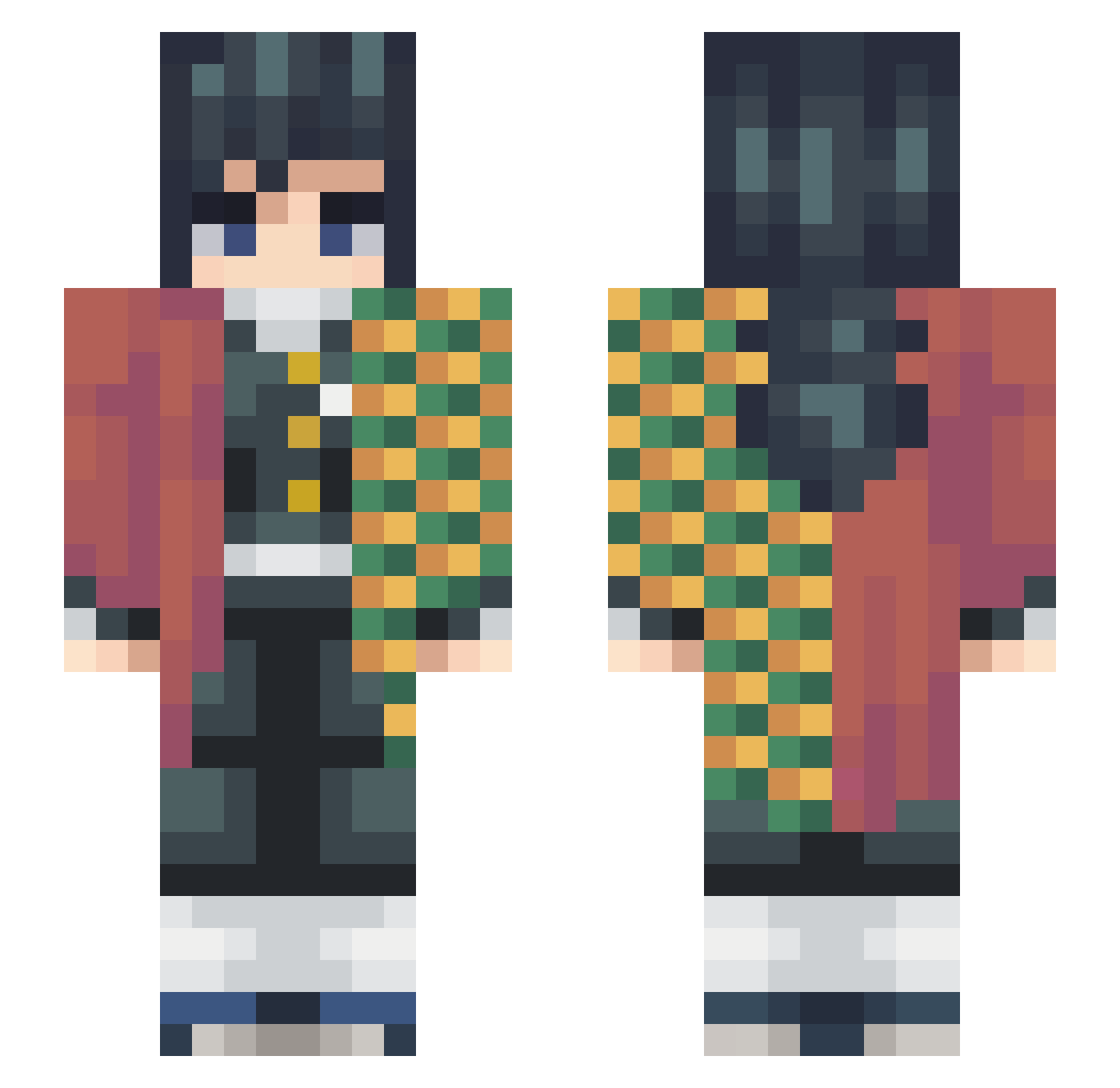
Current Minecraft skin of the player Pogsss, loaded from the official Mojang API. Rotate the 3D model with your mouse or finger, then download the skin as a PNG file and use it in Minecraft: Bedrock Edition or Java Edition for free. When Pogsss changes their skin, this page updates automatically and the old skin stays in the history below.
Other players with this skin (278)
Pogsss was the 56th player we have seen with this skin, first spotted on 17.08.2026. The same skin was seen on these players. Open a nickname to see their current skin and skin history.
 Darkn1ght16 bantine ChaTeedee Jimmythemoocow laxgoaliesam usio777 Baebo Bushwhacker007 C_O_L_B_Y trolling_noobs bricktps Lyons_7 SGMarA XiaSini MC_Kyro25 notyz12 IslandGuy Kleo____ SharpieDoe MooN_CoffeE Rusheng Roj33 Happy_Cheeky FrankDagu110 Hopsoplo semih1ne Hera95 Salvocagz Marker146 VibezFlxezy rougo667 monsterman04 tawraw420 Angel_Vir kat_kirua_07 wheelsupjustin soradubz LucaasBF Billybili Shadowind03 so_urf DrMobsy Idsa_4 Richard2x Tiger_Wiger Zilpah9 jinstar03 XdBlaise Unitatoe24 MrCahaman Dragon_Flamesss
 ___Teg___ Whitingalle canisniffyotoes Millyrock___ SO_Soul OoBlockoO SaltySquid007 Huynow Moozuu
More Hashira Minecraft skins
How to install the Pogsss skin
- Press the Download button above to save the skin as a PNG file.
- Minecraft: Bedrock Edition (PE): open the Dressing Room from the main menu (or tap your character → Edit Character), go to Classic Skins → Owned, press the + (new skin) button, choose the downloaded PNG and pick the Slim (Alex) model. Works on PC and mobile; consoles cannot import custom skins.
- Minecraft: Java Edition: open the Minecraft Launcher, go to the Skins tab, click New Skin, load the PNG, pick the Slim (Alex) model and press Save & Use. You can also upload it at minecraft.net → Profile → Change Skin.
The skin does not show up after import - what should I do?
Restart Minecraft and open the Dressing Room again - imported skins sometimes appear only after a restart. Also make sure you selected the imported skin and picked the Slim (Alex) model.
Which model should I choose, Classic or Slim?
This skin is designed for the Slim (Alex) model. If you pick the wrong model, the arms of the skin will look stretched or squeezed.
Is the skin of Pogsss free to download?
Yes. Press Download, save the PNG file and use it in Minecraft: Bedrock Edition or Java Edition - no payment or registration needed. The skin also works on multiplayer servers and Realms.
More skins
Looking for more? Go back to all Minecraft skins and check the top skins of the week, month and all time, or find any player's skin by nickname.