
Pedrogamer5239 - Minecraft Skins & Skin History
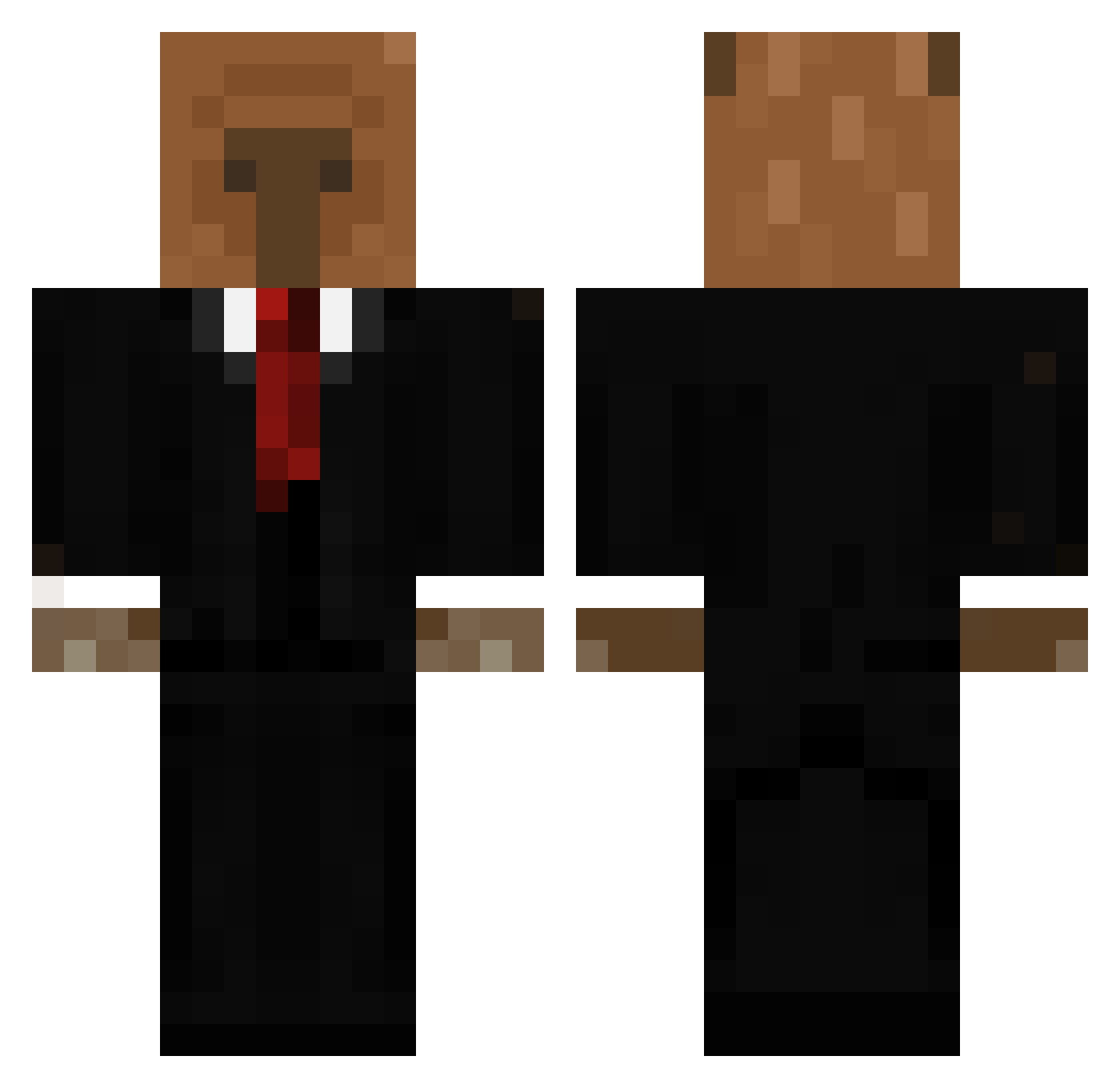
Current Minecraft skin of the player Pedrogamer5239, loaded from the official Mojang API. Rotate the 3D model with your mouse or finger, then download the skin as a PNG file and use it in Minecraft: Bedrock Edition or Java Edition for free. When Pedrogamer5239 changes their skin, this page updates automatically and the old skin stays in the history below.
Other players with this skin (656)
Pedrogamer5239 was the 321st player we have seen with this skin, first spotted on 22.09.2026. The same skin was seen on these players. Open a nickname to see their current skin and skin history.
 JoJoSola Papipu1 didmitan guzfer Neplo TheKlon Jamie935 BillyBoum Sl4shBr_ Nacho15z_ TyskiDziku gabalindao Arthur200 briccA sammyboi3668 alexander_999 Mongix sxlokd Lineyboy HEEJUN0111 xytra02 Raspiutin AJNUGENT 5naz chomei123 Vasalo Rozco01 ATL4NT1 Krumpit2009 BusToS_ EpsoT434 ilba14 FriskyChill Nigelos kimbles10 maddieeelol AngelIsNotCuteXD TripleLegal DazenII5 Cheeyz Jimmiey TadekFujara TuTanga qwas930926 sethroth3 Lionsnakk bananamanji Okalume Y3E7 SinanSS ANTOINEette LottosKolok Guiltbaker GMominho Tydon007 krsao ByF0rma prizmll SoyAdric Okarynx
More Business Bear Minecraft skins
See all 11 Business Bear skins
How to install the Pedrogamer5239 skin
- Press the Download button above to save the skin as a PNG file.
- Minecraft: Bedrock Edition (PE): open the Dressing Room from the main menu (or tap your character → Edit Character), go to Classic Skins → Owned, press the + (new skin) button, choose the downloaded PNG and pick the Classic (Steve) model. Works on PC and mobile; consoles cannot import custom skins.
- Minecraft: Java Edition: open the Minecraft Launcher, go to the Skins tab, click New Skin, load the PNG, pick the Classic (Steve) model and press Save & Use. You can also upload it at minecraft.net → Profile → Change Skin.
The skin does not show up after import - what should I do?
Restart Minecraft and open the Dressing Room again - imported skins sometimes appear only after a restart. Also make sure you selected the imported skin and picked the Classic (Steve) model.
Which model should I choose, Classic or Slim?
This skin is designed for the Classic (Steve) model. If you pick the wrong model, the arms of the skin will look stretched or squeezed.
Is the skin of Pedrogamer5239 free to download?
Yes. Press Download, save the PNG file and use it in Minecraft: Bedrock Edition or Java Edition - no payment or registration needed. The skin also works on multiplayer servers and Realms.
More skins
Looking for more? Go back to all Minecraft skins and check the top skins of the week, month and all time, or find any player's skin by nickname.