
PancakeShark - Minecraft Skins & Skin History
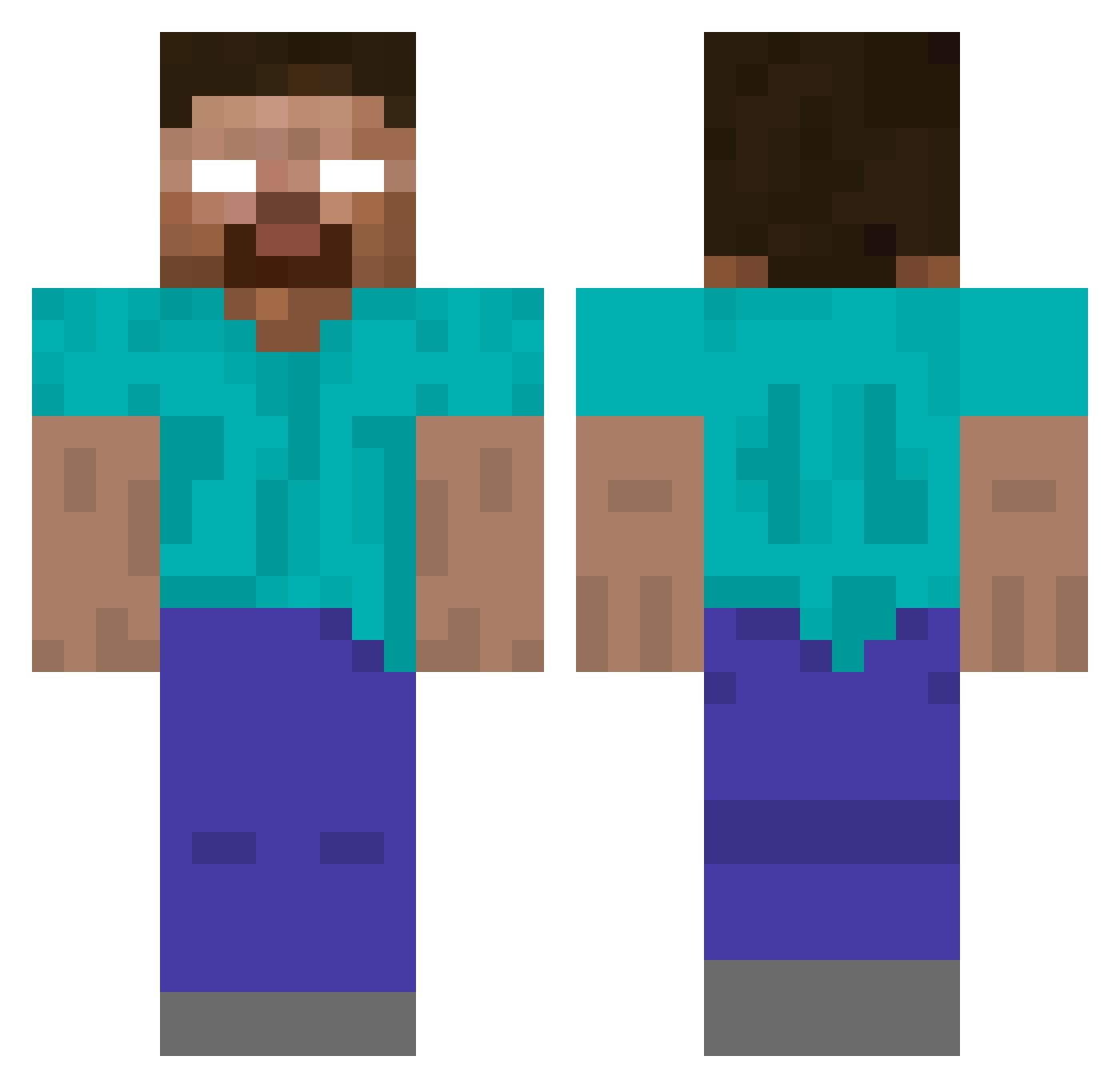
Current Minecraft skin of the player PancakeShark, loaded from the official Mojang API. Rotate the 3D model with your mouse or finger, then download the skin as a PNG file and use it in Minecraft: Bedrock Edition or Java Edition for free. When PancakeShark changes their skin, this page updates automatically and the old skin stays in the history below.
Other players with this skin (173)
PancakeShark was the 96th player we have seen with this skin, first spotted on 20.09.2026. The same skin was seen on these players. Open a nickname to see their current skin and skin history.
 Escarabajoazul5 unclever Davidkonator jeg_coomer shind0g CounterSign pogsterfrogster porquinhotriste Tunafb7 Foxhill11 kekko_404 Infinity_Fade zieas pogtommy zengooddino KingQL PerEric keyhanthegreat u2ax_ LoudSnoreCat MeABea5t jortay9 chrxm FeelsSMOrcMan solariium backblack997
 Lari07260 Artezzy_ veksoVv herobrine2003 w1xs Bozz915 goodalien kojimagenio Tuntlandfrugal8 Suwava invasoooooorr clr WalkUDownBrayden hearobrian Zack1948 Yelrad its_emill South_Park_ gercekmafya _e___ pethamenas eonrique Mister_Kamikaze xFrosted whyU_gae Yusau Kingneutrum2007 whrmq _mazsy_ LarpLuca JavierMartinez Jawpanu 22IQ_Gamer TroneFlex
More Herobrine Minecraft skins
How to install the PancakeShark skin
- Press the Download button above to save the skin as a PNG file.
- Minecraft: Bedrock Edition (PE): open the Dressing Room from the main menu (or tap your character → Edit Character), go to Classic Skins → Owned, press the + (new skin) button, choose the downloaded PNG and pick the Classic (Steve) model. Works on PC and mobile; consoles cannot import custom skins.
- Minecraft: Java Edition: open the Minecraft Launcher, go to the Skins tab, click New Skin, load the PNG, pick the Classic (Steve) model and press Save & Use. You can also upload it at minecraft.net → Profile → Change Skin.
The skin does not show up after import - what should I do?
Restart Minecraft and open the Dressing Room again - imported skins sometimes appear only after a restart. Also make sure you selected the imported skin and picked the Classic (Steve) model.
Which model should I choose, Classic or Slim?
This skin is designed for the Classic (Steve) model. If you pick the wrong model, the arms of the skin will look stretched or squeezed.
Is the skin of PancakeShark free to download?
Yes. Press Download, save the PNG file and use it in Minecraft: Bedrock Edition or Java Edition - no payment or registration needed. The skin also works on multiplayer servers and Realms.
More skins
Looking for more? Go back to all Minecraft skins and check the top skins of the week, month and all time, or find any player's skin by nickname.