
PVP_Range - Minecraft Skins & Skin History
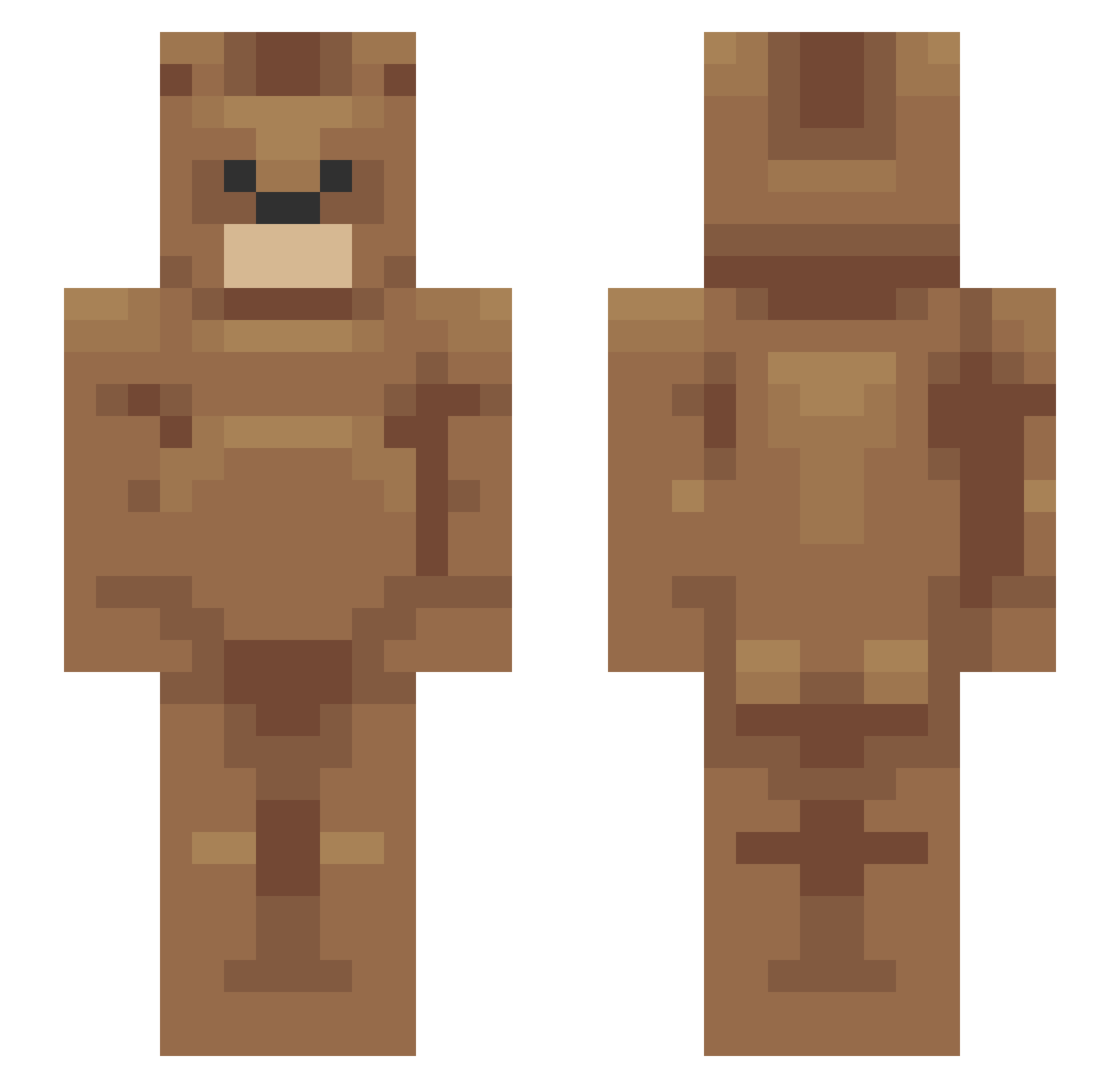
Current Minecraft skin of the player PVP_Range, loaded from the official Mojang API. Rotate the 3D model with your mouse or finger, then download the skin as a PNG file and use it in Minecraft: Bedrock Edition or Java Edition for free. When PVP_Range changes their skin, this page updates automatically and the old skin stays in the history below.
Other players with this skin (161)
PVP_Range was the 49th player we have seen with this skin, first spotted on 27.08.2026. The same skin was seen on these players. Open a nickname to see their current skin and skin history.
 emrecimtrkgl patrick13521 Arowaiy hout3e quietonmars lbrotney Estebandido3
 vspxz_ gabittto Inverts polizei11 daltys Armedkouki666 RoyaleSlave41 AssylaV2 _Cursive oppy09 honeybutterchipp shep45612 ElectrifiedPvP piloa _EliteDanny icedancerrr TomasAMG Conoisseur Drizz7 Defrock18 Asttile Guggled Jessy_Lingard Jqssie sarbia81 RufflesPlayz Funky MartySideChick1 Biillyy architect42815 bogadyr _FESTASHKA_ Jungwon_ HRN_ BSjun_ ImCordo raulro0920 Bliry goatveren31 0x29 AgushTin Abells__ MoritzMo65 menace20135 Harday Dadiogaosai20 oomor chrupek747 Flosemite HakanOZDEMIR Hvboo_ Halsy_65 Odally
More Bear Minecraft skins
How to install the PVP_Range skin
- Press the Download button above to save the skin as a PNG file.
- Minecraft: Bedrock Edition (PE): open the Dressing Room from the main menu (or tap your character → Edit Character), go to Classic Skins → Owned, press the + (new skin) button, choose the downloaded PNG and pick the Slim (Alex) model. Works on PC and mobile; consoles cannot import custom skins.
- Minecraft: Java Edition: open the Minecraft Launcher, go to the Skins tab, click New Skin, load the PNG, pick the Slim (Alex) model and press Save & Use. You can also upload it at minecraft.net → Profile → Change Skin.
The skin does not show up after import - what should I do?
Restart Minecraft and open the Dressing Room again - imported skins sometimes appear only after a restart. Also make sure you selected the imported skin and picked the Slim (Alex) model.
Which model should I choose, Classic or Slim?
This skin is designed for the Slim (Alex) model. If you pick the wrong model, the arms of the skin will look stretched or squeezed.
Is the skin of PVP_Range free to download?
Yes. Press Download, save the PNG file and use it in Minecraft: Bedrock Edition or Java Edition - no payment or registration needed. The skin also works on multiplayer servers and Realms.
More skins
Looking for more? Go back to all Minecraft skins and check the top skins of the week, month and all time, or find any player's skin by nickname.