
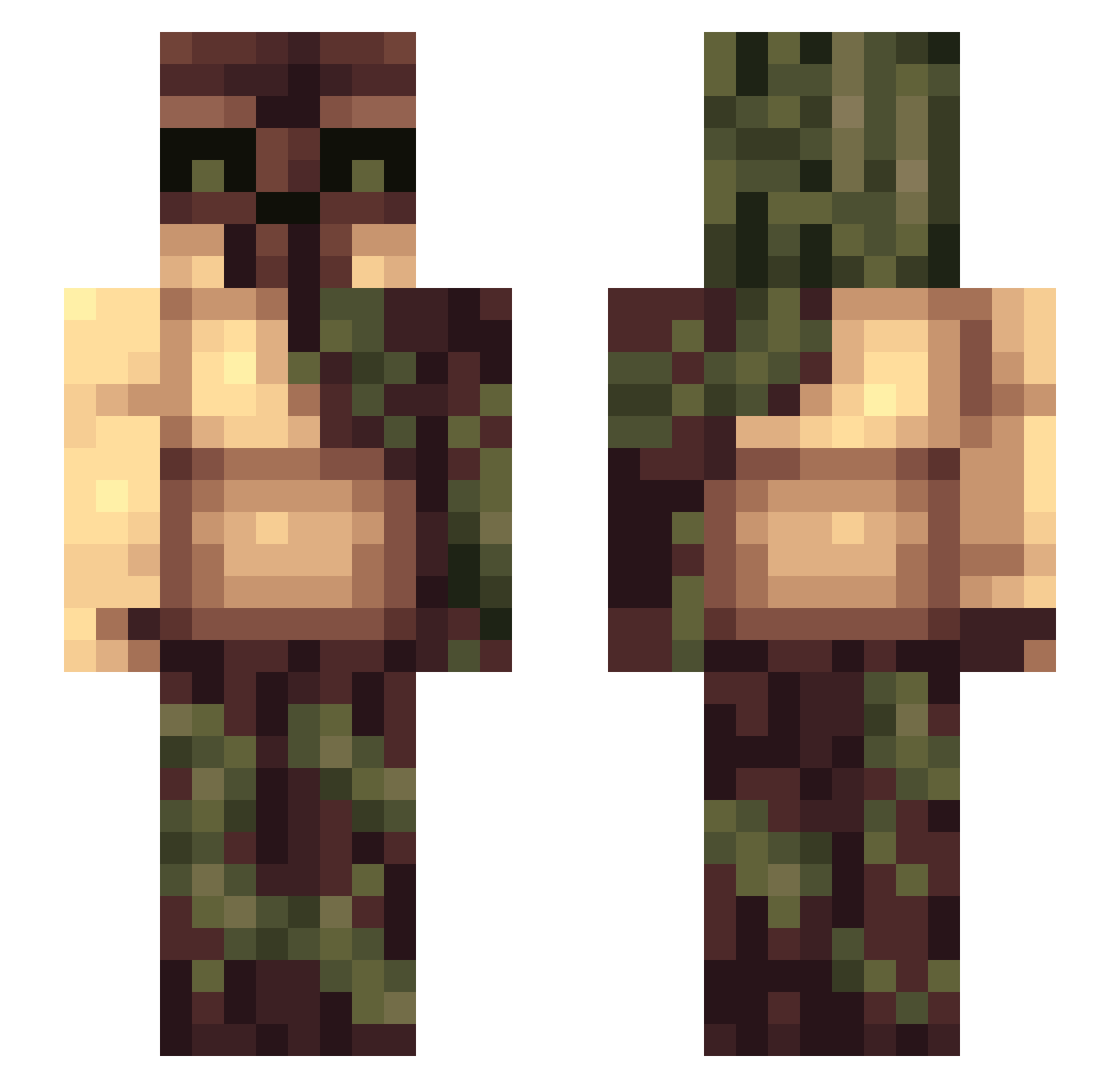
Current Minecraft skin of the player NullErR, loaded from the official Mojang API. Rotate the 3D model with your mouse or finger, then download the skin as a PNG file and use it in Minecraft: Bedrock Edition or Java Edition for free. When NullErR changes their skin, this page updates automatically and the old skin stays in the history below.
Other players with this skin (152)
NullErR was the 77th player we have seen with this skin, first spotted on 03.09.2026. The same skin was seen on these players. Open a nickname to see their current skin and skin history.
 Gnagis05 GreenGift CZorg lakeontario Bolgrac kayakbrain BSTNBSCH download99 KingOpossum tiger27463 janvandaal xShaggy_ LVL1337 ShiftyShadows radxzombiz Bogeta 2hux AthenaF ELKhunter0712 Itz_Inzanity BushW0oki3 WildrOG STIGGYG21 LizzLu64 One2Tree Elitefallout D0m3__M bot371 lilpimp1200 Sam_Skillzzz 5aucepan cable_fort JerkySnipez BionicPsycho Freeshy Mijetmij aBush Fearles_Wanderer T2kezo MrSyfter Brehxe BatteringRambo BlockBuster283 DieMiro rick_013 Dannakin THE___SILENCE wildwhitewahine Swekob drake1919 CJD333 deadcraft57 ElektroRAGE Wi11ys MindOfMotto byLyko BaconSweat rattrap360 Peeta_hunger KeijoWaffle
More Golem Minecraft skins
How to install the NullErR skin
- Press the Download button above to save the skin as a PNG file.
- Minecraft: Bedrock Edition (PE): open the Dressing Room from the main menu (or tap your character → Edit Character), go to Classic Skins → Owned, press the + (new skin) button, choose the downloaded PNG and pick the Slim (Alex) model. Works on PC and mobile; consoles cannot import custom skins.
- Minecraft: Java Edition: open the Minecraft Launcher, go to the Skins tab, click New Skin, load the PNG, pick the Slim (Alex) model and press Save & Use. You can also upload it at minecraft.net → Profile → Change Skin.
The skin does not show up after import - what should I do?
Restart Minecraft and open the Dressing Room again - imported skins sometimes appear only after a restart. Also make sure you selected the imported skin and picked the Slim (Alex) model.
Which model should I choose, Classic or Slim?
This skin is designed for the Slim (Alex) model. If you pick the wrong model, the arms of the skin will look stretched or squeezed.
Is the skin of NullErR free to download?
Yes. Press Download, save the PNG file and use it in Minecraft: Bedrock Edition or Java Edition - no payment or registration needed. The skin also works on multiplayer servers and Realms.
More skins
Looking for more? Go back to all Minecraft skins and check the top skins of the week, month and all time, or find any player's skin by nickname.