
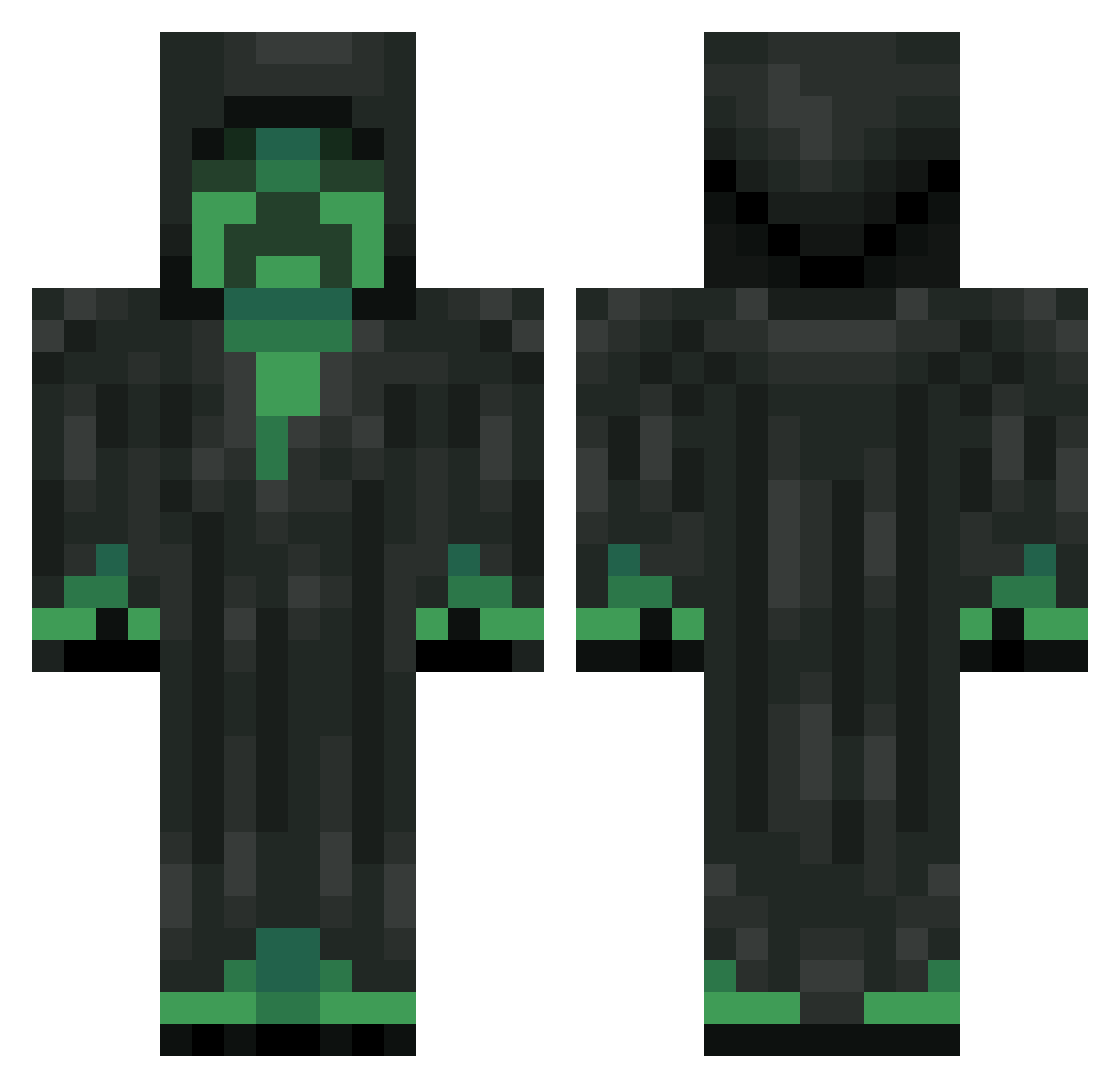
Current Minecraft skin of the player NerlonL, loaded from the official Mojang API. Rotate the 3D model with your mouse or finger, then download the skin as a PNG file and use it in Minecraft: Bedrock Edition or Java Edition for free. When NerlonL changes their skin, this page updates automatically and the old skin stays in the history below.
Other players with this skin (132)
NerlonL was the 101st player we have seen with this skin, first spotted on 26.09.2026. The same skin was seen on these players. Open a nickname to see their current skin and skin history.
 zrila _DERPcookie_ Asekol AwesomeNinja0781 oStable THE_SLOTH220 KevlarZA _creepereaper_ Kelevra_ Nach0Khezo Jodarux coconuts2i Parasike_ PsychedelicSeal Pokemon_1 llllwAxllll FrogSmoothie Ape12 SweetMullet kysall coco_coda SickTV AnonymousPyro12 kyontop IrU93 SirThunderHam Zer0fy felugh TombsoonHD69 yeisson_mr greencreeper0900 yiwuyv kingcrossxx Warman200000017 SinisterPig212 Sg0sH_Me funnyjohn4 zhouliwei PrinceOfMagic Brodacious2008 LILBOB0812 lodkingdom YesImANerd Zyimmy Hanmusui leo940201 i_am_pomidor Maki_najjaci luis360killer98 XLJ_Ricardo CubicTriangle21 Fire_Yami QiweiLeo Hephwe11 LilBoomba CrispyAlpha cboss999 Nicky_no_Name Mercer2185 Alrawa7i_
More Creeper Minecraft skins
How to install the NerlonL skin
- Press the Download button above to save the skin as a PNG file.
- Minecraft: Bedrock Edition (PE): open the Dressing Room from the main menu (or tap your character → Edit Character), go to Classic Skins → Owned, press the + (new skin) button, choose the downloaded PNG and pick the Classic (Steve) model. Works on PC and mobile; consoles cannot import custom skins.
- Minecraft: Java Edition: open the Minecraft Launcher, go to the Skins tab, click New Skin, load the PNG, pick the Classic (Steve) model and press Save & Use. You can also upload it at minecraft.net → Profile → Change Skin.
The skin does not show up after import - what should I do?
Restart Minecraft and open the Dressing Room again - imported skins sometimes appear only after a restart. Also make sure you selected the imported skin and picked the Classic (Steve) model.
Which model should I choose, Classic or Slim?
This skin is designed for the Classic (Steve) model. If you pick the wrong model, the arms of the skin will look stretched or squeezed.
Is the skin of NerlonL free to download?
Yes. Press Download, save the PNG file and use it in Minecraft: Bedrock Edition or Java Edition - no payment or registration needed. The skin also works on multiplayer servers and Realms.
More skins
Looking for more? Go back to all Minecraft skins and check the top skins of the week, month and all time, or find any player's skin by nickname.