
Nastybogging - Minecraft Skins & Skin History
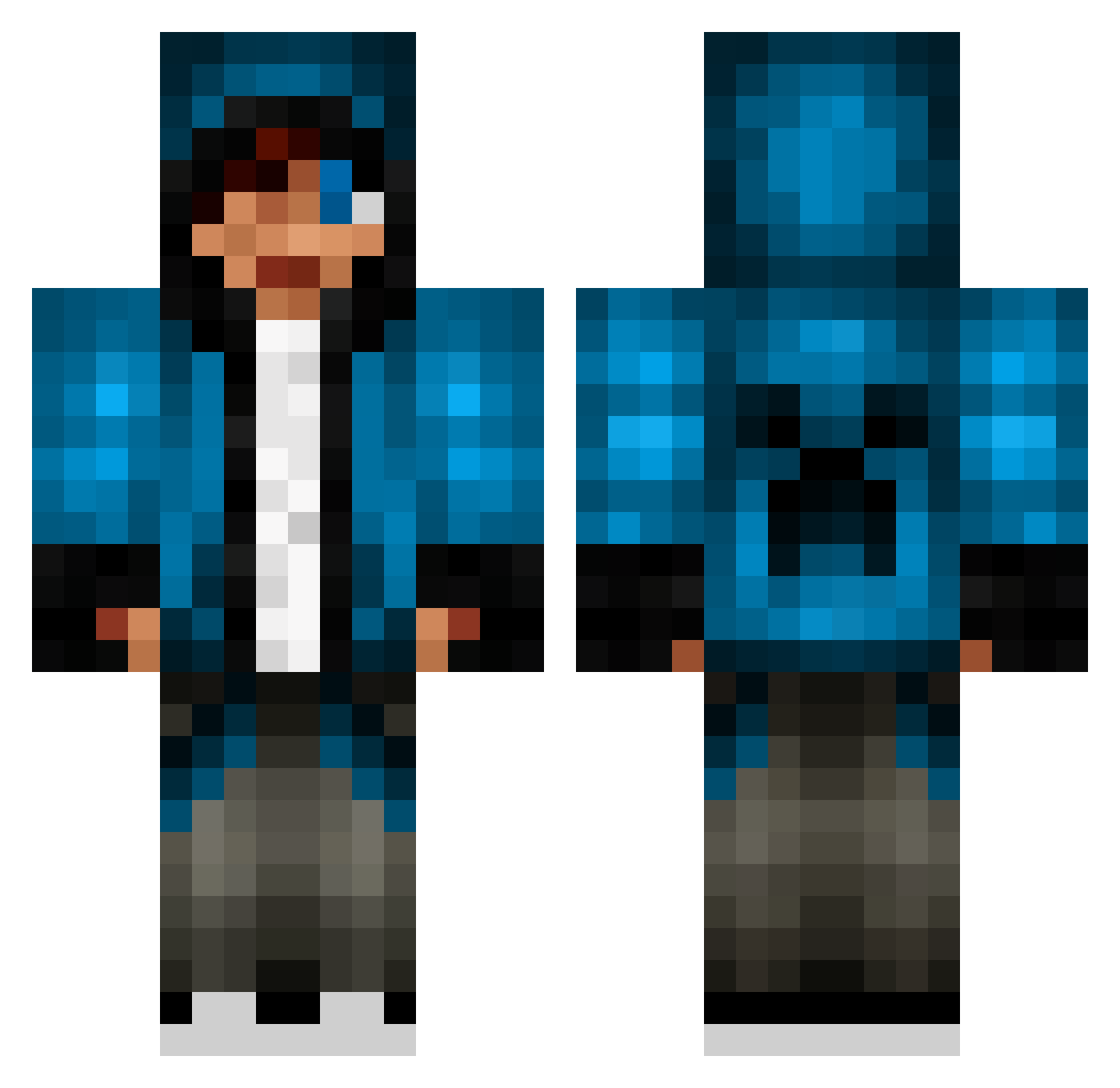
Current Minecraft skin of the player Nastybogging, loaded from the official Mojang API. Rotate the 3D model with your mouse or finger, then download the skin as a PNG file and use it in Minecraft: Bedrock Edition or Java Edition for free. When Nastybogging changes their skin, this page updates automatically and the old skin stays in the history below.
Other players with this skin (837)
Nastybogging was the 649th player we have seen with this skin, first spotted on 22.10.2026. The same skin was seen on these players. Open a nickname to see their current skin and skin history.
 EmSeNo blackhunta TheEpicOre Elmars1 Nickel1996 DangerP7 razmotaz ninja20p applesunflower Lukasthell JuJulemand007 iceteafreak2 Bulkiestbean58 Gabe2704 ForzaNight lewismennie13 Who_Am_I_127 BassieTheMan skierboyxx CRAZEEMONKEY54 Cripster xXDarkErikXx WOOKIEWOOKIE62 ferix_50 kingzach156 RegularJoe0022 red_dragon_c kingkasma246 gingerfiles PlaysJust4Fun 4pewdiepie ULTRALIGHT_0 Dylan070700 IamKEKKO xXBROOKX Bananageil fireyminer steamfunlab12 ThomasDavies88 FlashBang002 JellyBeanBag dwight_k_poop Sanscho94 00sickmodz Linixur ryanman2000 justindhaliwal lightVoltz a41644 Medivalor TurpsMann Kossu04 PlatinumGamer921 BlockedPuppy56 Briordan xvcordova7vx Coman128 JoKer1999s TinyTurtle1234 chunwai612
More Creeper Minecraft skins
How to install the Nastybogging skin
- Press the Download button above to save the skin as a PNG file.
- Minecraft: Bedrock Edition (PE): open the Dressing Room from the main menu (or tap your character → Edit Character), go to Classic Skins → Owned, press the + (new skin) button, choose the downloaded PNG and pick the Classic (Steve) model. Works on PC and mobile; consoles cannot import custom skins.
- Minecraft: Java Edition: open the Minecraft Launcher, go to the Skins tab, click New Skin, load the PNG, pick the Classic (Steve) model and press Save & Use. You can also upload it at minecraft.net → Profile → Change Skin.
The skin does not show up after import - what should I do?
Restart Minecraft and open the Dressing Room again - imported skins sometimes appear only after a restart. Also make sure you selected the imported skin and picked the Classic (Steve) model.
Which model should I choose, Classic or Slim?
This skin is designed for the Classic (Steve) model. If you pick the wrong model, the arms of the skin will look stretched or squeezed.
Is the skin of Nastybogging free to download?
Yes. Press Download, save the PNG file and use it in Minecraft: Bedrock Edition or Java Edition - no payment or registration needed. The skin also works on multiplayer servers and Realms.
More skins
Looking for more? Go back to all Minecraft skins and check the top skins of the week, month and all time, or find any player's skin by nickname.