
MuntoKun - Minecraft Skins & Skin History
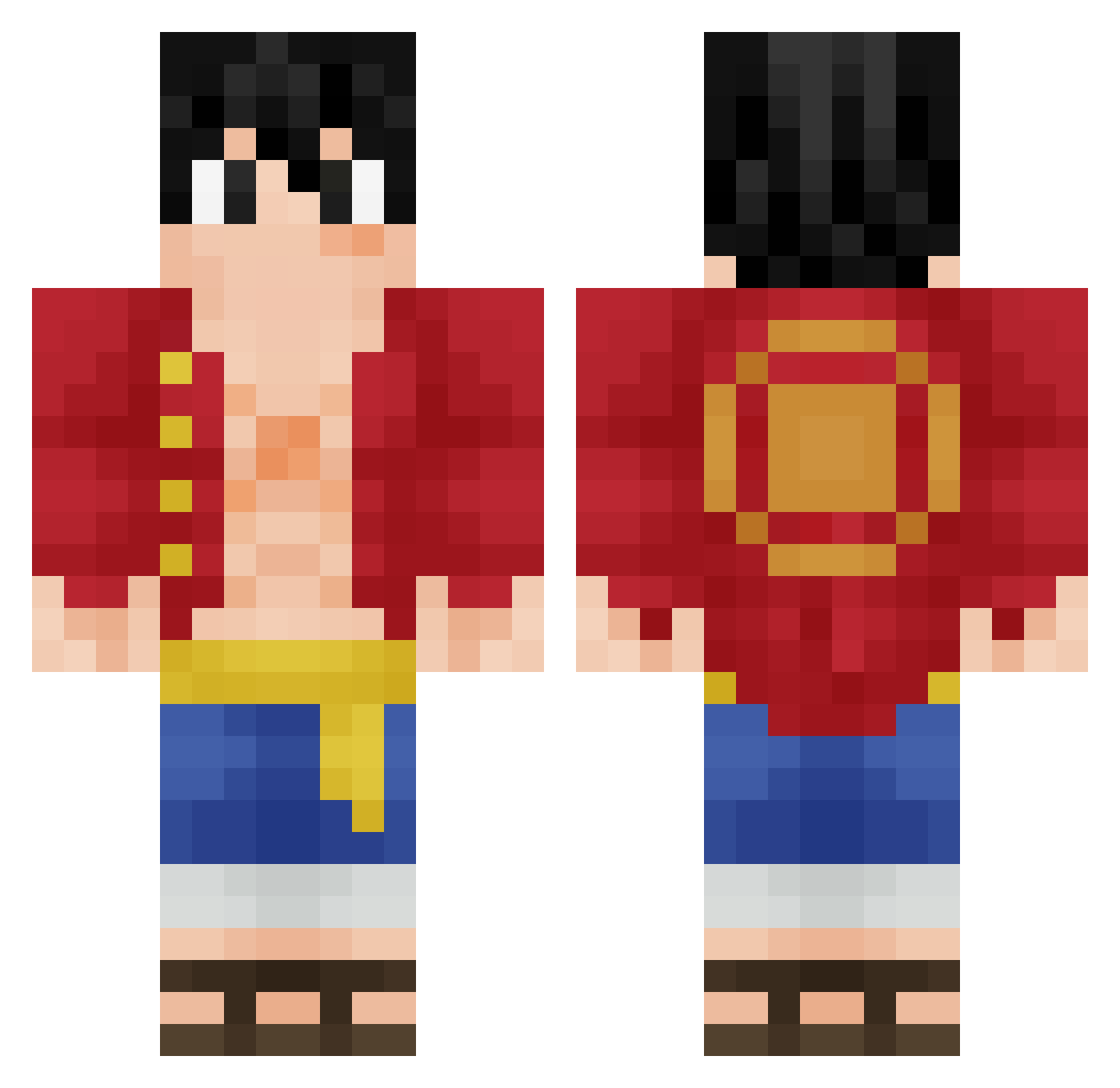
Current Minecraft skin of the player MuntoKun, loaded from the official Mojang API. Rotate the 3D model with your mouse or finger, then download the skin as a PNG file and use it in Minecraft: Bedrock Edition or Java Edition for free. When MuntoKun changes their skin, this page updates automatically and the old skin stays in the history below.
Other players with this skin (350)
MuntoKun was the 112th player we have seen with this skin, first spotted on 05.09.2026. The same skin was seen on these players. Open a nickname to see their current skin and skin history.
 luffy4057 Bibiauquartier Pilastrox heyits_dav1d Destroyerzao TurtleaChip RajunCajun308 sam_play HecticRacer41 Yeah_Gnarly Rike_Joga Darius1509 Monker_Chunker_ LilBarty07 Jobrien907 Ishiraan Xywey Kirii12 6_Razor_9 MyBaka takumiA48 proxi2 Ardooo MaxSebas1 KaidoRN Twiggy94 nrhrocket MugiwaraNooLuffy joyboy449 NagisaQQ Etro13 boboo2016 Shankkhy Willnumps jhoan_tp PharmDeezSeeds Hata_prince EraEmir Kuhchu qvxoo muku893 XSt3fR0 labuche131 Shrooll Boundman55 william_waddell MaiaJota veyang qancak Nikkiboo12 ShaveHD eGoDennis korcey JOWMOS Kimo1903 Skyplane12 Bouj_hamadi JDF0925 I_am_a_kat Vini135r
More Monkey D Luffy Minecraft skins
See all 925 Monkey D Luffy skins
How to install the MuntoKun skin
- Press the Download button above to save the skin as a PNG file.
- Minecraft: Bedrock Edition (PE): open the Dressing Room from the main menu (or tap your character → Edit Character), go to Classic Skins → Owned, press the + (new skin) button, choose the downloaded PNG and pick the Classic (Steve) model. Works on PC and mobile; consoles cannot import custom skins.
- Minecraft: Java Edition: open the Minecraft Launcher, go to the Skins tab, click New Skin, load the PNG, pick the Classic (Steve) model and press Save & Use. You can also upload it at minecraft.net → Profile → Change Skin.
The skin does not show up after import - what should I do?
Restart Minecraft and open the Dressing Room again - imported skins sometimes appear only after a restart. Also make sure you selected the imported skin and picked the Classic (Steve) model.
Which model should I choose, Classic or Slim?
This skin is designed for the Classic (Steve) model. If you pick the wrong model, the arms of the skin will look stretched or squeezed.
Is the skin of MuntoKun free to download?
Yes. Press Download, save the PNG file and use it in Minecraft: Bedrock Edition or Java Edition - no payment or registration needed. The skin also works on multiplayer servers and Realms.
More skins
Looking for more? Go back to all Minecraft skins and check the top skins of the week, month and all time, or find any player's skin by nickname.