
MistyShine - Minecraft Skins & Skin History
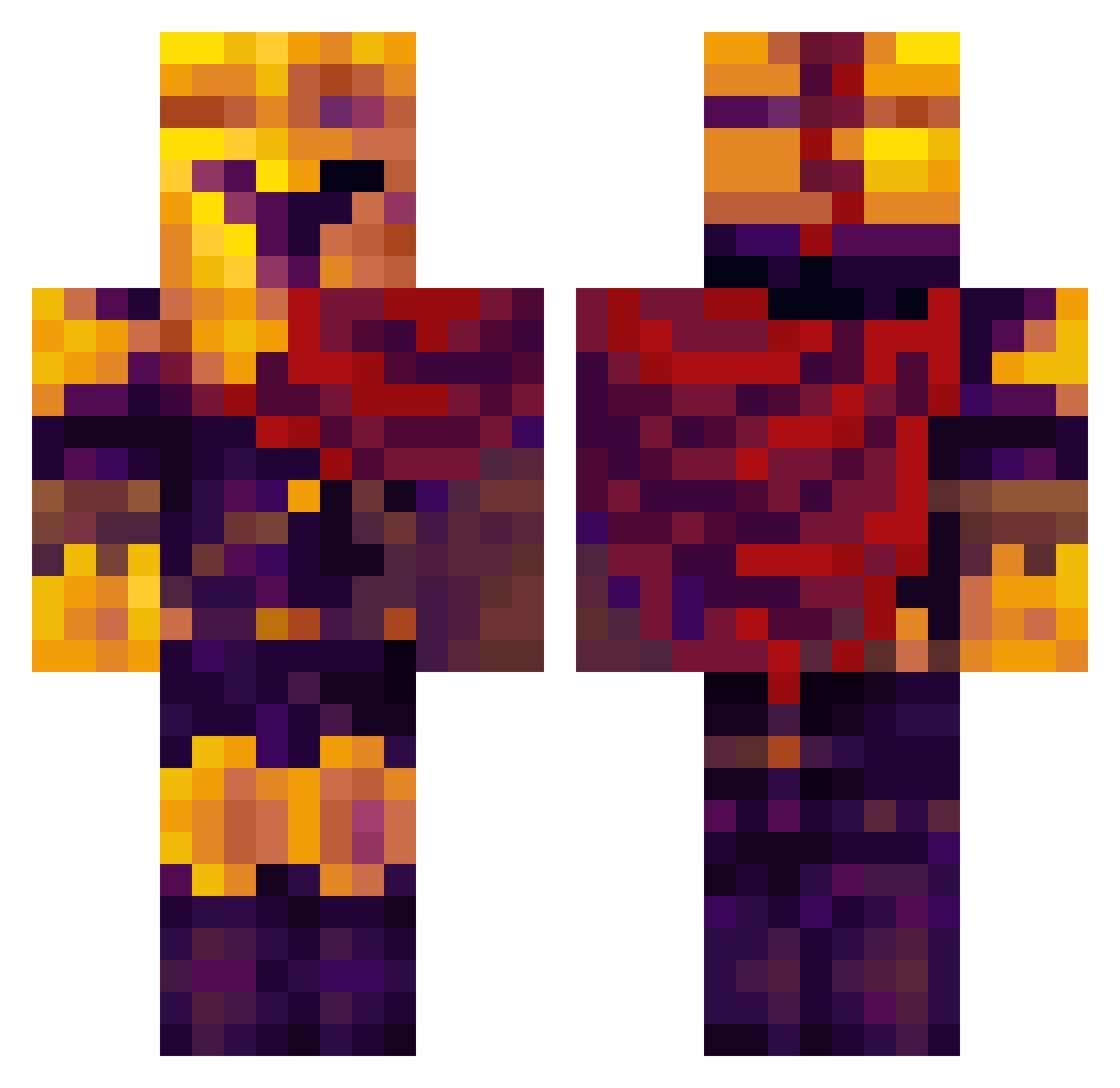
Current Minecraft skin of the player MistyShine, loaded from the official Mojang API. Rotate the 3D model with your mouse or finger, then download the skin as a PNG file and use it in Minecraft: Bedrock Edition or Java Edition for free. When MistyShine changes their skin, this page updates automatically and the old skin stays in the history below.
Other players with this skin (332)
MistyShine was the 249th player we have seen with this skin, first spotted on 30.09.2026. The same skin was seen on these players. Open a nickname to see their current skin and skin history.
 hakinsjogdes ipeedmypants12 Notorious_xac TigerTots2 Space_Orphan ligma_yeet Mugger_W MrFuse xima32 Black_Vlad DirtyMcChicken Tiger_Guy _MadParadox_ ShadowHokage971 Athonis_ _FreakOfNature antooo0o jonut2001 Caelusii SplitScreen12 Goldenapps00 kittyboy33 TheWinterTitan Yannael74 acepunck Zimsterr Astic1234 Kilianir Dan143314 anakin_vader23 Schrodinger8 swite_oo bdwidefield69 whotristn misterio3271 mandomcan ZuluGeist485783 PizzaEATer12345 Littwickk GoonieTheGoon BriefingToast50 LitaNotis spyfox20241 _Thominator Unsafetvest JacketSMG Nilo_zockt PhoenixHeat_ DrakonDouds10 BionicDev67 Bilv wobbly Cosmic_999 PETARKRALJ UchihaItachi904 Kazekinda Rocky_kin HydrixPy dbldlx59 MorvrinHere
More Spartan Minecraft skins
How to install the MistyShine skin
- Press the Download button above to save the skin as a PNG file.
- Minecraft: Bedrock Edition (PE): open the Dressing Room from the main menu (or tap your character → Edit Character), go to Classic Skins → Owned, press the + (new skin) button, choose the downloaded PNG and pick the Classic (Steve) model. Works on PC and mobile; consoles cannot import custom skins.
- Minecraft: Java Edition: open the Minecraft Launcher, go to the Skins tab, click New Skin, load the PNG, pick the Classic (Steve) model and press Save & Use. You can also upload it at minecraft.net → Profile → Change Skin.
The skin does not show up after import - what should I do?
Restart Minecraft and open the Dressing Room again - imported skins sometimes appear only after a restart. Also make sure you selected the imported skin and picked the Classic (Steve) model.
Which model should I choose, Classic or Slim?
This skin is designed for the Classic (Steve) model. If you pick the wrong model, the arms of the skin will look stretched or squeezed.
Is the skin of MistyShine free to download?
Yes. Press Download, save the PNG file and use it in Minecraft: Bedrock Edition or Java Edition - no payment or registration needed. The skin also works on multiplayer servers and Realms.
More skins
Looking for more? Go back to all Minecraft skins and check the top skins of the week, month and all time, or find any player's skin by nickname.