
LeoMikiCz - Minecraft Skins & Skin History
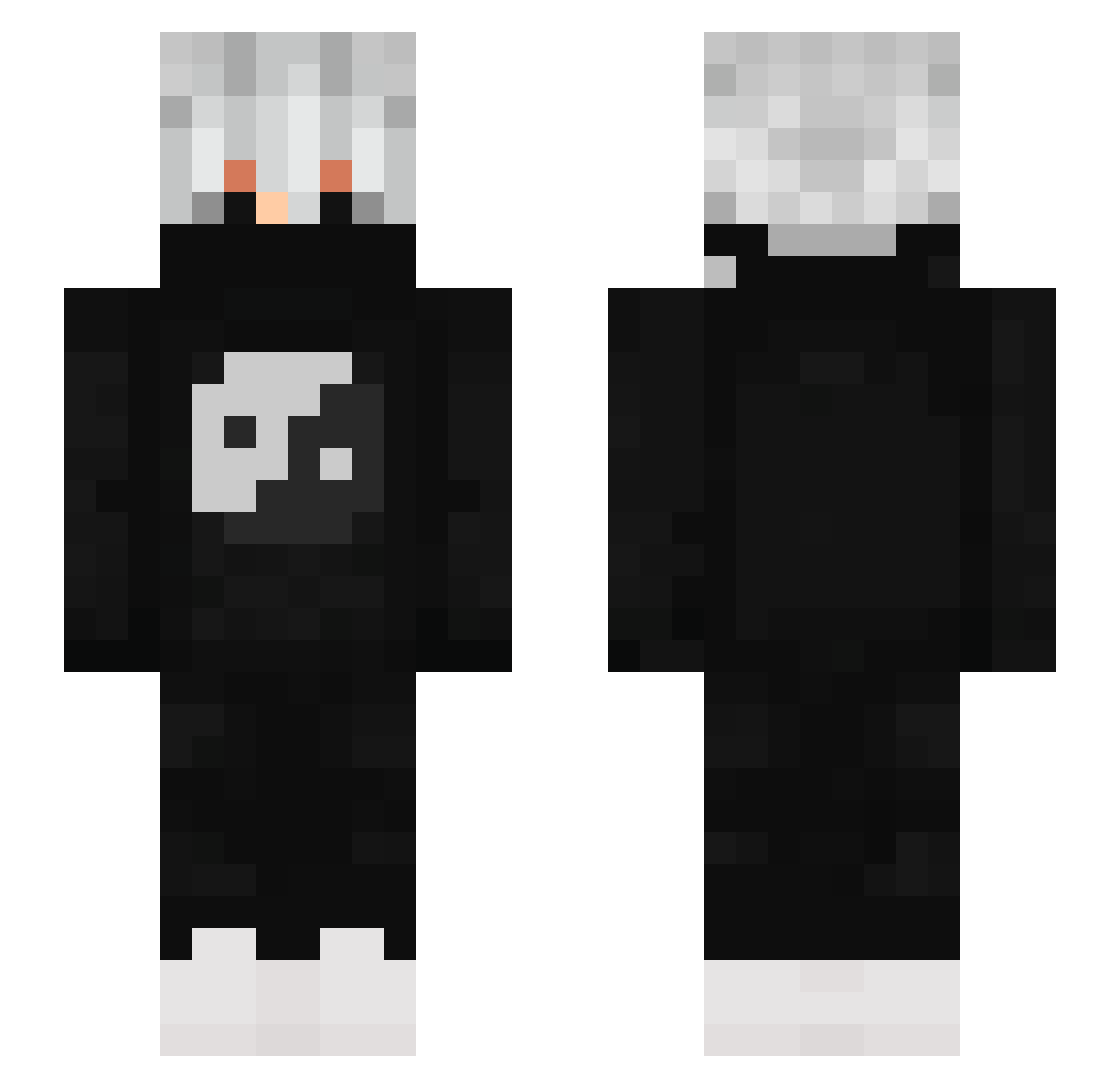
Current Minecraft skin of the player LeoMikiCz, loaded from the official Mojang API. Rotate the 3D model with your mouse or finger, then download the skin as a PNG file and use it in Minecraft: Bedrock Edition or Java Edition for free. When LeoMikiCz changes their skin, this page updates automatically and the old skin stays in the history below.
Other players with this skin (880)
LeoMikiCz was the 116th player we have seen with this skin, first spotted on 08.08.2026. The same skin was seen on these players. Open a nickname to see their current skin and skin history.
 ____Dembe____ tx23 Ruuh7 Bryan_pro DragapultShadow boss1076 01_KING_01 BlackNor62 TheOneShazam BOYLOCK BlackYO1478 banuf StonePvP_ UkiraG Zerosilverwolf Dheanto Phoenix61417 XnightmareX7522 yodee_ Maxou531 Dr_axert XeXn02 Myqoo43 Axiial kenzo_playz HolySaint666 k0rney
 Kamyss samuelicano3 _Fol1ter_ Metality_hardox willix41 TrueDead0 z_xxgusta_y
 kingking1233 K4rzo VlTU Zentrified VineGuy SwagHacking Husarix
 _Piesel__ Dark_Legit Marcozeta15 Snowishare1 Mysticall_Vortex KazhuraPT SRCTD Jason455 Bi1el_ drinqz DragonWings080 ImBium rekis15 Suchejrohlik1
 BENCEBOX Official_Nino Stroe__ _Braxx RubenElFarty
More Yin Yang Minecraft skins
How to install the LeoMikiCz skin
- Press the Download button above to save the skin as a PNG file.
- Minecraft: Bedrock Edition (PE): open the Dressing Room from the main menu (or tap your character → Edit Character), go to Classic Skins → Owned, press the + (new skin) button, choose the downloaded PNG and pick the Slim (Alex) model. Works on PC and mobile; consoles cannot import custom skins.
- Minecraft: Java Edition: open the Minecraft Launcher, go to the Skins tab, click New Skin, load the PNG, pick the Slim (Alex) model and press Save & Use. You can also upload it at minecraft.net → Profile → Change Skin.
The skin does not show up after import - what should I do?
Restart Minecraft and open the Dressing Room again - imported skins sometimes appear only after a restart. Also make sure you selected the imported skin and picked the Slim (Alex) model.
Which model should I choose, Classic or Slim?
This skin is designed for the Slim (Alex) model. If you pick the wrong model, the arms of the skin will look stretched or squeezed.
Is the skin of LeoMikiCz free to download?
Yes. Press Download, save the PNG file and use it in Minecraft: Bedrock Edition or Java Edition - no payment or registration needed. The skin also works on multiplayer servers and Realms.
More skins
Looking for more? Go back to all Minecraft skins and check the top skins of the week, month and all time, or find any player's skin by nickname.