
LQii7 - Minecraft Skins & Skin History
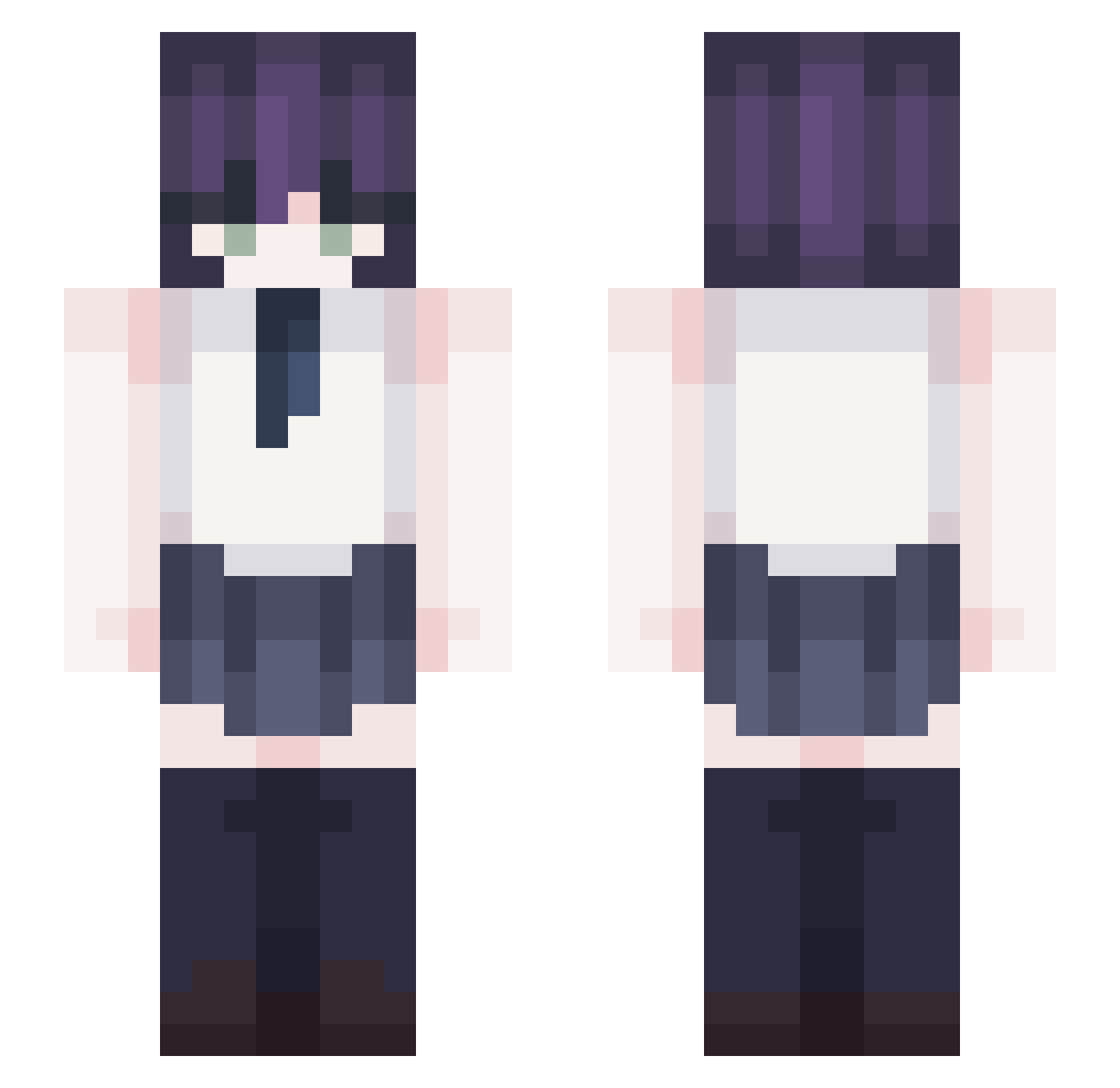
Current Minecraft skin of the player LQii7, loaded from the official Mojang API. Rotate the 3D model with your mouse or finger, then download the skin as a PNG file and use it in Minecraft: Bedrock Edition or Java Edition for free. When LQii7 changes their skin, this page updates automatically and the old skin stays in the history below.
Other players with this skin (367)
LQii7 was the 208th player we have seen with this skin, first spotted on 25.09.2026. The same skin was seen on these players. Open a nickname to see their current skin and skin history.
 letsgoadhd halluzinationz awttethani cauntrd Jacky990404 m0nzx SinYong8 CausedShoe75515 heymabel shark11123 Jerry1212814 Cielo_12 MINERVA1122 shell228 Andreax2410 01Mikuu jun_yun CedR1CCC S1eepyZ30 sadcat16 ATTRIBUTIVE1234 _Hason Snowleopard630 Detrioted solunae1 Yieke Hina_mori Krabik356 iz_re Boss_KR iluvyeu BUZIBAZI higapi Re___ZE KKlinck TricksterFox0115 MingJ214 Matiiin asd0320 ekamie Gigi8974 _vanss Astalaa reze_11 ItzMeeeWinAr Crash020 Shawnobile Samsara138 Ezzekiiell _Lora PZBounce magrez ezyma TOMPPELI110 YONGDDAKI l0up_123 DarlingEres hiwon202 Weiyiii kubasak21
More School Uniform Minecraft skins
See all 6889 School Uniform skins
How to install the LQii7 skin
- Press the Download button above to save the skin as a PNG file.
- Minecraft: Bedrock Edition (PE): open the Dressing Room from the main menu (or tap your character → Edit Character), go to Classic Skins → Owned, press the + (new skin) button, choose the downloaded PNG and pick the Slim (Alex) model. Works on PC and mobile; consoles cannot import custom skins.
- Minecraft: Java Edition: open the Minecraft Launcher, go to the Skins tab, click New Skin, load the PNG, pick the Slim (Alex) model and press Save & Use. You can also upload it at minecraft.net → Profile → Change Skin.
The skin does not show up after import - what should I do?
Restart Minecraft and open the Dressing Room again - imported skins sometimes appear only after a restart. Also make sure you selected the imported skin and picked the Slim (Alex) model.
Which model should I choose, Classic or Slim?
This skin is designed for the Slim (Alex) model. If you pick the wrong model, the arms of the skin will look stretched or squeezed.
Is the skin of LQii7 free to download?
Yes. Press Download, save the PNG file and use it in Minecraft: Bedrock Edition or Java Edition - no payment or registration needed. The skin also works on multiplayer servers and Realms.
More skins
Looking for more? Go back to all Minecraft skins and check the top skins of the week, month and all time, or find any player's skin by nickname.