
Konk654 - Minecraft Skins & Skin History
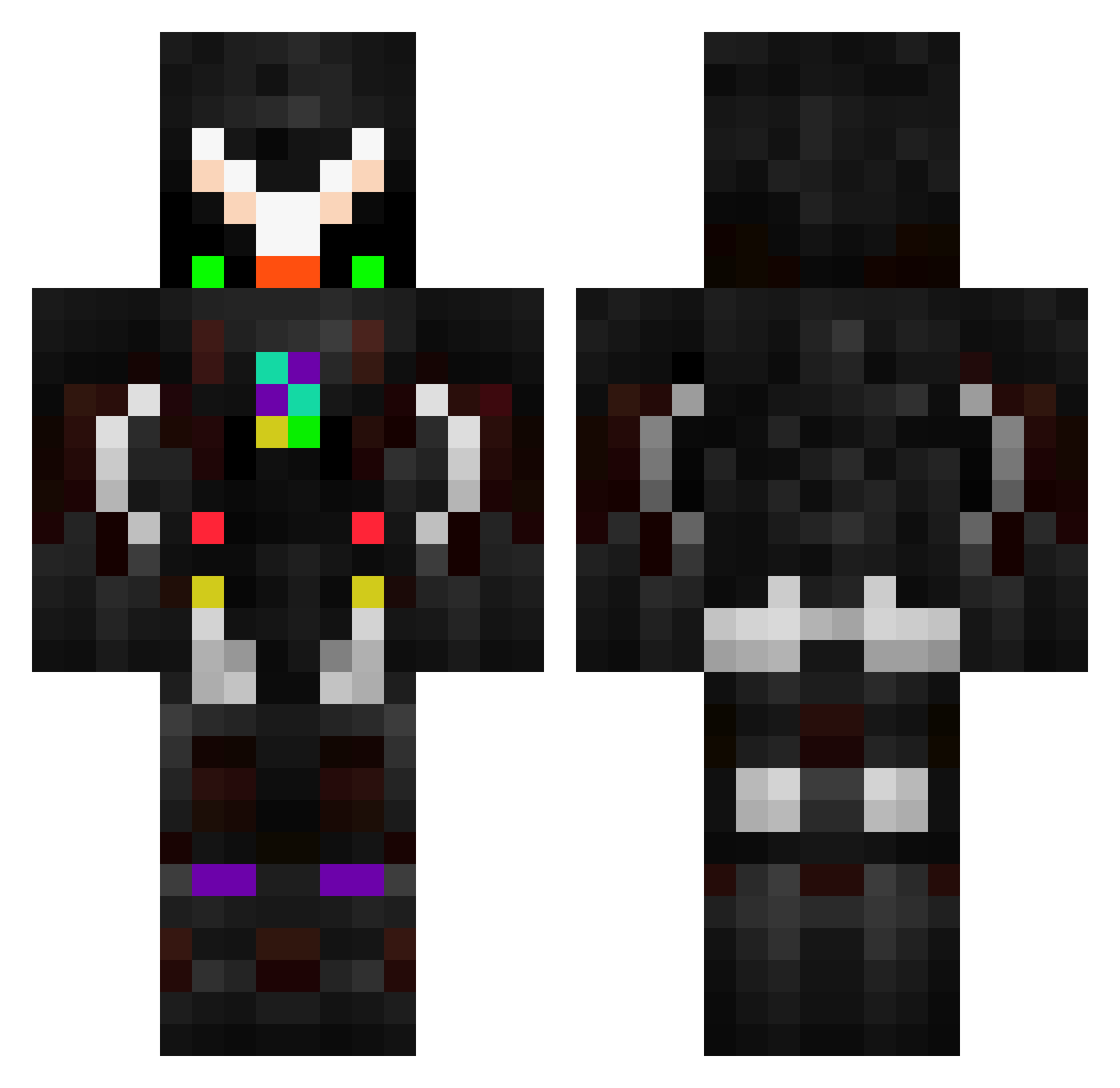
Current Minecraft skin of the player Konk654, loaded from the official Mojang API. Rotate the 3D model with your mouse or finger, then download the skin as a PNG file and use it in Minecraft: Bedrock Edition or Java Edition for free. When Konk654 changes their skin, this page updates automatically and the old skin stays in the history below.
Other players with this skin (63)
Konk654 was the 3rd player we have seen with this skin, first spotted on 31.07.2026. The same skin was seen on these players. Open a nickname to see their current skin and skin history.
 Extromoner Mander_King Crazy_Shiba_Inu
 HyperChris
 FlyingIksis
 beneficialprofit AOZORATRAIN NUKEBlaze100 Bandon4Kill Omg_its_me_POG barajas2048 thejumper666 FrozenDragon0 Schoschking
 elAdrieel Lil_Gerado paulk2016 Daikraiz p1skle Munchaon wifi_white2115 Rayo2003 MBY257 kennldk ikeplays Humzino HeavenForYou BluSpiritBlu Dark974 GreenHound62 W1nterF3st Warworker OrochiTKS Alvaroogl explosivelarry64 George04022000 kocakafamemot MinMax1300 _Divinitus_ Acontius alen3765 gjhkl JorshGamer_YT02 LuckyFelix4848 Bertram_Roth Waldfeekicker31 SCORPION_LC XkurosakiX_ King_Estebon Jojo387 dawidlolek fytrg Rubiikoy pantheon_ray Sallazare NovaOmega Nazim69 Wscar Redskullzzzz RAINN1_
More Futuristic Minecraft skins
How to install the Konk654 skin
- Press the Download button above to save the skin as a PNG file.
- Minecraft: Bedrock Edition (PE): open the Dressing Room from the main menu (or tap your character → Edit Character), go to Classic Skins → Owned, press the + (new skin) button, choose the downloaded PNG and pick the Classic (Steve) model. Works on PC and mobile; consoles cannot import custom skins.
- Minecraft: Java Edition: open the Minecraft Launcher, go to the Skins tab, click New Skin, load the PNG, pick the Classic (Steve) model and press Save & Use. You can also upload it at minecraft.net → Profile → Change Skin.
The skin does not show up after import - what should I do?
Restart Minecraft and open the Dressing Room again - imported skins sometimes appear only after a restart. Also make sure you selected the imported skin and picked the Classic (Steve) model.
Which model should I choose, Classic or Slim?
This skin is designed for the Classic (Steve) model. If you pick the wrong model, the arms of the skin will look stretched or squeezed.
Is the skin of Konk654 free to download?
Yes. Press Download, save the PNG file and use it in Minecraft: Bedrock Edition or Java Edition - no payment or registration needed. The skin also works on multiplayer servers and Realms.
More skins
Looking for more? Go back to all Minecraft skins and check the top skins of the week, month and all time, or find any player's skin by nickname.