
King_Entobert - Minecraft Skins & Skin History
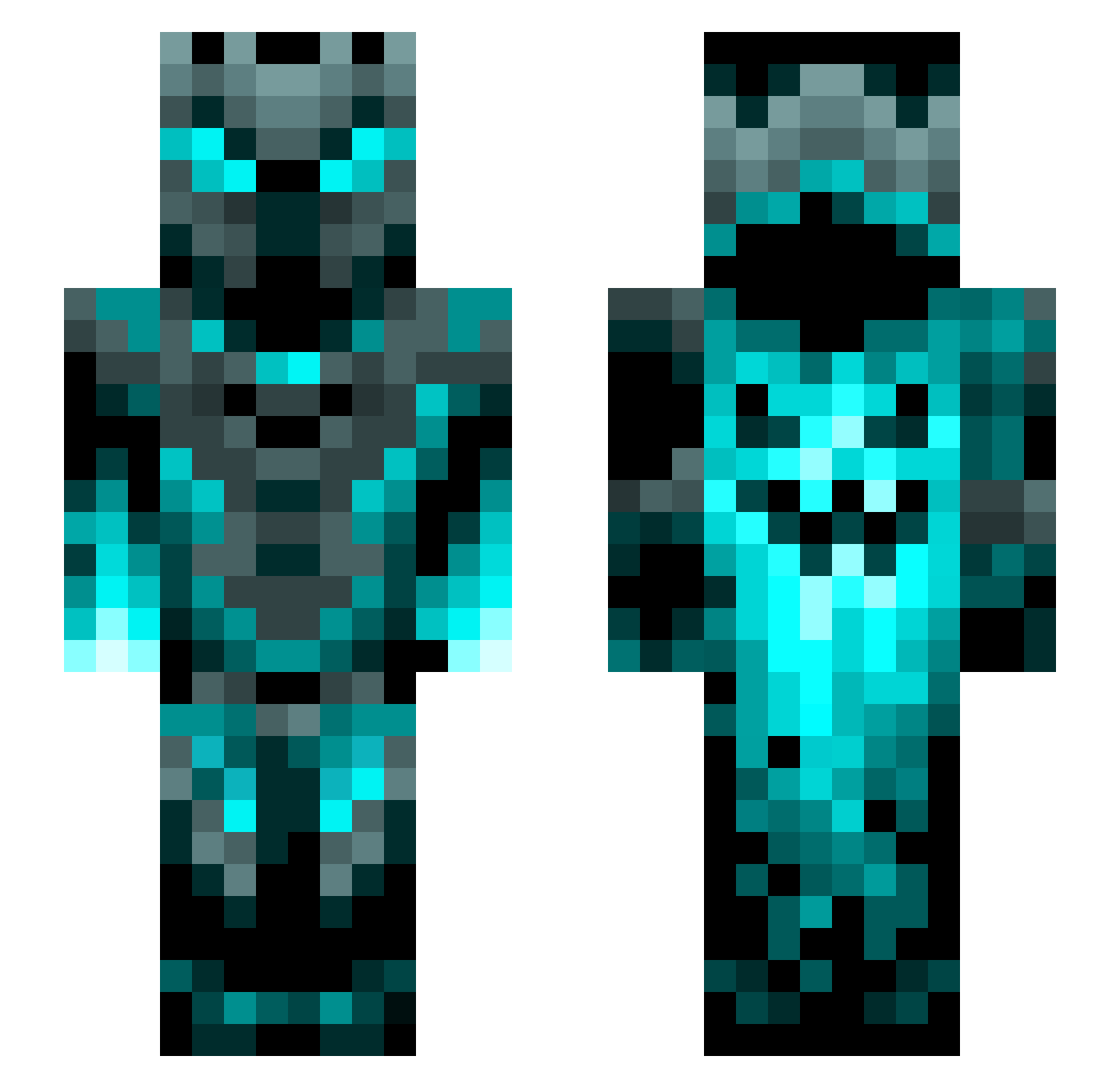
Current Minecraft skin of the player King_Entobert, loaded from the official Mojang API. Rotate the 3D model with your mouse or finger, then download the skin as a PNG file and use it in Minecraft: Bedrock Edition or Java Edition for free. When King_Entobert changes their skin, this page updates automatically and the old skin stays in the history below.
Other players with this skin (1200)
King_Entobert was the 810th player we have seen with this skin, first spotted on 03.10.2026. The same skin was seen on these players. Open a nickname to see their current skin and skin history.
 Bluegriffin543 6H05TX Zay0rt Syntium21 Pantherfan750 leebrachi TSWagner7 iNocturno Pappabusboden EZIBOY entity_Thiex wessel1221 CycloneBomb linfaning cuervo992 FlyyBlitZZ ROIGALIZA Byroid303 DarkLord4393 KosukeHizuma Solageo jaybobba Careos07 Slayer0722 elozarwol Shadowknight3030 SPARKS101 crafcik23 maksom2 DisturbedSpawn Ethob0807 AdeptLamp93653 TLOS_25 Krk1961 Gooniack Darkside_2013 LonelyCozmo phantom_sparkles MasterEel gatorbait__72 Minsterr SebiSebastian Xenomatej NAYEF_k InsertName64 Hectorgg83 Ehiras Drastorm0 WALLY2010 LeatherJohn Supperseal foxclankid KingZoro SoulChaosX Senruc GasparCro B14Z3R_6 Apotheker1312 LuckyLuga JimViper17
More Phantom Minecraft skins
How to install the King_Entobert skin
- Press the Download button above to save the skin as a PNG file.
- Minecraft: Bedrock Edition (PE): open the Dressing Room from the main menu (or tap your character → Edit Character), go to Classic Skins → Owned, press the + (new skin) button, choose the downloaded PNG and pick the Slim (Alex) model. Works on PC and mobile; consoles cannot import custom skins.
- Minecraft: Java Edition: open the Minecraft Launcher, go to the Skins tab, click New Skin, load the PNG, pick the Slim (Alex) model and press Save & Use. You can also upload it at minecraft.net → Profile → Change Skin.
The skin does not show up after import - what should I do?
Restart Minecraft and open the Dressing Room again - imported skins sometimes appear only after a restart. Also make sure you selected the imported skin and picked the Slim (Alex) model.
Which model should I choose, Classic or Slim?
This skin is designed for the Slim (Alex) model. If you pick the wrong model, the arms of the skin will look stretched or squeezed.
Is the skin of King_Entobert free to download?
Yes. Press Download, save the PNG file and use it in Minecraft: Bedrock Edition or Java Edition - no payment or registration needed. The skin also works on multiplayer servers and Realms.
More skins
Looking for more? Go back to all Minecraft skins and check the top skins of the week, month and all time, or find any player's skin by nickname.