
KZKAST - Minecraft Skins & Skin History
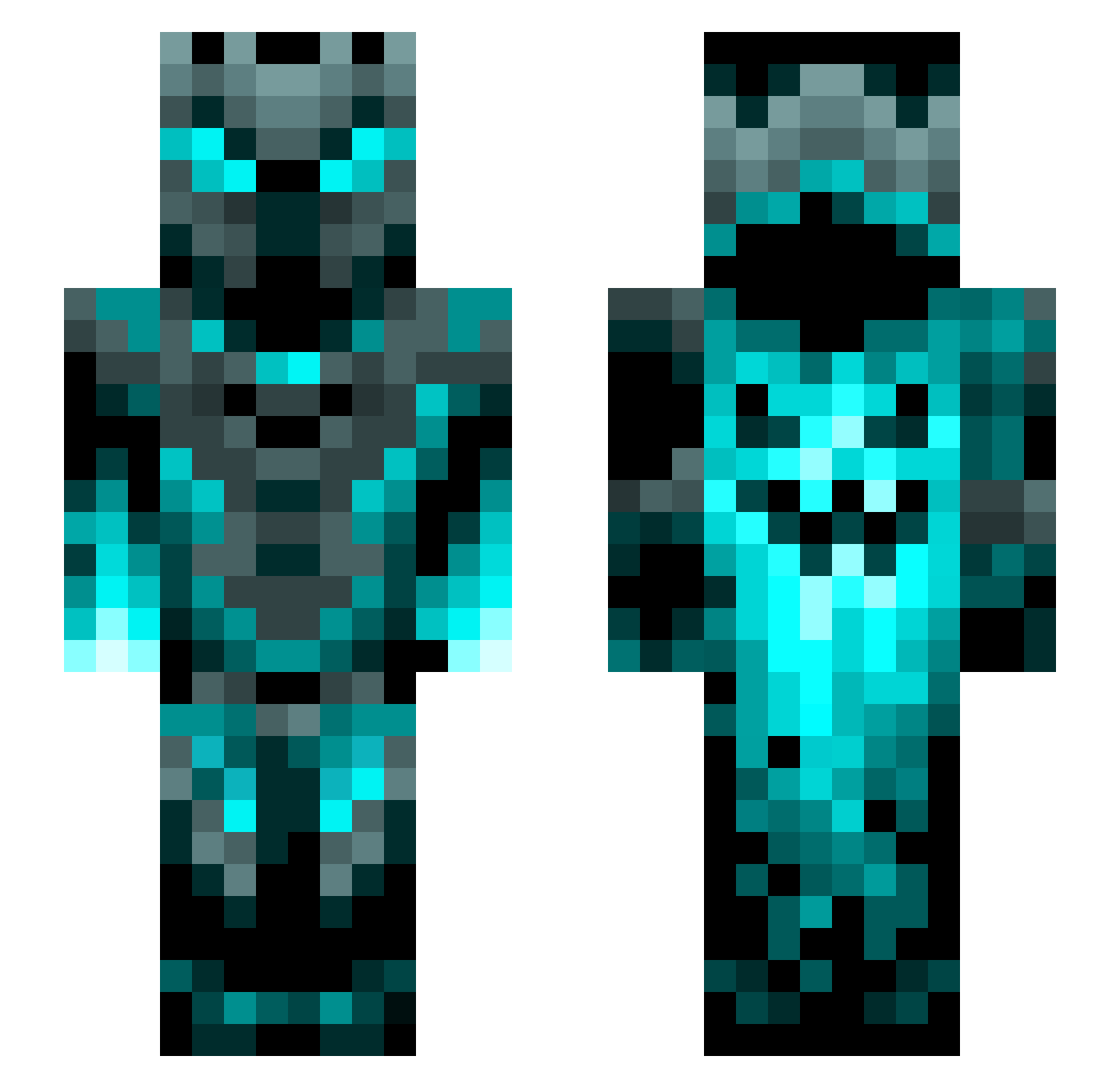
Current Minecraft skin of the player KZKAST, loaded from the official Mojang API. Rotate the 3D model with your mouse or finger, then download the skin as a PNG file and use it in Minecraft: Bedrock Edition or Java Edition for free. When KZKAST changes their skin, this page updates automatically and the old skin stays in the history below.
Other players with this skin (1200)
KZKAST was the 904th player we have seen with this skin, first spotted on 11.10.2026. The same skin was seen on these players. Open a nickname to see their current skin and skin history.
 xDark_Dragonx Werisheri santiago763 Jolen1728 Feeding_Tube Shamiul001 Karasu_1061 ronnieedson ViridianD3v1l kxl8 acidmattia15 Aurora00918 Damasus2 Soy_Sauce2020 Phrost124 Zeleny_Smaragd WillyP0403 tomw_2k over2020 ZepherDragon_14 __Krysk__ ExorK1ng DavidHausmann12 Ayven83 LordFulgore Tabor815 LeadingArrow428 fireman102 J0D0R1 Illandms Doroam boondict Aidan2636 BozhyeDitya NoomzuTheMLGPro Dipperchen JumpShots Boondocksaint001 Itz_SnowBear Wavering01 Frankenfich Discovery_Road GamerX5218 vT_Anxiety Aid_BVI soulbreaker92 HeavyMetalSpain AlexSylho Marrokas Clickboom47_ lolinc10 fardean q1z2e3r4_ Diegox133653 EnderDog999 Nisshani ETN69420 Robertus10 Doomking18 Mr_tijger
More Phantom Minecraft skins
How to install the KZKAST skin
- Press the Download button above to save the skin as a PNG file.
- Minecraft: Bedrock Edition (PE): open the Dressing Room from the main menu (or tap your character → Edit Character), go to Classic Skins → Owned, press the + (new skin) button, choose the downloaded PNG and pick the Slim (Alex) model. Works on PC and mobile; consoles cannot import custom skins.
- Minecraft: Java Edition: open the Minecraft Launcher, go to the Skins tab, click New Skin, load the PNG, pick the Slim (Alex) model and press Save & Use. You can also upload it at minecraft.net → Profile → Change Skin.
The skin does not show up after import - what should I do?
Restart Minecraft and open the Dressing Room again - imported skins sometimes appear only after a restart. Also make sure you selected the imported skin and picked the Slim (Alex) model.
Which model should I choose, Classic or Slim?
This skin is designed for the Slim (Alex) model. If you pick the wrong model, the arms of the skin will look stretched or squeezed.
Is the skin of KZKAST free to download?
Yes. Press Download, save the PNG file and use it in Minecraft: Bedrock Edition or Java Edition - no payment or registration needed. The skin also works on multiplayer servers and Realms.
More skins
Looking for more? Go back to all Minecraft skins and check the top skins of the week, month and all time, or find any player's skin by nickname.