
Im_duck_man - Minecraft Skins & Skin History
Current Minecraft skin of the player Im_duck_man, loaded from the official Mojang API. Rotate the 3D model with your mouse or finger, then download the skin as a PNG file and use it in Minecraft: Bedrock Edition or Java Edition for free. When Im_duck_man changes their skin, this page updates automatically and the old skin stays in the history below.
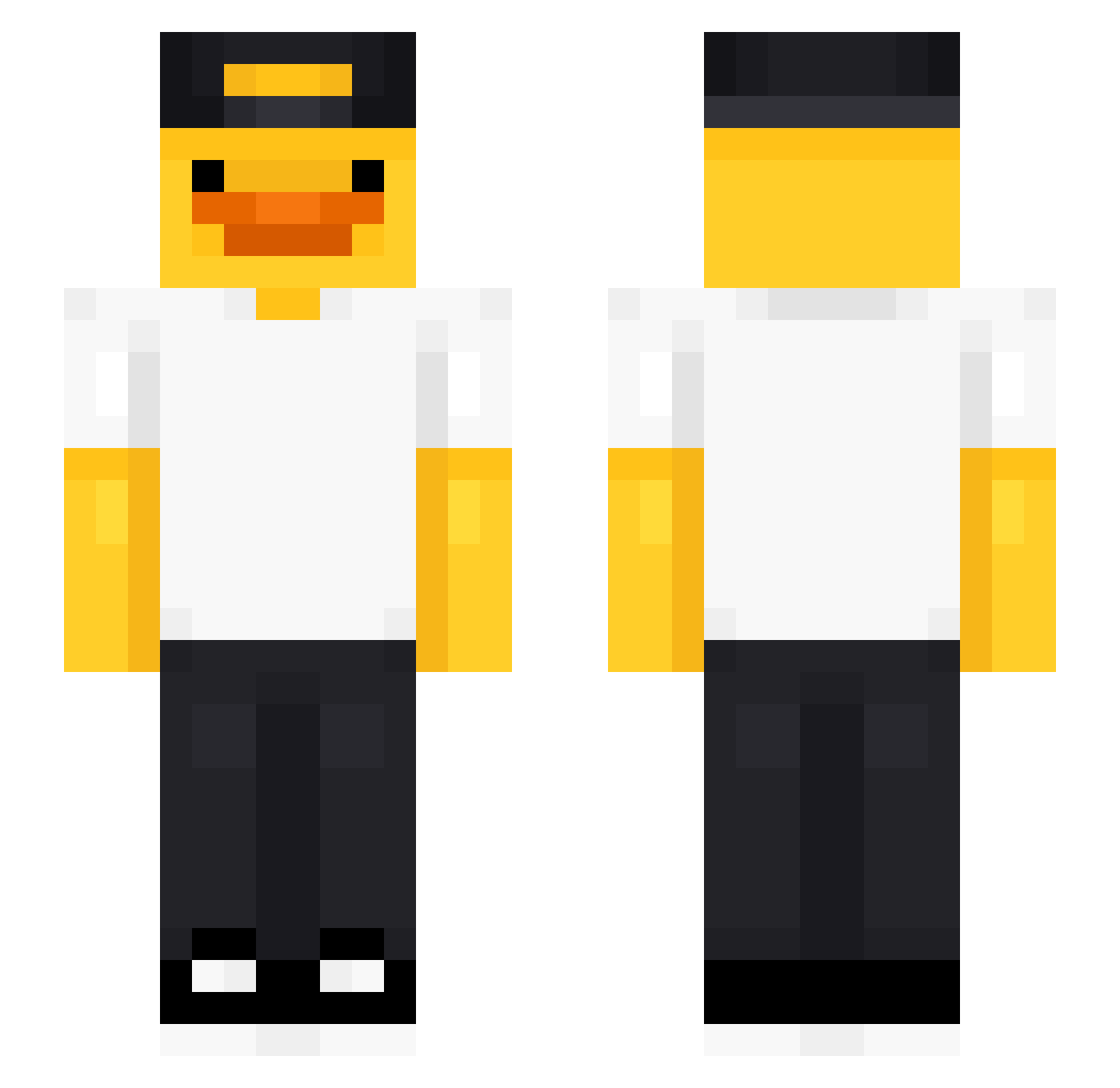
Other players with this skin (489)
Im_duck_man was the 27th player we have seen with this skin, first spotted on 29.07.2026. The same skin was seen on these players. Open a nickname to see their current skin and skin history.
 Escobar2113 Shaddix18 baekkim oTheHype Mamba828 RastALF Emerald_Island RiPO_LORD vzvw Nico45256 kaczuch_7 LaCaStAr ItsMeBeast5691
 aussies11 alphaamyfarted LoveMango_ AntoinE010203 dzedaj03 IagoADL BlanNN Soph1116 GiasoneGG DotingRL K4rlik Kimato007 Yeons93
 anjhon6 raaf1227 ghshshys Katil_Kediy
 PanteraTM Vyset4 Cotton_Oath __Vertex___ Jerryistcool55 iPodia Baweeed hsiexu SrToWS xanmantheslayer JKAY_IS_HERE w0j4r Motinhas20 Alurbb07 Deena_ notsnowbucket Mufasa1337 Ongsatepza007 Matiiii13 siel_serpentine4 Librarian_1123 benmertdemir CMR_1337 ihatepillagers31 AMDUck7 giwon30 Buble1232 Lombradoo Jeng_The_God
 maxomix3012
More Cap Minecraft skins
How to install the Im_duck_man skin
- Press the Download button above to save the skin as a PNG file.
- Minecraft: Bedrock Edition (PE): open the Dressing Room from the main menu (or tap your character → Edit Character), go to Classic Skins → Owned, press the + (new skin) button, choose the downloaded PNG and pick the Slim (Alex) model. Works on PC and mobile; consoles cannot import custom skins.
- Minecraft: Java Edition: open the Minecraft Launcher, go to the Skins tab, click New Skin, load the PNG, pick the Slim (Alex) model and press Save & Use. You can also upload it at minecraft.net → Profile → Change Skin.
The skin does not show up after import - what should I do?
Restart Minecraft and open the Dressing Room again - imported skins sometimes appear only after a restart. Also make sure you selected the imported skin and picked the Slim (Alex) model.
Which model should I choose, Classic or Slim?
This skin is designed for the Slim (Alex) model. If you pick the wrong model, the arms of the skin will look stretched or squeezed.
Is the skin of Im_duck_man free to download?
Yes. Press Download, save the PNG file and use it in Minecraft: Bedrock Edition or Java Edition - no payment or registration needed. The skin also works on multiplayer servers and Realms.
More skins
Looking for more? Go back to all Minecraft skins and check the top skins of the week, month and all time, or find any player's skin by nickname.