
HugoUwU1 - Minecraft Skins & Skin History
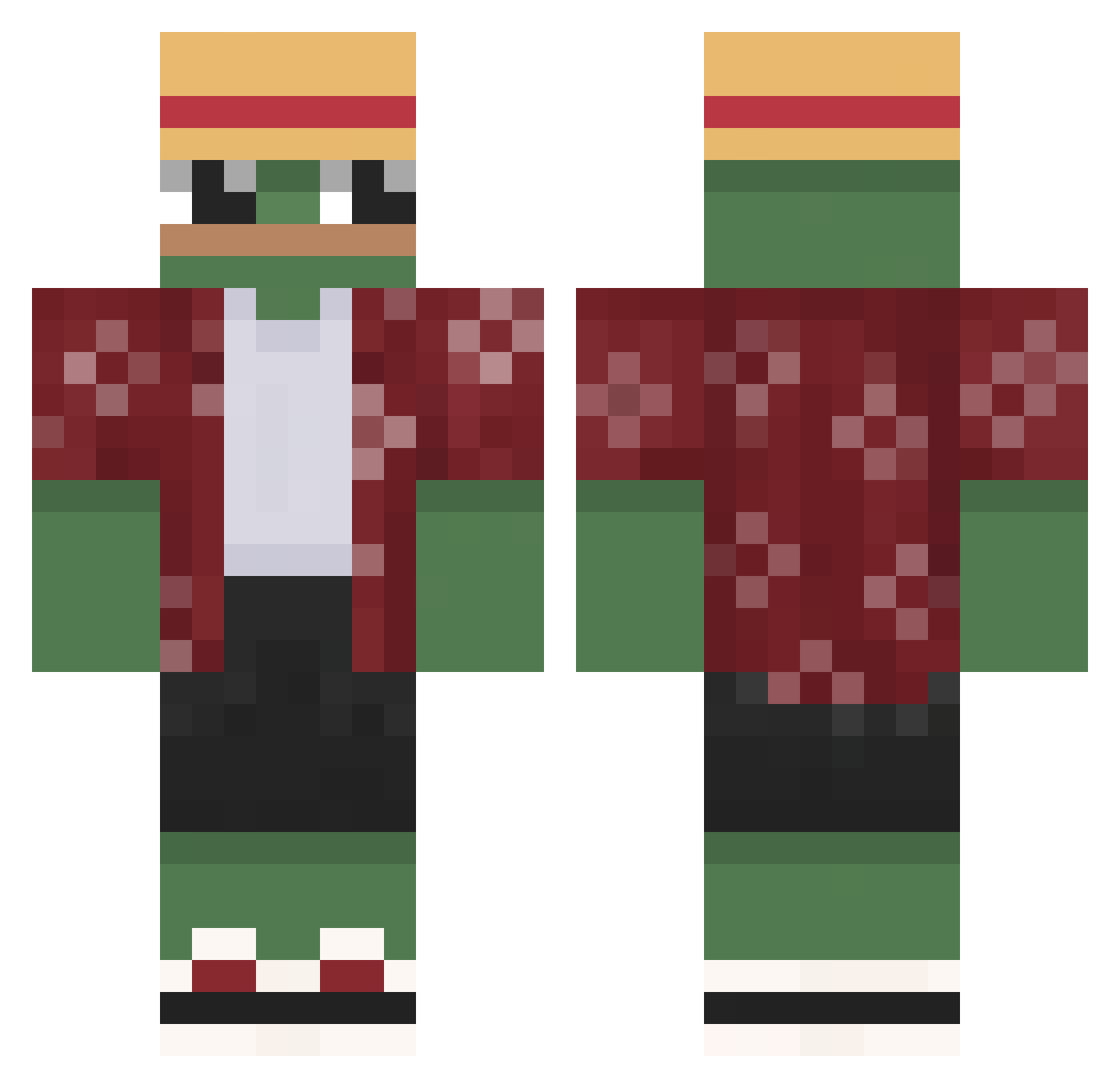
Current Minecraft skin of the player HugoUwU1, loaded from the official Mojang API. Rotate the 3D model with your mouse or finger, then download the skin as a PNG file and use it in Minecraft: Bedrock Edition or Java Edition for free. When HugoUwU1 changes their skin, this page updates automatically and the old skin stays in the history below.
Other players with this skin (644)
HugoUwU1 was the 185th player we have seen with this skin, first spotted on 24.08.2026. The same skin was seen on these players. Open a nickname to see their current skin and skin history.
 Blikuuu SrOrgaz fede_3050 Saunatonttu_123 ItsLeow jonasz_ciuta IamJoel34 SorryImJoumi xDreadHunter rockyasocks Prjoergensen W1zdunBis AGR346 gabriellegal kier0wnik ZaliaDaily
 vadi_barmani Garci__ will563 MrKoeppel Viktorko23 wns_gks Joffuu Julianncho Iboprofaxe9 LeakiestBucket EugeneMLR CW_woo Niiaac _Szambonurek_ Leeyonardo Sgnature TravisGlaze GiuseppePicci TinoWinoo Dovster14 observer4231 Danzyx7 Peabbles RXJosh13
 Jubiro C0NNLEY Cedezoo Drodzek guy58 huviz TheArtemosky KFC_BROWN Kirysh23 _Eronox_ Danknugz12 RuthlessDreamz DreamixFN Macho_Van Brunomannn Lammmet JazZiooo Loeweantolina Jahamy DerekDraimon
More Monkey D Luffy Minecraft skins
See all 925 Monkey D Luffy skins
How to install the HugoUwU1 skin
- Press the Download button above to save the skin as a PNG file.
- Minecraft: Bedrock Edition (PE): open the Dressing Room from the main menu (or tap your character → Edit Character), go to Classic Skins → Owned, press the + (new skin) button, choose the downloaded PNG and pick the Classic (Steve) model. Works on PC and mobile; consoles cannot import custom skins.
- Minecraft: Java Edition: open the Minecraft Launcher, go to the Skins tab, click New Skin, load the PNG, pick the Classic (Steve) model and press Save & Use. You can also upload it at minecraft.net → Profile → Change Skin.
The skin does not show up after import - what should I do?
Restart Minecraft and open the Dressing Room again - imported skins sometimes appear only after a restart. Also make sure you selected the imported skin and picked the Classic (Steve) model.
Which model should I choose, Classic or Slim?
This skin is designed for the Classic (Steve) model. If you pick the wrong model, the arms of the skin will look stretched or squeezed.
Is the skin of HugoUwU1 free to download?
Yes. Press Download, save the PNG file and use it in Minecraft: Bedrock Edition or Java Edition - no payment or registration needed. The skin also works on multiplayer servers and Realms.
More skins
Looking for more? Go back to all Minecraft skins and check the top skins of the week, month and all time, or find any player's skin by nickname.