
HotKofe - Minecraft Skins & Skin History
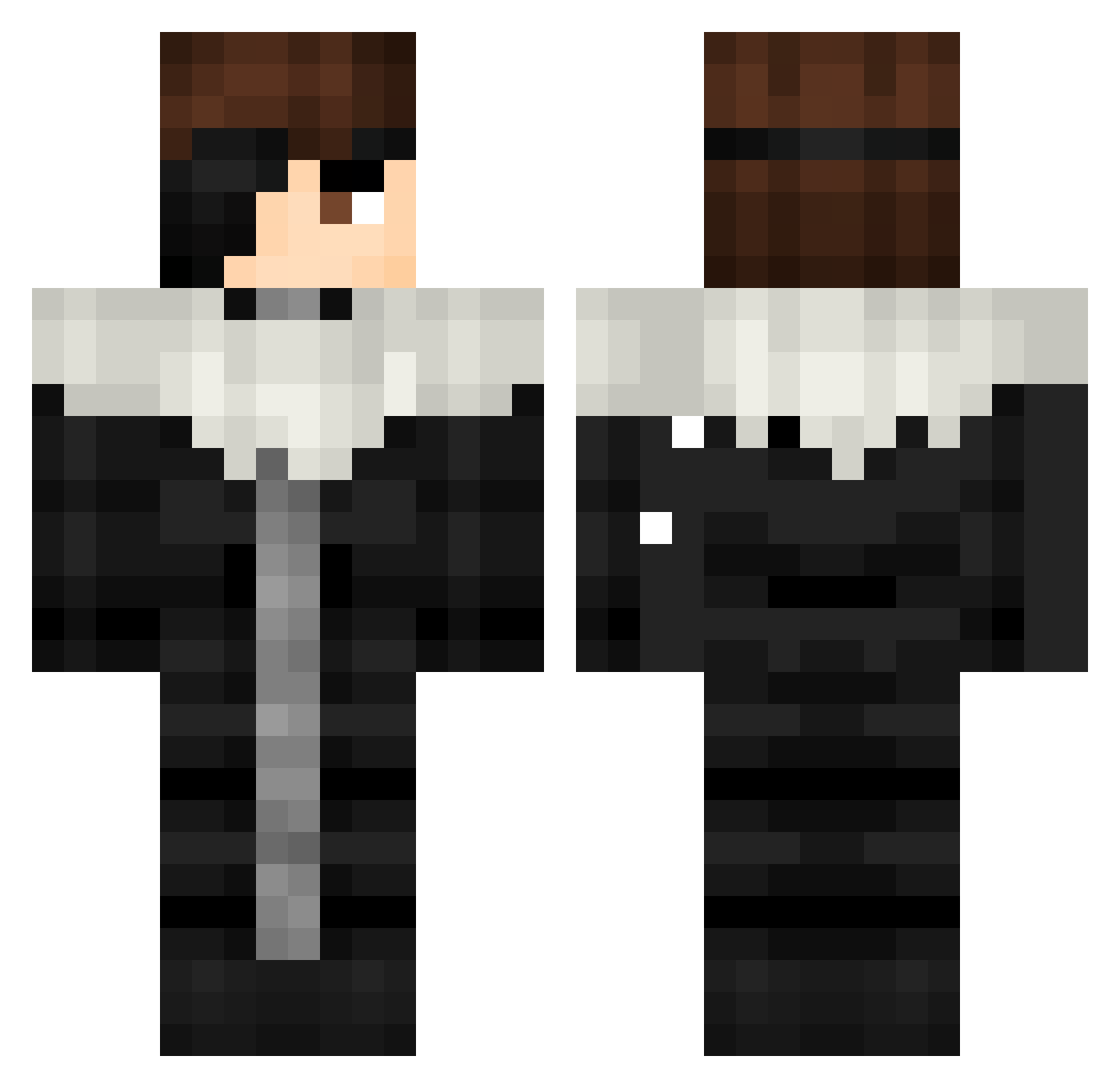
Current Minecraft skin of the player HotKofe, loaded from the official Mojang API. Rotate the 3D model with your mouse or finger, then download the skin as a PNG file and use it in Minecraft: Bedrock Edition or Java Edition for free. When HotKofe changes their skin, this page updates automatically and the old skin stays in the history below.
Other players with this skin (396)
HotKofe was the 370th player we have seen with this skin, first spotted on 17.10.2026. The same skin was seen on these players. Open a nickname to see their current skin and skin history.
 Juninhocass Ebrithil SlickBobs Ms_Rein D4C944 DizzYa Beastjee ImDariussLaka Lin_0211 mioony CharlSma shunxukekun GhostTyson NihilSama EssKay47 MigatteNoGoku08 puder1 Dah_507 zdzr gabryx11 Cairuzitos KacoZmaj Aschente72 thebiguce TypeSoul67 _Anush loserxs tnfkawnl MaiMooAhBooDaBee Pokerr1 merek39 Enzuli_96 Destan0867 7Safters zilliax_1 jjangms jEdd_ls adfasf Meliodas19307 MinMaxMint dabby_69_ Thxrfinn_0 Keimalu Killua_LF rtgg1315 Dr0pZ1 Scorpion12 Censurado03 8anzai zZendAsHi nicodiedd dikowkaaaaa Chimelng Quptan Aiz3en Shiru_9 Istanbul0 onimenogo ttoendertas futurebeaver
More Squall Leonhart Minecraft skins
See all 3 Squall Leonhart skins
How to install the HotKofe skin
- Press the Download button above to save the skin as a PNG file.
- Minecraft: Bedrock Edition (PE): open the Dressing Room from the main menu (or tap your character → Edit Character), go to Classic Skins → Owned, press the + (new skin) button, choose the downloaded PNG and pick the Classic (Steve) model. Works on PC and mobile; consoles cannot import custom skins.
- Minecraft: Java Edition: open the Minecraft Launcher, go to the Skins tab, click New Skin, load the PNG, pick the Classic (Steve) model and press Save & Use. You can also upload it at minecraft.net → Profile → Change Skin.
The skin does not show up after import - what should I do?
Restart Minecraft and open the Dressing Room again - imported skins sometimes appear only after a restart. Also make sure you selected the imported skin and picked the Classic (Steve) model.
Which model should I choose, Classic or Slim?
This skin is designed for the Classic (Steve) model. If you pick the wrong model, the arms of the skin will look stretched or squeezed.
Is the skin of HotKofe free to download?
Yes. Press Download, save the PNG file and use it in Minecraft: Bedrock Edition or Java Edition - no payment or registration needed. The skin also works on multiplayer servers and Realms.
More skins
Looking for more? Go back to all Minecraft skins and check the top skins of the week, month and all time, or find any player's skin by nickname.