
Hinnata - Minecraft Skins & Skin History
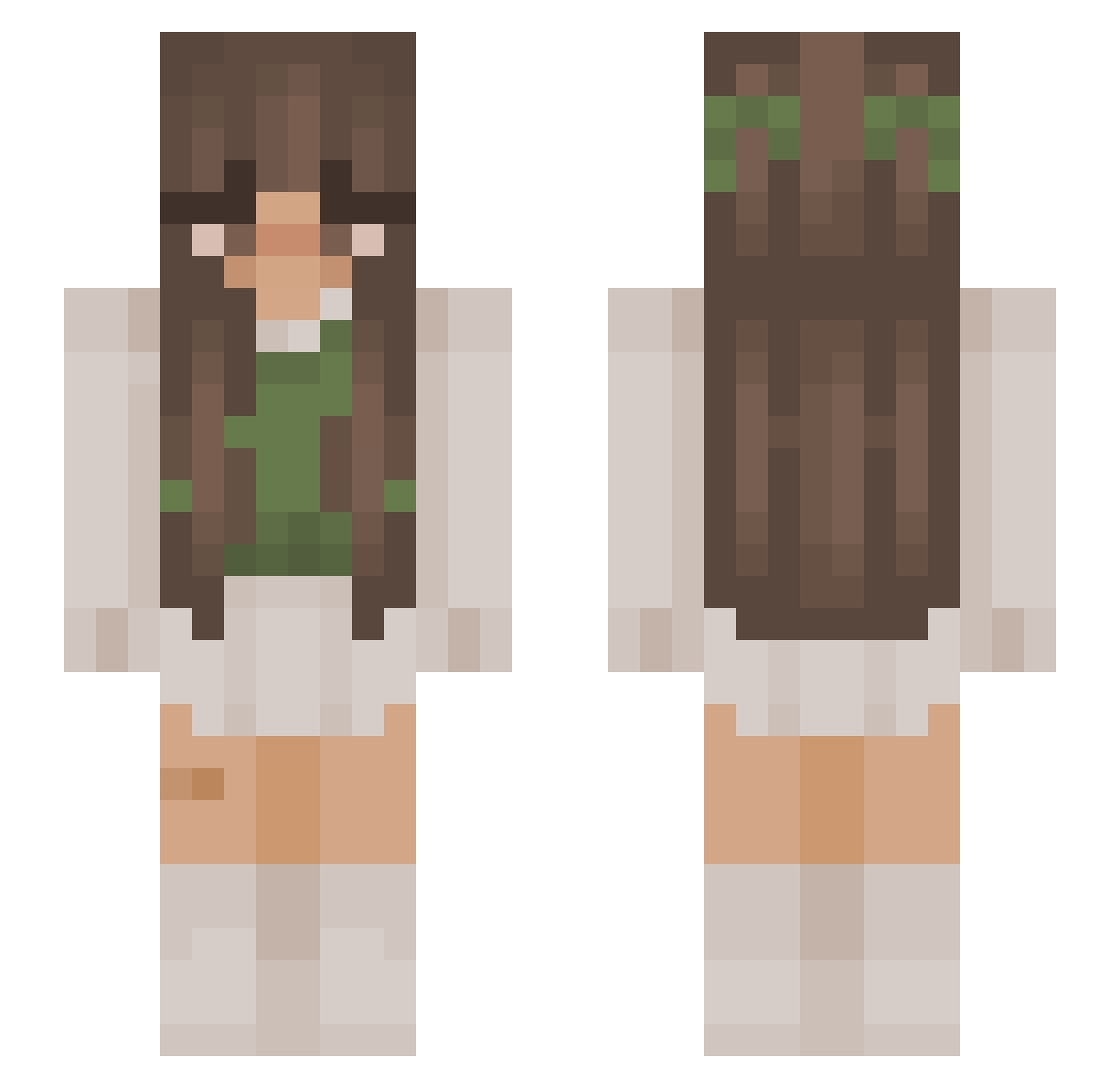
Current Minecraft skin of the player Hinnata, loaded from the official Mojang API. Rotate the 3D model with your mouse or finger, then download the skin as a PNG file and use it in Minecraft: Bedrock Edition or Java Edition for free. When Hinnata changes their skin, this page updates automatically and the old skin stays in the history below.
Other players with this skin (982)
Hinnata was the 518th player we have seen with this skin, first spotted on 18.09.2026. The same skin was seen on these players. Open a nickname to see their current skin and skin history.
 jyjyploff Agnesswag _lilywhy Sophia1810 miqstri zzzcar moonfxre Vickytoriya Nenyxo isabelle25x W4iko leenka79 mummamedusa BloodyOnyx PlutoLeaks2024 simplyfreyja PaulaCarr LigiaDro LNOLB_Chepa m1ssyyy albii99 dinonuggsam BabaSenpai69 ItsLizzy288 AmberMcF111 RabidLearner128 Mimi21106 greblos99 jinkanubis Elkamist valedayz Pooooooooooo0o paulacao sw4ggiefr0ggie kirikikiku irelandplease itsmetasanko charlottecharlot raechellle 31feb xmaybee ilysmmaty MyMelodyHeart VilaAmalka825 chloeoez Looneyluna82 meet_hideous Hedgiehoge TracyC700 Venessa04 KimyonaCos08 annaabee_ Kiramiko231 s0phiiiii AsaMira ameliex XxMidnightocean zooweeemamaaa Pitcompany rozowa1305
More Cottagecore Minecraft skins
See all 6440 Cottagecore skins
How to install the Hinnata skin
- Press the Download button above to save the skin as a PNG file.
- Minecraft: Bedrock Edition (PE): open the Dressing Room from the main menu (or tap your character → Edit Character), go to Classic Skins → Owned, press the + (new skin) button, choose the downloaded PNG and pick the Slim (Alex) model. Works on PC and mobile; consoles cannot import custom skins.
- Minecraft: Java Edition: open the Minecraft Launcher, go to the Skins tab, click New Skin, load the PNG, pick the Slim (Alex) model and press Save & Use. You can also upload it at minecraft.net → Profile → Change Skin.
The skin does not show up after import - what should I do?
Restart Minecraft and open the Dressing Room again - imported skins sometimes appear only after a restart. Also make sure you selected the imported skin and picked the Slim (Alex) model.
Which model should I choose, Classic or Slim?
This skin is designed for the Slim (Alex) model. If you pick the wrong model, the arms of the skin will look stretched or squeezed.
Is the skin of Hinnata free to download?
Yes. Press Download, save the PNG file and use it in Minecraft: Bedrock Edition or Java Edition - no payment or registration needed. The skin also works on multiplayer servers and Realms.
More skins
Looking for more? Go back to all Minecraft skins and check the top skins of the week, month and all time, or find any player's skin by nickname.