
Heiteki - Minecraft Skins & Skin History
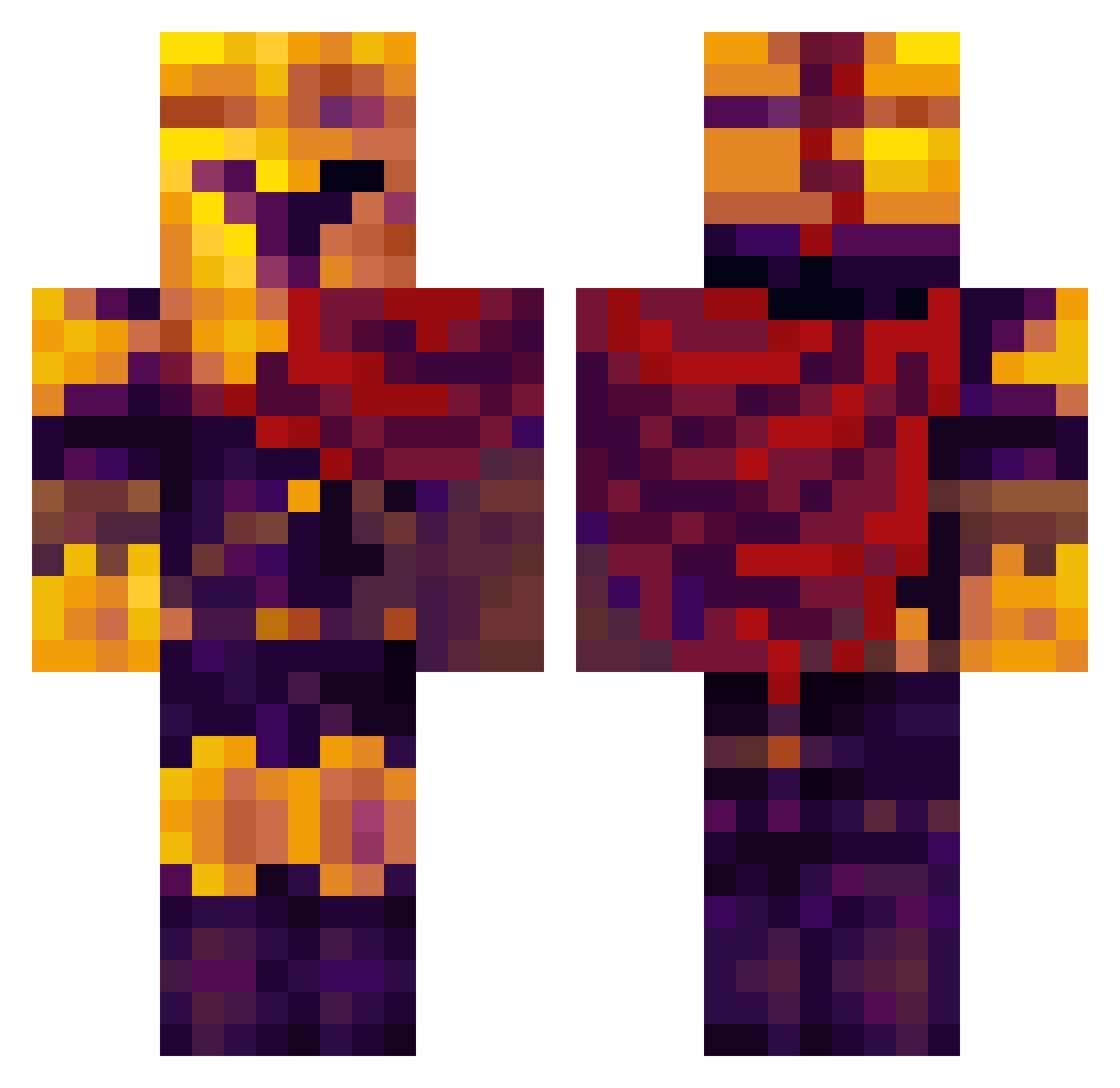
Current Minecraft skin of the player Heiteki, loaded from the official Mojang API. Rotate the 3D model with your mouse or finger, then download the skin as a PNG file and use it in Minecraft: Bedrock Edition or Java Edition for free. When Heiteki changes their skin, this page updates automatically and the old skin stays in the history below.
Other players with this skin (332)
Heiteki was the 166th player we have seen with this skin, first spotted on 10.09.2026. The same skin was seen on these players. Open a nickname to see their current skin and skin history.
 SniperShot2994 Rutvikal Lancelot1214 LOrd_Hugo14 Rockfarming Googster5298 Demonic_Rune BeufordTheBrazen Thirsk DangerSoap yuckyoudebbie SunflowerDarling Hello_kong Sadface312 _McDreamy152_ Doomslayer108382 aziboy23 xWaaardz Smuffen123 Wry_x selutscher RealMend rchiBRUH Froggie1o1o f1forlife
 malin125 Nra_Star PPPkoko Larsonito25 Lowksnap g1___ DeviBoy1280 Zbebig Kraybowl Wirgell marcusgwawu raven_landed Haraldt69 xpit56 Nuez_5 the_princenoctis MrIssues jackisverybored SaintBurly dopiece KingThe3rd Validin211 Antiark tfp0911 SlyDaddy sStancEe PastaMoney Fabian_0101 Austincrow CroftyOne BaskingBall5941 Chunky_Picklezz vGlows skibidisigma2014 globalattac
More Spartan Minecraft skins
How to install the Heiteki skin
- Press the Download button above to save the skin as a PNG file.
- Minecraft: Bedrock Edition (PE): open the Dressing Room from the main menu (or tap your character → Edit Character), go to Classic Skins → Owned, press the + (new skin) button, choose the downloaded PNG and pick the Classic (Steve) model. Works on PC and mobile; consoles cannot import custom skins.
- Minecraft: Java Edition: open the Minecraft Launcher, go to the Skins tab, click New Skin, load the PNG, pick the Classic (Steve) model and press Save & Use. You can also upload it at minecraft.net → Profile → Change Skin.
The skin does not show up after import - what should I do?
Restart Minecraft and open the Dressing Room again - imported skins sometimes appear only after a restart. Also make sure you selected the imported skin and picked the Classic (Steve) model.
Which model should I choose, Classic or Slim?
This skin is designed for the Classic (Steve) model. If you pick the wrong model, the arms of the skin will look stretched or squeezed.
Is the skin of Heiteki free to download?
Yes. Press Download, save the PNG file and use it in Minecraft: Bedrock Edition or Java Edition - no payment or registration needed. The skin also works on multiplayer servers and Realms.
More skins
Looking for more? Go back to all Minecraft skins and check the top skins of the week, month and all time, or find any player's skin by nickname.