
HakuyaZ - Minecraft Skins & Skin History
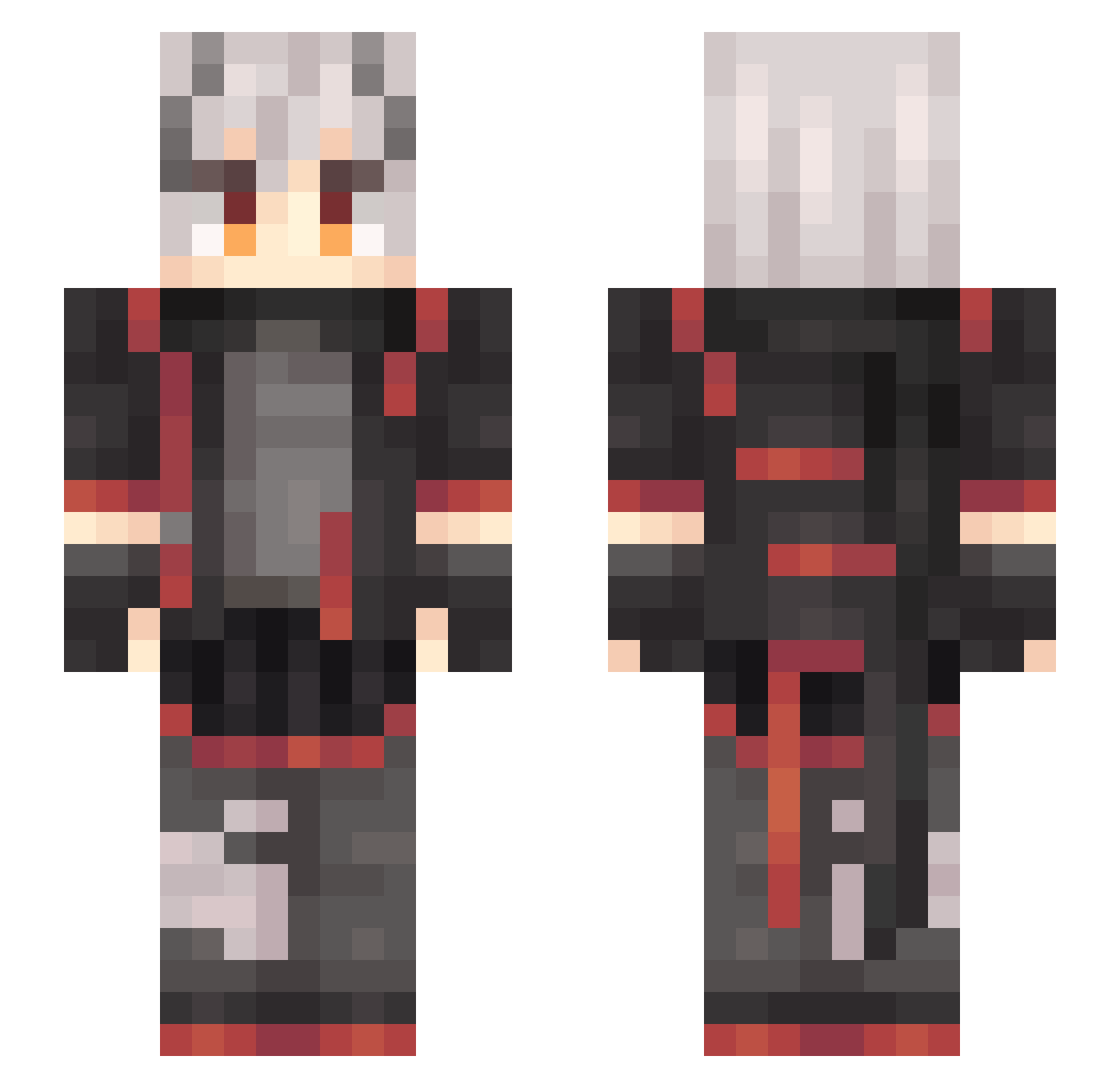
Current Minecraft skin of the player HakuyaZ, loaded from the official Mojang API. Rotate the 3D model with your mouse or finger, then download the skin as a PNG file and use it in Minecraft: Bedrock Edition or Java Edition for free. When HakuyaZ changes their skin, this page updates automatically and the old skin stays in the history below.
Other players with this skin (637)
HakuyaZ was the 395th player we have seen with this skin, first spotted on 05.10.2026. The same skin was seen on these players. Open a nickname to see their current skin and skin history.
 Xiaoyang_1 Summer_Light_X mengsanya CoverZero Shallow_Tide wqlzqs El_Pazo OctaneSilva Littlechip_kater chacha2001 baozids WtQAQ Luback07 YuDian_V5 isnotagames keegerr xbtdys Baiou1 aidenbrown HappyCamper130 ming_ge233 Alreadar EasRain xueshixing SaltFish12345 AshX8352 EM9112 Long_Winds IPPA624 lty8902 hanjinlun520 Ad_Astra7 black18hh recerr XiaoYovo Wmywife Vacu0u5 xzx1112 LocalFilthyMage tzmrx RRollond youtul pinoypounder333 RAINBOW_LJY Namiko_L VU_yu xuanjieCc Que1Tu KyleRichh41 morcla0 _Lingwu_ Dsir_DW Ultraman0716 XjzLing _taozi mymz616 ZSQY Noah2828 MapleL LACIAtype05
More Cyberpunk Minecraft skins
How to install the HakuyaZ skin
- Press the Download button above to save the skin as a PNG file.
- Minecraft: Bedrock Edition (PE): open the Dressing Room from the main menu (or tap your character → Edit Character), go to Classic Skins → Owned, press the + (new skin) button, choose the downloaded PNG and pick the Slim (Alex) model. Works on PC and mobile; consoles cannot import custom skins.
- Minecraft: Java Edition: open the Minecraft Launcher, go to the Skins tab, click New Skin, load the PNG, pick the Slim (Alex) model and press Save & Use. You can also upload it at minecraft.net → Profile → Change Skin.
The skin does not show up after import - what should I do?
Restart Minecraft and open the Dressing Room again - imported skins sometimes appear only after a restart. Also make sure you selected the imported skin and picked the Slim (Alex) model.
Which model should I choose, Classic or Slim?
This skin is designed for the Slim (Alex) model. If you pick the wrong model, the arms of the skin will look stretched or squeezed.
Is the skin of HakuyaZ free to download?
Yes. Press Download, save the PNG file and use it in Minecraft: Bedrock Edition or Java Edition - no payment or registration needed. The skin also works on multiplayer servers and Realms.
More skins
Looking for more? Go back to all Minecraft skins and check the top skins of the week, month and all time, or find any player's skin by nickname.