
Fettarmeswasser - Minecraft Skins & Skin History
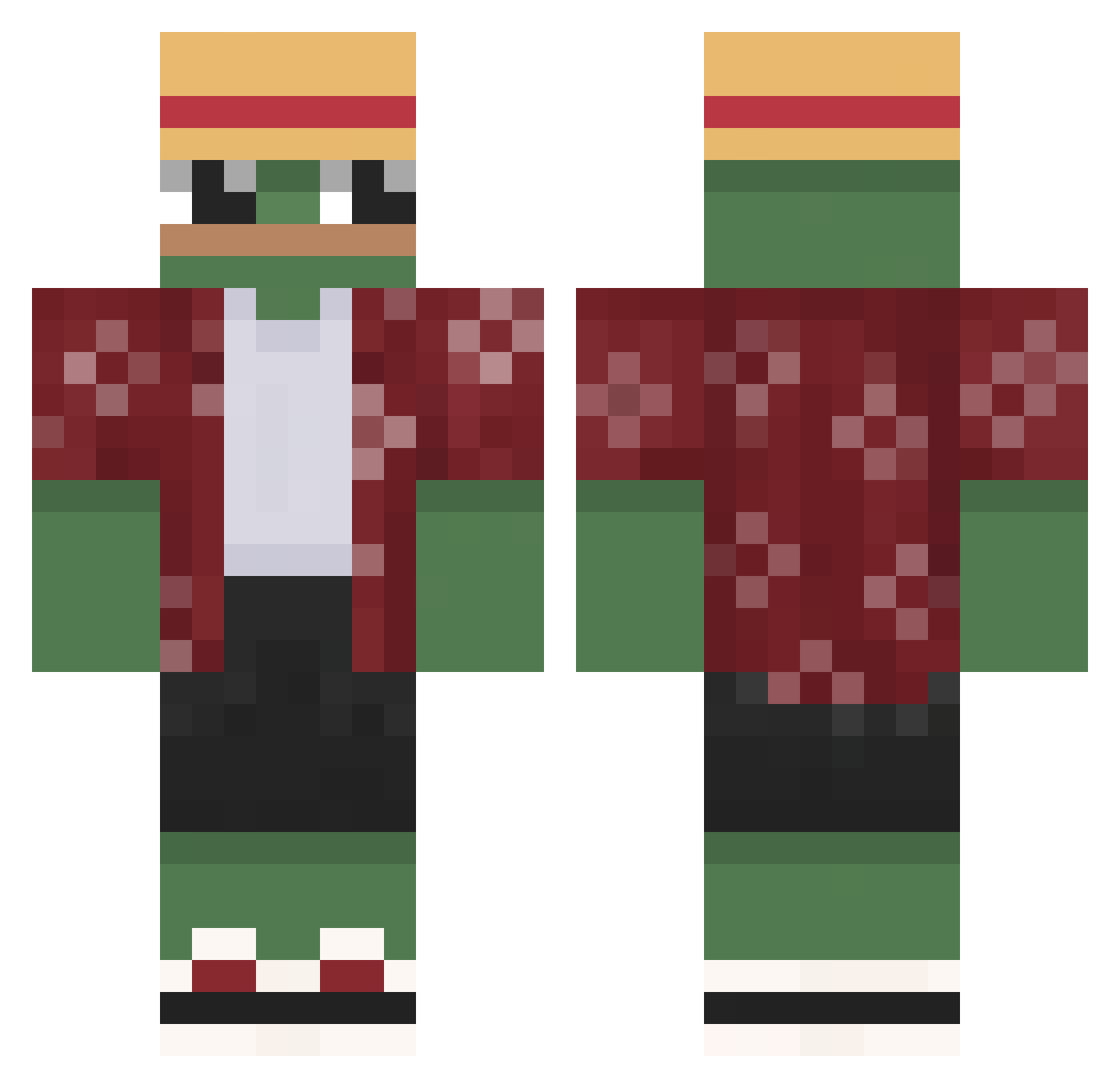
Current Minecraft skin of the player Fettarmeswasser, loaded from the official Mojang API. Rotate the 3D model with your mouse or finger, then download the skin as a PNG file and use it in Minecraft: Bedrock Edition or Java Edition for free. When Fettarmeswasser changes their skin, this page updates automatically and the old skin stays in the history below.
Other players with this skin (557)
Fettarmeswasser was the 330th player we have seen with this skin, first spotted on 19.09.2026. The same skin was seen on these players. Open a nickname to see their current skin and skin history.
 MoogoMC_ boomwave Joopel Kampffalke88 MaorPeco RedSoulHunter cow28 Hincenbergs THORSEN4052 Nimmylol NoelPapira matimingle WaterGuppy74 Han_e01 Tsukuu Palalala SinanLord g_l_a_s_s_y IJOCO98 FlickoTheSwagGod Brown_BOI911 IDaebak PablosSantos 3zm707 tomytrex Skibbidi_Toilet SaulBadman0 Maths3 iNightz StormyBananaX DomiNv1 Urumotion tyvolejanevim erZeus OppenheimersSoda ArticOne Irishek MATIxxo04 Chrisi889 EdSheeransWife yung_chaddy elliejooo MaggusXPepe TRapzzzie SledzikMK Gaeilito27c kimbone1106 dodgemc12 N0TQ Oxn3 kingswallow sikiera28 Bouamo Godzatdying elsneedo Kevolonii No_Nickname_ RangoWest DomKRFC AntChillAda
More Monkey D Luffy Minecraft skins
See all 856 Monkey D Luffy skins
How to install the Fettarmeswasser skin
- Press the Download button above to save the skin as a PNG file.
- Minecraft: Bedrock Edition (PE): open the Dressing Room from the main menu (or tap your character → Edit Character), go to Classic Skins → Owned, press the + (new skin) button, choose the downloaded PNG and pick the Classic (Steve) model. Works on PC and mobile; consoles cannot import custom skins.
- Minecraft: Java Edition: open the Minecraft Launcher, go to the Skins tab, click New Skin, load the PNG, pick the Classic (Steve) model and press Save & Use. You can also upload it at minecraft.net → Profile → Change Skin.
The skin does not show up after import - what should I do?
Restart Minecraft and open the Dressing Room again - imported skins sometimes appear only after a restart. Also make sure you selected the imported skin and picked the Classic (Steve) model.
Which model should I choose, Classic or Slim?
This skin is designed for the Classic (Steve) model. If you pick the wrong model, the arms of the skin will look stretched or squeezed.
Is the skin of Fettarmeswasser free to download?
Yes. Press Download, save the PNG file and use it in Minecraft: Bedrock Edition or Java Edition - no payment or registration needed. The skin also works on multiplayer servers and Realms.
More skins
Looking for more? Go back to all Minecraft skins and check the top skins of the week, month and all time, or find any player's skin by nickname.