
EricIII - Minecraft Skins & Skin History
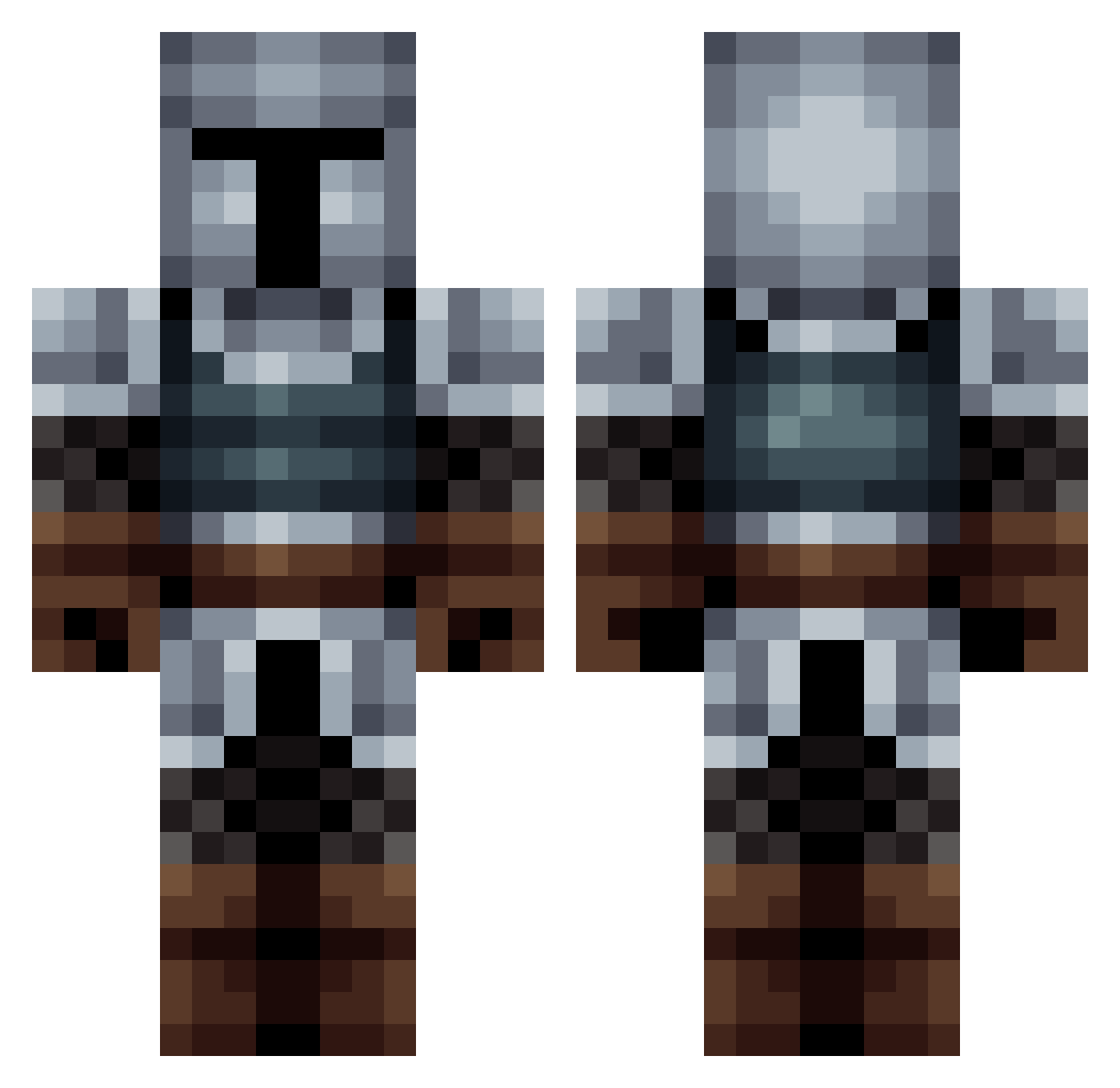
Current Minecraft skin of the player EricIII, loaded from the official Mojang API. Rotate the 3D model with your mouse or finger, then download the skin as a PNG file and use it in Minecraft: Bedrock Edition or Java Edition for free. When EricIII changes their skin, this page updates automatically and the old skin stays in the history below.
Other players with this skin (563)
EricIII was the 215th player we have seen with this skin, first spotted on 09.09.2026. The same skin was seen on these players. Open a nickname to see their current skin and skin history.
 Timo3 TheTreGor Klim_lol JacobHo5301 Captain_Laser Dundorr Hectalion Drakehinst Slayoon MoRiyaz camo_4 robinofzo TheBanbanman LordLeek Red_Skull0 HorronZ RetroJedi_ Bugrakhan Trawka_
 MonkeyKingman24 EL_Abuel0 aaronjsixx ashmorn snrDinosaur sdryon DaseFrost Soseeee Mr_Spare_ UncleKracker151 erik4875 MauretaniaFreak kaminarii YumikoGL zabaki8 BattleWilliam TestName01 clanmorgan Nift04 Royston2468 MinerDaryl HiredGunRP V3llian CaptainChock Fireballcat13 SdDarklight Gwang_98 EighteenDonut Enforcer7 Panini_Tempest SirElrik_Smith01 IDivinus matc4 Greywolf167 KravenLegendary solfell Cephisto Rose12w Rowan_watt solieos Nickolas99
More Medieval Minecraft skins
How to install the EricIII skin
- Press the Download button above to save the skin as a PNG file.
- Minecraft: Bedrock Edition (PE): open the Dressing Room from the main menu (or tap your character → Edit Character), go to Classic Skins → Owned, press the + (new skin) button, choose the downloaded PNG and pick the Classic (Steve) model. Works on PC and mobile; consoles cannot import custom skins.
- Minecraft: Java Edition: open the Minecraft Launcher, go to the Skins tab, click New Skin, load the PNG, pick the Classic (Steve) model and press Save & Use. You can also upload it at minecraft.net → Profile → Change Skin.
The skin does not show up after import - what should I do?
Restart Minecraft and open the Dressing Room again - imported skins sometimes appear only after a restart. Also make sure you selected the imported skin and picked the Classic (Steve) model.
Which model should I choose, Classic or Slim?
This skin is designed for the Classic (Steve) model. If you pick the wrong model, the arms of the skin will look stretched or squeezed.
Is the skin of EricIII free to download?
Yes. Press Download, save the PNG file and use it in Minecraft: Bedrock Edition or Java Edition - no payment or registration needed. The skin also works on multiplayer servers and Realms.
More skins
Looking for more? Go back to all Minecraft skins and check the top skins of the week, month and all time, or find any player's skin by nickname.