
EG24112007 - Minecraft Skins & Skin History
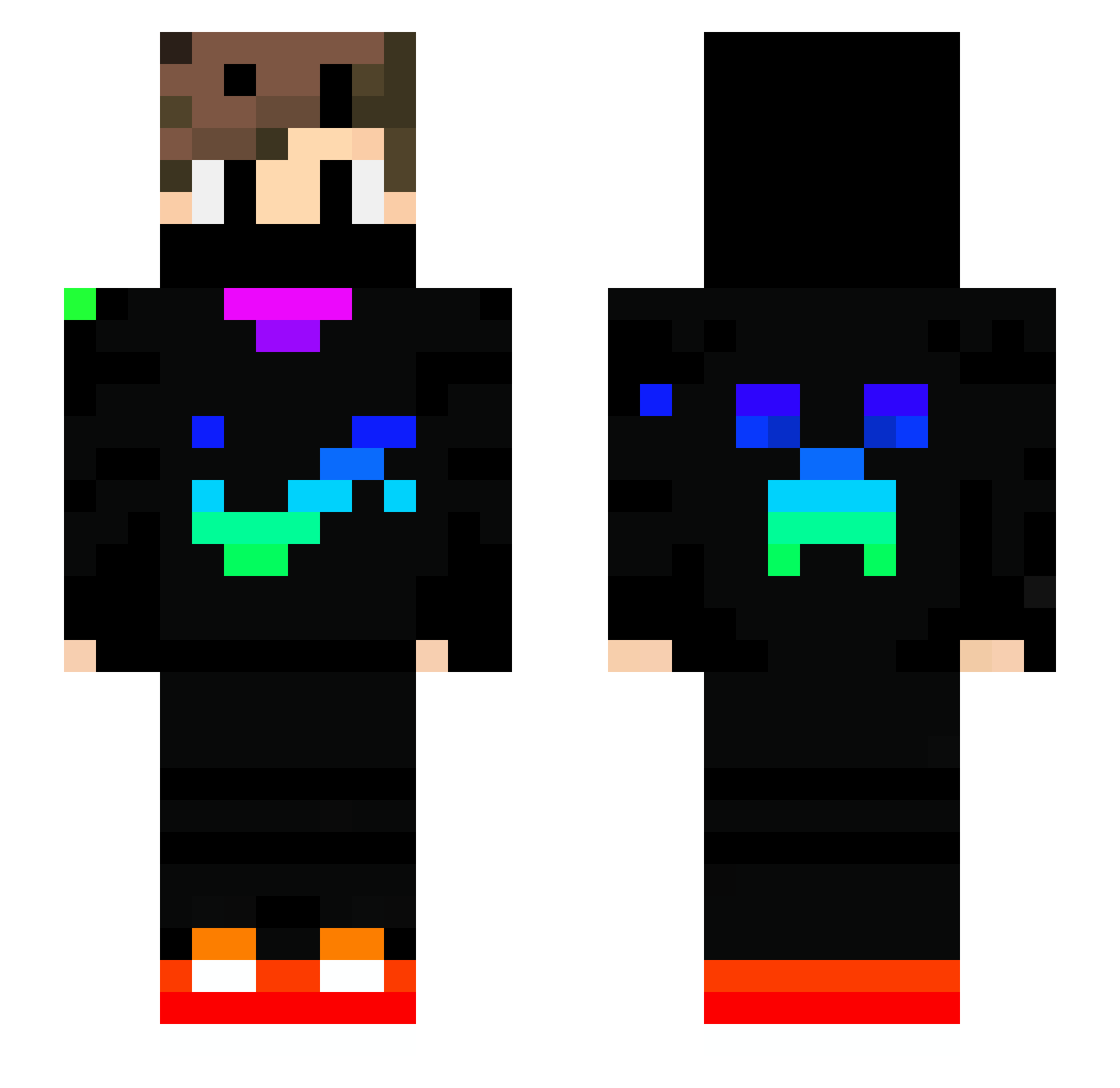
Current Minecraft skin of the player EG24112007, loaded from the official Mojang API. Rotate the 3D model with your mouse or finger, then download the skin as a PNG file and use it in Minecraft: Bedrock Edition or Java Edition for free. When EG24112007 changes their skin, this page updates automatically and the old skin stays in the history below.
Other players with this skin (739)
EG24112007 was the 255th player we have seen with this skin, first spotted on 31.08.2026. The same skin was seen on these players. Open a nickname to see their current skin and skin history.
 beby7078 Warren256 akaMique M3necraftpr0Java Ishaan_gamer Bloblox_ davidbabo Jhon364s Phantom_xyz Bedwarsmaster2 thatnikitax9979 OliverHLyng DaviMestre18 MrStepa9 Spaggeti5186 Billy24h c4il Maxey_2 222Erik cortinovis fynn1488 Raider_M darthsloan12 Kenin2222 Coco_PVP _Spite_ KouKen8567 OvelimGames lukasgamer10 HMoney9211 Annemarie2013 noamkids nolo4990 Thefrag14 CrookedOne Star10006 SrRoock FamousJasonT CookiePlayz1520 Luluzocktgern Devil_Alex crazy_zodiac Mayur_OP takebe kuromagro looneytuners34 MeteorFang s1d0r MarkinO_os neoman83 takutyanbouya William059 Ashishm Miprime7 Kubix_GamerYT
 MightyDohnut Simobo11 MehPurple Louis_Noni Nico10vip
More Creeper Minecraft skins
How to install the EG24112007 skin
- Press the Download button above to save the skin as a PNG file.
- Minecraft: Bedrock Edition (PE): open the Dressing Room from the main menu (or tap your character → Edit Character), go to Classic Skins → Owned, press the + (new skin) button, choose the downloaded PNG and pick the Slim (Alex) model. Works on PC and mobile; consoles cannot import custom skins.
- Minecraft: Java Edition: open the Minecraft Launcher, go to the Skins tab, click New Skin, load the PNG, pick the Slim (Alex) model and press Save & Use. You can also upload it at minecraft.net → Profile → Change Skin.
The skin does not show up after import - what should I do?
Restart Minecraft and open the Dressing Room again - imported skins sometimes appear only after a restart. Also make sure you selected the imported skin and picked the Slim (Alex) model.
Which model should I choose, Classic or Slim?
This skin is designed for the Slim (Alex) model. If you pick the wrong model, the arms of the skin will look stretched or squeezed.
Is the skin of EG24112007 free to download?
Yes. Press Download, save the PNG file and use it in Minecraft: Bedrock Edition or Java Edition - no payment or registration needed. The skin also works on multiplayer servers and Realms.
More skins
Looking for more? Go back to all Minecraft skins and check the top skins of the week, month and all time, or find any player's skin by nickname.