
DuckTB28 - Minecraft Skins & Skin History
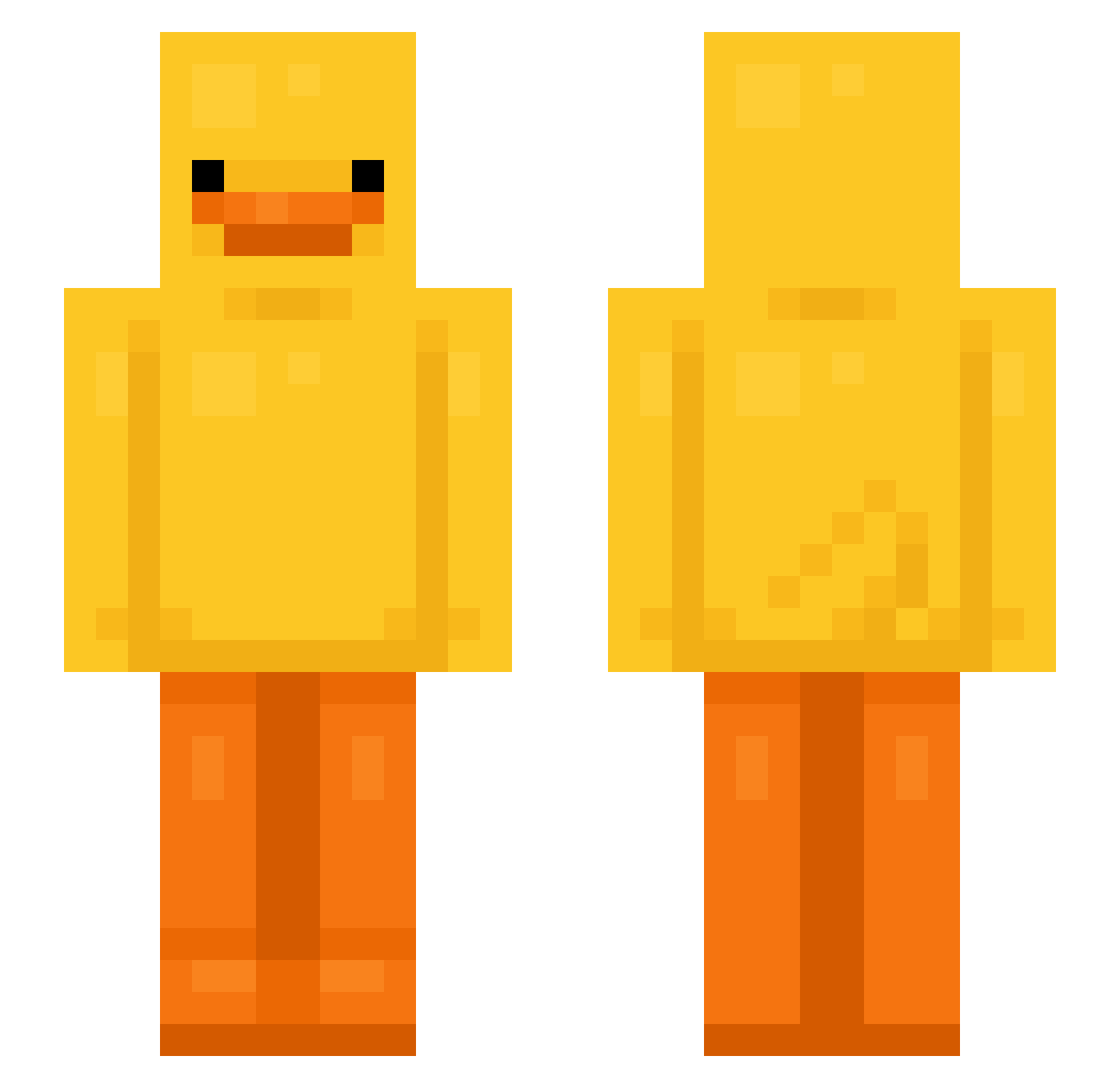
Current Minecraft skin of the player DuckTB28, loaded from the official Mojang API. Rotate the 3D model with your mouse or finger, then download the skin as a PNG file and use it in Minecraft: Bedrock Edition or Java Edition for free. When DuckTB28 changes their skin, this page updates automatically and the old skin stays in the history below.
Other players with this skin (634)
DuckTB28 was the 24th player we have seen with this skin, first spotted on 25.07.2026. The same skin was seen on these players. Open a nickname to see their current skin and skin history.
 GOM9612 Philippius
 Abris22345
 Xerosinha puytjesb Mola5210 R0mix13 Zepher75 hellasmiles JuiciestLemon SwanZeyBruh SoiroGHG VeronicaXxs Duckyx4273 SpUdDy202 Pakulaalt3 VeryLazyPerson1 Akirumi goettinpiu spearXmace SteadyingAura27 unclar1ty duckgu23 PERLMAN117 LitSanly HoodieSkull niklassonn PinedaSPP Pp846 Nineningas4 _b6o6 RusticOrange787 Tanjiro_07 Z_JI Swampy204 sonyewon MOZART6020 cazzettes
 Koriswaldo OGVxrge nb_legit Mpawel30 camji _langr snaps1er nuclearpants69
 ilovenico123 zeeuss7 FROOTLOOP69 Crazycats1310 mashusya_
 Kubulasek123 oskkey pigguny deideiDEIDEI Arm0758 Leo04114
 zoiila kKrix_OnTop kyeongs
More Bird Minecraft skins
How to install the DuckTB28 skin
- Press the Download button above to save the skin as a PNG file.
- Minecraft: Bedrock Edition (PE): open the Dressing Room from the main menu (or tap your character → Edit Character), go to Classic Skins → Owned, press the + (new skin) button, choose the downloaded PNG and pick the Slim (Alex) model. Works on PC and mobile; consoles cannot import custom skins.
- Minecraft: Java Edition: open the Minecraft Launcher, go to the Skins tab, click New Skin, load the PNG, pick the Slim (Alex) model and press Save & Use. You can also upload it at minecraft.net → Profile → Change Skin.
The skin does not show up after import - what should I do?
Restart Minecraft and open the Dressing Room again - imported skins sometimes appear only after a restart. Also make sure you selected the imported skin and picked the Slim (Alex) model.
Which model should I choose, Classic or Slim?
This skin is designed for the Slim (Alex) model. If you pick the wrong model, the arms of the skin will look stretched or squeezed.
Is the skin of DuckTB28 free to download?
Yes. Press Download, save the PNG file and use it in Minecraft: Bedrock Edition or Java Edition - no payment or registration needed. The skin also works on multiplayer servers and Realms.
More skins
Looking for more? Go back to all Minecraft skins and check the top skins of the week, month and all time, or find any player's skin by nickname.