
Dimjoslol - Minecraft Skins & Skin History
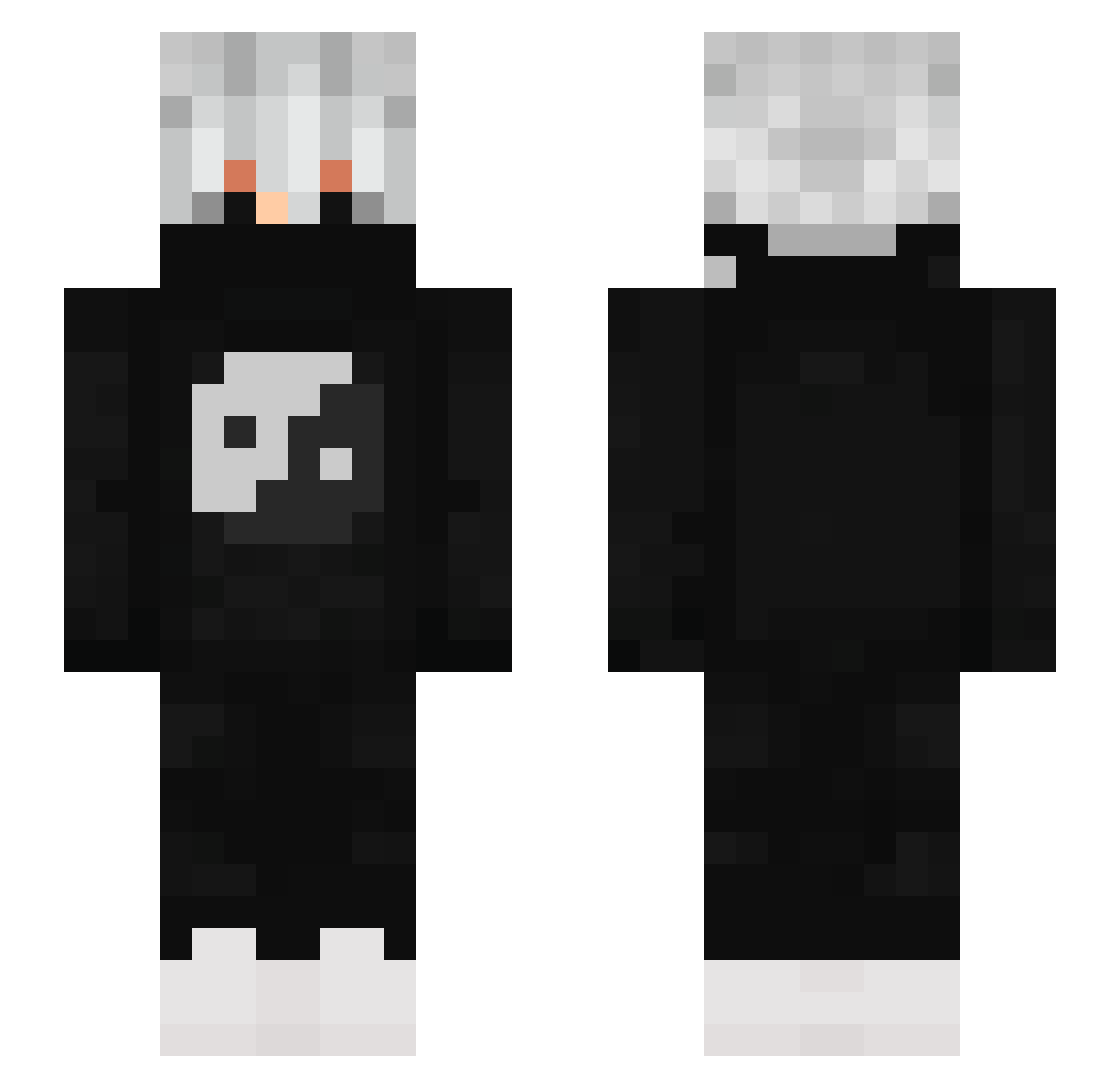
Current Minecraft skin of the player Dimjoslol, loaded from the official Mojang API. Rotate the 3D model with your mouse or finger, then download the skin as a PNG file and use it in Minecraft: Bedrock Edition or Java Edition for free. When Dimjoslol changes their skin, this page updates automatically and the old skin stays in the history below.
Other players with this skin (881)
Dimjoslol was the 396th player we have seen with this skin, first spotted on 17.09.2026. The same skin was seen on these players. Open a nickname to see their current skin and skin history.
 Wyangh AkaTobiii everafter333 kaiXun666 Temp0202 _Zerka__ Gurkenwasser01 Panda_imut KoronPL324 F3CVYGIDGYFOFHJO YonEmir _Boraaa_ xlGuiDz7 Astomm ZTGG21 coccaineee Funny5hadow Henrique007o s201301032 xAngryFlamee Meteninho KITC_2013 MANJIITSUKI Blondstar3 Fickilius _Noelzwerg_ SaferLF peaky_02 B_aal Spinnerrr NOT_SPEAR HyugaTiuga TNWover LuKrann RadiusProz Dudu_14 shartyalds madridzzz _Theuzx_ SwitchYyyy Owlloveralex Aysmow Yato_6 Royglee Meinsoul STARLORD_ARP caua092010 Clxids Zyphyr_Vi wgf_3011 vithallys Pooo_luv_MH CHATFELIX WNL_Knight SirFisher Blueman10 ZeBzIoO Agate4110 KELVEM Lalaliam
More Yin Yang Minecraft skins
How to install the Dimjoslol skin
- Press the Download button above to save the skin as a PNG file.
- Minecraft: Bedrock Edition (PE): open the Dressing Room from the main menu (or tap your character → Edit Character), go to Classic Skins → Owned, press the + (new skin) button, choose the downloaded PNG and pick the Slim (Alex) model. Works on PC and mobile; consoles cannot import custom skins.
- Minecraft: Java Edition: open the Minecraft Launcher, go to the Skins tab, click New Skin, load the PNG, pick the Slim (Alex) model and press Save & Use. You can also upload it at minecraft.net → Profile → Change Skin.
The skin does not show up after import - what should I do?
Restart Minecraft and open the Dressing Room again - imported skins sometimes appear only after a restart. Also make sure you selected the imported skin and picked the Slim (Alex) model.
Which model should I choose, Classic or Slim?
This skin is designed for the Slim (Alex) model. If you pick the wrong model, the arms of the skin will look stretched or squeezed.
Is the skin of Dimjoslol free to download?
Yes. Press Download, save the PNG file and use it in Minecraft: Bedrock Edition or Java Edition - no payment or registration needed. The skin also works on multiplayer servers and Realms.
More skins
Looking for more? Go back to all Minecraft skins and check the top skins of the week, month and all time, or find any player's skin by nickname.